What's new

New in September 2026

What you can do now that you couldn't before, in plain words. Only real changes, and only ones you can see in the product.

September 7, 2026

Fewer surprises with minutes and money

No more guessing what a video will cost. Before you press the button, the options dialog tells you how many minutes it will take from your balance and how many you will have left. A burned-in video or an extra language shows its price there too, not on the invoice afterwards.

Prices are in your own currency, and if a payment fails you get a plain sentence saying why, not an error code.

Switching plans is yours to do, from the billing page. Downgrade and it takes effect at the end of the period you already paid for, and the card says so. Every invoice sits there as a PDF.

Where to find it: The options dialog, every time you start a job: the line next to the button says what the video will use from your balance, before you press it.
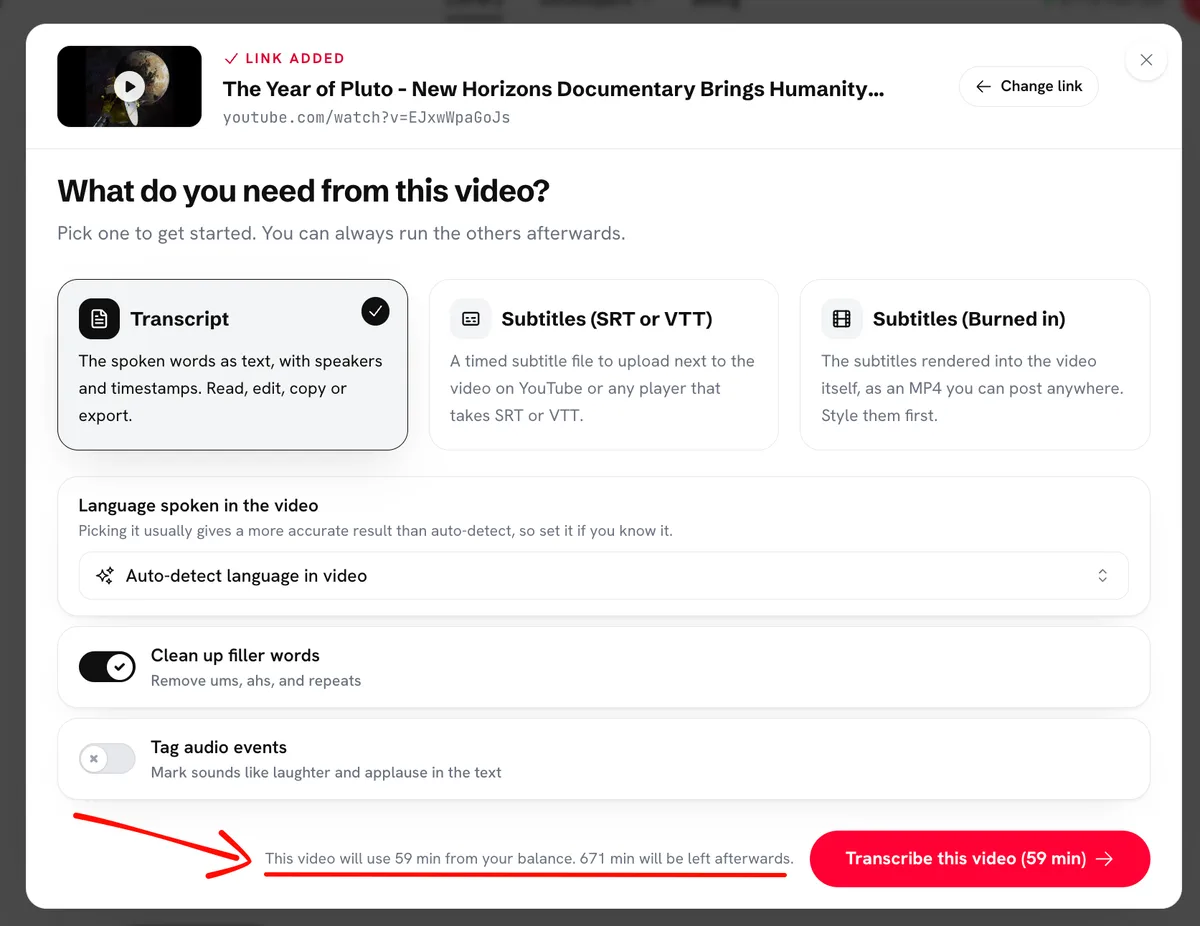
The options dialog before a job starts, with the line that says how many minutes the video will use and how many will be left.

September 3, 2026

Unlock a preview with the minutes you already have

Paste a video longer than the minutes you have left and we still transcribe the first part, so you can see the quality before you pay for the rest.

Come back with enough minutes on your account and one click unlocks the whole thing with those. A credit pack or a plan works too.

Where to find it: The banner on a locked preview.

Ready when you are

Your words are worth more than a video.

Paste your link nowFirst 10 minutes free. No credit card required.