Learn how to translate from Korean to English for video subtitles. This guide covers AI tools and manual editing for accuracy and cultural nuance.
Translate from Korean to English for Flawless Subtitles
If you've ever tried to translate Korean video content into English, you know it's about much more than just swapping words. A simple machine translation often mangles the meaning because it can't grasp the unique sentence structures, honorifics, and cultural subtleties baked into the Korean language. The result? Clunky, confusing, and sometimes just plain wrong subtitles that prevent your content from connecting with a global audience.
This guide solves that problem by walking you through a hybrid approach. Start by getting a solid Korean transcript, let AI handle the initial heavy lifting of translation, and then put on your editor's hat for the crucial final polish. This method streamlines your workflow, making it easier to create accessible and engaging content for a wider audience.
Why Getting Korean Translation Right Is So Tricky
The whole world is captivated by Korean culture right now, from K-pop and K-dramas to the latest foodie trends on Youtube. This global spotlight means a massive new audience is waiting, but reaching them effectively depends entirely on the quality of your subtitles. Relying on basic automated tools is a recipe for disaster, leaving viewers with translations that feel off or, worse, culturally insensitive.
This isn't just about grammar; it's about how the two languages are built. Korean follows a Subject-Object-Verb sentence structure, the complete opposite of English's Subject-Verb-Object. Then there's the complex system of honorifics used to show respect, something that just doesn't have a direct equivalent in English. A literal, word-for-word translation often loses all that vital context, completely changing the speaker's tone and what they truly meant to say.
The Soaring Demand for Good Translation
This isn't just an anecdotal observation; the numbers tell the same story. In the United States, for instance, Korean is a major language. Census data shows that around 1.71 million people speak Korean at home, placing it among the most common non-English languages. This has created a huge need for reliable Korean-to-English translation across the board, from business communications to digital content. If you're curious about the linguistic landscape in the US, Wikipedia's Languages of the United States page offers a great overview.
This chart from Wikipedia shows just how prominent Korean is, ranking as the sixth most common non-English language spoken in U.S. households.
This data really drives home the size of the Korean-speaking community and highlights why creating clear, accessible English content is so important for connecting with this large and active audience.
The real goal of translation isn't just to swap words; it's to recreate the original experience. When a translation misses the cultural nuance, it puts up a wall between the creator and their audience, no matter how technically "correct" the words might seem.
To bridge that gap, you need a solid workflow. This guide will walk you through a practical, step-by-step process that uses AI for speed and human expertise for accuracy. Follow these steps, and you'll be able to create culturally sensitive subtitles that genuinely connect with your English-speaking viewers, boosting your productivity and making your content more accessible.
Getting Your Korean Video Ready for Translation
A top-notch translation always starts with a solid foundation. Before you even think about converting the Korean audio to English, taking a few moments to prepare your video and its audio can make a world of difference. It’s what separates a frustrating, lengthy editing session from a smooth, efficient workflow that enhances your productivity.
First things first, you need to get your video into the transcription tool. You've got two main ways to go about this. You can download the Korean Youtube video and upload the file, or you can just grab the video's URL. Honestly, the URL method is usually the path of least resistance. Most modern tools, like YoutubeToText, let you paste the link directly, which is a massive time-saver.
This simple diagram shows how the whole process works—it’s a smart blend of AI speed and the essential human touch for a truly polished result.
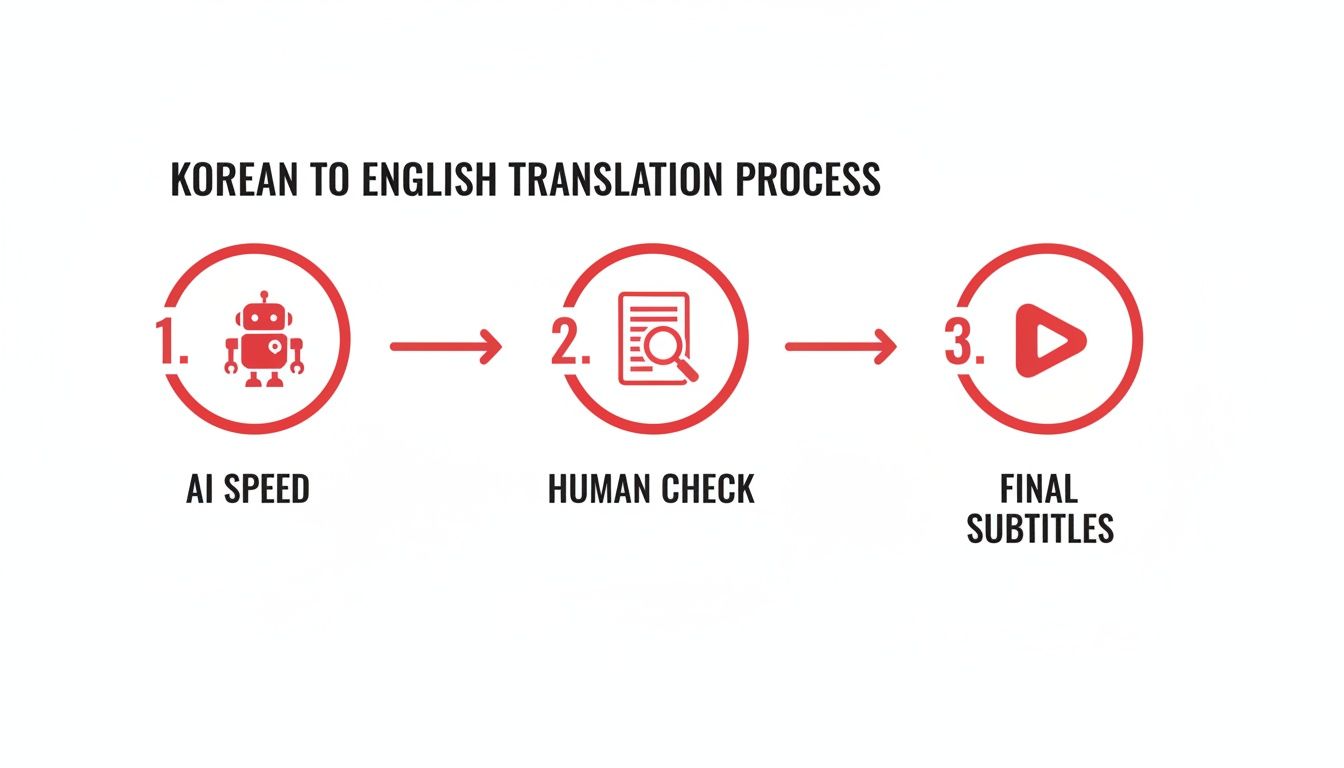
As you can see, the technology does the initial heavy lifting, but it’s that human check that acts as the critical bridge to creating subtitles that sound natural and are genuinely accurate.
Why Audio Quality is Everything
If there’s one thing to take away from this, it’s that audio quality is the single most important factor for an accurate AI transcription. It’s not negotiable. Think of the AI as a very literal listener—if it can’t hear the words clearly, it’s forced to guess, and that’s where the errors creep in, creating more work for you later.
You don't need a professional studio, either. Small changes can have a huge impact. For instance, using a simple external microphone instead of the one built into your camera can slash echo and that tinny sound. Recording in a quiet room is just as crucial. Background chatter, a humming air conditioner, or passing traffic forces the AI to struggle to isolate the speaker’s voice.
Clean audio directly results in a more accurate Korean transcript. That, in turn, gives the translation AI a much better source to work with. It's a perfect example of "garbage in, garbage out." High-quality audio is your first and best defense against a messy transcript.
The Smart Move: Start with a Korean Transcript
Here’s a pro tip that can save you a mountain of headaches and boost your productivity: generate and clean up a Korean transcript before you even start translating. It might feel like an extra step, but it pays off big time.
Here's why this is such a game-changer:
- You'll Spot Errors Immediately: It is so much easier for a Korean speaker (or even just using context) to catch transcription mistakes in the original language. An AI might easily confuse a similar-sounding word or get tripped up by a regional dialect.
- You'll Keep the Original Nuance: By editing the Korean text first, you make sure speaker labels are right and that specific slang or colloquialisms are captured correctly. This context is absolutely vital for a translation that feels authentic.
- You're Giving the AI a Clean Slate: When the translation engine gets a polished, accurate Korean text, its English output is dramatically better. It isn't trying to make sense of words that were wrongly transcribed in the first place.
I always think of it like building a house. The Korean transcript is your foundation. If that foundation is uneven or has cracks, everything you build on top—in this case, the English translation—is going to be wobbly and need major fixes.
By investing a little time upfront to prepare your video and lock in a solid Korean transcript, you're setting the entire project up for success. This preparation ensures every step that follows is built on a reliable base, making the whole process of creating accurate English subtitles faster and far more effective.
Getting Your First Korean Transcript with AI
Alright, with your video ready to go, it’s time to let the tech do the heavy lifting. This is where we create the foundation for our entire translation project: a complete, written transcript of all the spoken Korean in your video. This is a critical step for accessibility and a great way to repurpose your video content into other formats later.
Thankfully, this part is incredibly simple. With a tool like YoutubeToText, you can either upload your video file directly or just paste the Youtube link. The URL option is usually the fastest, getting you started in seconds without clogging up your computer with large video files.
Once the tool has your video, the AI gets to work. It meticulously "listens" to every word of spoken Korean and converts it into written Hangul. This speech-to-text step is the first critical milestone on our path to translate from Korean to English.
How Accurate Is This AI Transcript, Really?
It’s important to go into this with the right mindset. Think of the AI's output as a fantastic first draft. It’s a solid starting point, but it's not the final, polished product. While the technology is remarkably quick and often gets a lot right, it isn't perfect.
Even the best AI models have their weak spots, and a few common things can trip them up when dealing with Korean.
Here’s what to watch out for:
- Regional Dialects (Satoori): Korea has many distinct dialects. If an AI was mainly trained on the standard Seoul accent, it might get confused by the unique vocabulary and pronunciation from Busan or Gwangju.
- Casual Slang & New Words: Language, especially online, evolves fast. The latest slang or internet buzzwords might not be in the AI’s dictionary yet, leading to some strange interpretations.
- Fast or Overlapping Speech: When people get excited, talk over each other, or speak really quickly, the AI can struggle to separate who said what and even miss words entirely.
- Proper Nouns: Specific names of people, places, or brands that aren't world-famous often get transcribed phonetically but incorrectly spelled.
The key here is to see the AI as a powerful assistant, not a perfect transcriber. Knowing its limits from the start will save you a lot of frustration. Don’t worry if you see mistakes; our job is to clean them up.
What's Happening Under the Hood?
So, how does it all work? When you give the AI your video, it first isolates the audio. Then, it chops that audio into tiny, manageable segments and analyses the phonetic sounds in each one.
Using some pretty complex algorithms, it compares those sounds to its massive Korean language database and predicts the most likely words and sentences. It's not just guessing word by word; it looks at the context of what was just said to predict what might come next, which really boosts the accuracy. The whole thing happens in just a few minutes. For a more detailed look, our guide on how to get a Youtube video transcript breaks it down even further.
This automated first pass is a huge productivity booster. Transcribing a 10-minute video by hand could easily take an hour or more. An AI can give you a draft in less than five minutes.
Turning Raw Text into a Usable Draft
After the AI has finished its analysis, you'll get a full block of Korean text, usually complete with timestamps. This is your raw material. It’s the lump of clay you’re about to shape into something perfect.
The next job is to go through this text, fix any mistakes the AI made, and check that the right person is credited for each line of dialogue. This "human-in-the-loop" approach is the best of both worlds—you get the speed of AI combined with the nuance and accuracy of a real person. It's the most effective way to guarantee a top-quality result.
Turning Your Korean Transcript into English
Once you have a clean, accurate Korean transcript, you're ready for the next big step: translation. This is where the magic of modern AI really comes into play. With just a click, you can get a nearly instant English version of your text.
This isn't your old-school, word-for-word translation. Today's tools use something called neural machine translation (NMT). Instead of just swapping out individual words, these systems are smart enough to look at the entire sentence. They analyse the context, figure out the relationships between words, and understand the grammar, which results in a much more natural-sounding first draft when you need to translate from Korean to English.
The Good, The Bad, and The Awkward of Machine Translation
NMT is incredibly powerful, but let’s be real—it's not perfect. It’s a fantastic starting point, but if you want a truly great translation, you need to know where these systems tend to trip up, especially when dealing with languages as different as Korean and English.
Here are a few classic mistakes I see all the time:
- Lost in Translation Idioms: An AI might see the Korean phrase "손이 크다" (son-i keu-da) and translate it literally as "hands are big." Anyone who speaks Korean knows it actually means someone is very generous. The machine almost always misses that cultural shortcut.
- Clumsy Handling of Honorifics: Korean has a beautifully complex system of honorifics to show respect, something that just doesn't exist in English. The AI either ignores these vital social cues completely or translates them into something stuffy and unnatural.
- Just Plain Weird Phrasing: Sometimes the translation is technically correct, but it just sounds wrong. The sentence structure might feel clunky, or the word choice is something a native English speaker would never use.
A great way to think about it is that the automated translation is like a very smart student who has memorised the entire dictionary but has never actually lived in the country. It knows the words and the rules, but it lacks the intuitive feel for the culture and rhythm of the language. Your job is to step in and provide that human touch.
Why Korean to English is a Special Kind of Challenge
The gap between Korean and English grammar is a huge hurdle for automated systems. Korean follows a Subject-Object-Verb sentence structure, while English uses Subject-Verb-Object. Unscrambling that sentence order while keeping the meaning intact is a massive task.
Even the best models struggle. Research often shows that accuracy for formal Korean-to-English text hovers in the 70-80% range, and that number drops significantly for casual conversation or anything with a lot of slang. You can read more about these quantifiable performance gaps on Language Connections.
This is exactly why starting with a perfect Korean transcript is so important. When you use a high-quality video to text converter first, you give the translation AI a clean, reliable source to work from. It dramatically reduces the chance of errors compounding on top of each other.
How to Spot and Fix Common Translation Glitches
Knowing where machine translation usually fails is half the battle. It helps you focus your editing efforts so you can quickly polish that initial draft into something great. I've put together a quick table of the most common errors I encounter and how to deal with them.
Common Machine Translation Errors and How to Fix Them
This table highlights frequent mistakes when automatically translating from Korean to English and provides practical solutions for manual correction.
| Error Type | Machine Translation Example | Human-Edited Correction | Reasoning |
|---|---|---|---|
| Cultural Nuance | "Let's go eat kimchi soup." | "Let's grab some kimchi-jjigae." | Using the specific dish name (kimchi-jjigae) feels more authentic and is what an English speaker familiar with Korean food would expect. |
| Honorifics | "The respected teacher did say..." | "The teacher said..." | English doesn't use honorific prefixes like "respected" in everyday speech. Dropping it makes the sentence sound natural. |
| Literalism | "My stomach hurts." (배가 아파요) | "I'm upset." or "I'm jealous." | While "배가 아파요" can mean a stomach ache, it’s a very common idiom for feeling jealous or upset. Context is everything here. |
These are just a handful of examples, but they all point to the same truth: context is king. An AI sees words and data patterns, but a human understands intention, cultural shortcuts, and what the speaker is really trying to say.
By using AI for its incredible speed and then applying your own human expertise to catch these subtle but crucial errors, you’ll end up with a translation that’s not just accurate, but one that truly connects with your audience.
How to Refine Your English Translation Manually
An automated translation gets you a first draft, but it’s the human touch that breathes life into it. The initial English text you get from an AI is just a starting point. The real magic happens when you step in to manually review it, transforming a functional but often clunky script into something that feels natural, accurate, and culturally aware.
This is where you stop just converting words and start truly translating from Korean to English. It’s about moving beyond literal swaps to capture the speaker’s actual intent, their unique tone, and personality. Without this crucial step, you risk leaving your audience with subtitles that are technically correct but emotionally hollow, undermining your efforts to create accessible content.
Going Beyond Basic Grammar Checks
Of course, your first pass should catch the obvious stuff—typos, grammatical slip-ups, and awkward phrasing. But a great translation requires a much deeper look. The goal is to make the text sound like it was originally spoken in English, not like it was passed through a machine.
This is especially true when bridging the huge gap between Korean and English. While the promotion of Korean language learning has exploded the demand for high-quality translation, machine translation still has a long way to go.
For instance, Naver’s popular Papago app only hits about 75% accuracy for Korean-to-English, largely because it stumbles over honorifics. Compare that to its Spanish-to-English accuracy, which is much higher at 90%. Professional translation services also report that in a whopping 42% of cases, literal translations completely miss the mark, needing a human to step in and fix cultural nuances. You can find more details on these translation challenges on PMC.
This data really drives home why your manual review is so vital. An AI simply can’t grasp the subtle social and emotional context that a person can.
The Nuance Checklist: What to Look For
To make your review more effective, it helps to have a checklist of common problem areas. This pushes you to go beyond surface-level fixes and truly refine the meaning and flow of the dialogue.
Here are the key things to focus on:
- Idioms and Slang: Did the AI spit out a literal, nonsensical phrase like "my foot is wide" (발이 넓다)? This actually means "I have a lot of connections." Your job is to find an English equivalent that carries the same feeling.
- Honorifics and Formality: Watch out for clunky translations of honorifics, like "the respected teacher." In most English contexts, this should just be "the teacher." The trick is to convey the level of respect through tone and word choice, not by translating a title literally.
- Cultural Context: Does the dialogue mention a specific Korean food, holiday, or historical event that a global audience might not recognise? You might need to add a quick, non-intrusive explanation or swap it for a more universally understood term if it doesn’t change the core meaning.
- Speaker Tone and Personality: Read the lines out loud. Does a character who’s supposed to be hilarious sound robotic? Does an emotional moment fall flat? Tweak the word choice until it perfectly matches the speaker's personality and the scene's mood.
Think of yourself as a cultural interpreter, not just a proofreader. Your job is to build a bridge between the Korean context and the English-speaking viewer, ensuring nothing important gets lost along the way.
A Practical Before-and-After Example
Let's see this in action. Imagine a Korean vlogger is venting about a frustrating day.
Raw AI Translation:
"Ah, today my head is complex. I ate the age one more time and the work was like a taffy."
This is a mess. It's completely literal and makes zero sense in English. A viewer would be totally lost.
Now, let's apply our manual refinement checklist. We need to decode the Korean idioms and rewrite the sentences to sound natural while keeping that original feeling of frustration.
Human-Edited Translation:
"Ugh, I'm so overwhelmed today. It feels like I've just gotten older without achieving anything, and work was an absolute drag."
Let’s break down what changed:
- "머리가 복잡하다" (meoriga bokjapada): The AI literally translated this to "my head is complex." A human editor correctly interprets this idiom as feeling overwhelmed or having a lot on your mind.
- "나이를 먹다" (naireul meokda): This literally means "to eat age," but it’s the standard way of saying you're getting older. The editor gave it context, tying it to the speaker's frustration about ageing without accomplishment.
- "엿 같다" (yeot gatda): This is strong slang, literally "like taffy," used to say something is terrible or frustrating. The editor chose "an absolute drag," a phrase that perfectly captures that negative, fed-up tone in natural English.
This transformation is exactly what manual editing is for. It takes confusing, machine-generated text and turns it into clear, emotionally resonant dialogue that an English-speaking audience can instantly connect with.
Getting Your English Subtitles onto Youtube
You've put in the hard work—the transcription is clean, the translation is spot-on, and the timing is perfect. Now for the final, satisfying step: getting your subtitles live on Youtube for the world to see. This is where your efforts pay off, making your content accessible to a global audience.
Before you can upload, your polished English text needs to be in a format that video players recognise. The two most common subtitle formats are SRT (.srt) and VTT (.vtt). Think of them as simple text files with a superpower: each line of dialogue is paired with a start and end time.
Thankfully, you don't need to create these manually. YoutubeToText takes care of the conversion, letting you download a perfectly formatted file in one click.
A Quick Sanity Check for Readability
Before you hit that export button, it's always a good idea to quickly review your work against some subtitling best practices. These aren't just arbitrary rules; they're essential for making sure your viewers can actually read and absorb the content without feeling overwhelmed. This final check is crucial for accessibility.
- Character Limits: Try to keep each line under 42 characters. This prevents a wall of text from cluttering the screen.
- Line Breaks: Never go over two lines of text on screen at any given time.
- Reading Speed: Make sure the text stays on screen long enough for an average person to read it. A good rule of thumb is about 15-20 characters per second.
Following these simple guidelines makes a huge difference in the viewing experience. Subtitles that flash by too quickly or are too dense will just cause viewers to tune out. If you're curious about the nuts and bolts of turning plain text into a subtitle file, you can learn more about the TXT to SRT process in our detailed guide.
Uploading to Youtube Studio
With your shiny new SRT or VTT file ready to go, the final part is a breeze. By uploading your own file, you're telling Youtube to use your high-quality, human-checked subtitles instead of its often-clunky auto-generated ones.
Here's the quick-and-dirty on how to get it done:
- Head over to your Youtube Studio and find the video you're working on.
- From the menu on the left, click into the "Subtitles" section.
- Click "Add Language" and select English.
- You'll see a new English row appear. Under the "Subtitles" column, click "Add".
- On the next screen, choose "Upload file".
- It'll ask if the file has timing. It does! So select "With timing".
- Upload your SRT or VTT file and hit "Publish".
And just like that, you're done. You've successfully bridged a language gap, taking a piece of Korean content and opening it up to a massive new English-speaking audience. Best of all, you've done it in a way that honours the original creator's tone and intent.
Got Questions? We've Got Answers
Diving into Korean-to-English video translation can feel a bit daunting. You've probably got questions about how reliable the tech is, how long this all takes, and what to do with the files once you're done. Let's clear up some of the most common queries.
Just How Good Is the AI Translation, Really?
This is the big one, isn't it? AI has come a long way, but it's not perfect. For clear, formal Korean, you can expect an accuracy of around 70-80%. That's a fantastic starting point. But throw in some casual slang, a strong regional accent, or people talking over each other, and that number can take a nosedive.
Think of the AI as a super-fast assistant, not the final editor. It gives you a solid first draft in minutes, but it's the human touch that catches the nuances in tone and culture that a machine will always miss.
How Much Time Should I Actually Set Aside for Editing?
This really boils down to two things: the clarity of your original audio and the complexity of what's being said. If you start with crisp, clean audio, you'll get a much better initial transcript, which means the AI translation has a better chance of being accurate. This is a key productivity hack.
As a rule of thumb, I'd suggest planning for at least double the video's length for your editing pass.
- For a 10-minute video: Give yourself a solid 20-30 minutes to go through everything carefully.
- For videos heavy with slang or technical terms: You might need closer to 40-60 minutes to get it right.
This is where the magic happens. You’ll be fixing awkward idioms, making sure the formality level fits the speaker, and polishing the subtitles so they sound completely natural to an English speaker. Don't skip this step; it's what separates decent content from great content.
SRT vs. VTT: Which Subtitle Format Should I Use for Youtube?
Once you're ready to export, you'll usually see two main options: SRT and VTT. Both are essentially just text files that match up your dialogue with timestamps, but which one is best for Youtube?
Honestly, for most people, SRT (.srt) is the way to go. It's the industry workhorse—simple, reliable, and supported by just about every platform out there, including Youtube. It’s the standard for accessibility.
VTT (.vtt) is a bit newer and lets you do fancy things like add colours or change font positions. The catch? Youtube’s own player will usually just ignore all that styling anyway. So, if you're looking for a no-fuss way to translate from Korean to English for your videos, sticking with SRT is your safest and most reliable choice.
Ready to take your Korean videos global? With YoutubeToText, you can get accurate transcripts and translations up and running in minutes. It's time to make your content creation process smoother and open up your channel to the world. Give it a try and see how easy it can be.