Learn how to use a sound ripper Youtube safely and legally. This guide covers the best tools, methods, and tips for extracting audio for your projects.
Your Practical Guide to Using a Sound Ripper Youtube Safely
Ever found yourself listening to a fantastic interview, a detailed lecture, or a live concert on Youtube and wishing you could just save the audio? Maybe you want to listen on your commute without draining your data or battery on video. That's exactly where a sound ripper for Youtube comes in.
These tools are designed to do one thing really well: extract the audio from a Youtube video and save it as a standalone file, like an MP3. Think of them as a way to liberate the sound from the visuals, making content more accessible and portable for things like offline study, building personal playlists, or snagging sound bites for your own creative projects. This guide will show you how to do it safely and unlock the full potential of that audio for productivity and content repurposing.
What Is a Youtube Sound Ripper and How Does It Work
A Youtube sound ripper essentially isolates the audio track from a video file and converts it into a common audio format like MP3, M4A, or WAV. It’s the perfect solution for turning video-only content into a podcast-like experience.
The magic behind it is actually quite simple. When you give the tool a Youtube URL, it connects to the video's source on Youtube's servers. It then identifies the separate streams for video and audio. Instead of downloading everything, it just grabs the audio component, processes it, and lets you download it directly to your device. Most good tools even give you options to choose the audio quality you prefer.
The Different Types of Sound Rippers
Not all sound rippers are created equal. They generally fall into a few different camps, and knowing the difference will help you pick the right tool for the job, whether you value speed, quality, or extra features.
Here’s a quick rundown of your main options:
- Web-Based Converters: These are websites where you just paste the Youtube link and hit a button. They’re fantastic for quick, one-off jobs because they don't require you to install any software.
- Desktop Software: If you need more power and control, a dedicated desktop program is the way to go. These apps often support batch downloads (grabbing audio from a whole playlist at once), offer higher-quality audio settings, and can convert to a wider range of formats.
- Browser Extensions: For those who frequently save audio, browser extensions are a game-changer. They add a download button directly onto the Youtube page, making the whole process feel seamless and integrated into your normal browsing.
Remember this: the method you choose has a real impact on the final audio quality. A quick web-based tool might give you a standard 128kbps MP3, which is fine for most things. But a powerful desktop application can often pull down a high-fidelity or even lossless format like FLAC, preserving every detail of the original sound.
Comparing Common Youtube Sound Ripper Methods
To help you decide, here’s a quick overview of the main methods for ripping sound from Youtube, highlighting their key features, pros, and cons.
| Method Type | Ease of Use | Audio Quality | Key Features | Best For |
|---|---|---|---|---|
| Web-Based | Very Easy (Copy/Paste URL) | Standard (Often 128-192kbps) | No installation, fast for single files | Quick, one-off downloads when convenience is the top priority. |
| Desktop Software | Moderate (Requires Installation) | High to Lossless (Up to 320kbps MP3, FLAC) | Batch downloads, format conversion, editing | Power users who need high-quality audio or need to convert many videos. |
| Browser Extension | Easy (Integrated into Youtube page) | Standard to High | One-click downloads, seamless experience | Frequent users who want a fast and integrated workflow. |
Ultimately, the "best" tool is the one that fits your workflow. For a single lecture, a web-based tool is perfect. For archiving an entire music channel, desktop software is your best bet.
Why Rip Audio from Youtube? Unlocking Productivity and Accessibility
The reasons for using a sound ripper are as varied as the content on Youtube itself. Beyond creating music playlists, it's a powerful tool for productivity, accessibility, and learning.
For instance, a student might rip the audio from a two-hour lecture to listen and revise while on the train, boosting their study efficiency. A content creator could grab a specific sound effect for a video they're editing, or transcribe an interview to create a blog post. Podcasters often extract audio from video interviews to mix into their episodes.
By turning a video into a portable audio file, you solve the problem of content being "stuck" on a screen. You unlock a ton of new ways to consume, create, and repurpose information for enhanced productivity and accessibility.
Understanding the Legal Rules in the Netherlands
Before you start ripping audio from Youtube, it’s really important to get your head around the rules, especially here in the Netherlands. The legal side of things isn't as simple as a yes or no; it’s a bit of a grey area, and knowing the specifics helps you stay on the right side of the law.
The key concept in Dutch law is the "thuiskopie", which translates to "private copy." This law allows you to make copies of content for your own personal use. Think of it like this: if you buy a CD, you’re allowed to make a copy for your car or load it onto your phone. This idea is central to how many people handle digital media in the Netherlands.
But when it comes to ripping audio from a streaming platform like Youtube, things get a little more complicated. The crucial difference is where the content comes from and, more importantly, what you do with it after you’ve downloaded it.
Personal Use Versus Public Distribution
The private copying rule is strictly for your own personal, non-commercial use. So, saving a lecture to listen back to while you're commuting, or grabbing a song for a workout playlist that only you will hear, is generally seen as okay. The real trouble starts when that "private" copy goes public.
Here’s a quick rundown to make it crystal clear:
- You're fine if: You’re making a copy for your own device and your ears only.
- You're not fine if: You start sharing the ripped audio file with friends or family.
- You're not fine if: You upload the file to a public website or a shared cloud drive.
- You're not fine if: You use the audio in your own commercial videos or projects without getting permission first.
The moment you share a ripped audio file with anyone else, you’ve crossed the line from private copying to illegal distribution. That’s a clear copyright violation.
Here’s the main takeaway: the law is there to let you make a personal backup or switch formats for convenience. It's not a green light to become a distributor. Your ripped audio should start and end with you.
In the Netherlands, while making a private copy of legally bought audio is allowed, sharing it isn't. Many people using a "sound ripper Youtube" tool assume that saving a track for personal listening is covered by this rule. While that might be a reasonable assumption for personal use, it absolutely does not legalise sharing, uploading, or making money from that ripped audio.
Don't Forget Youtube's Terms of Service
On top of Dutch law, you also have to think about the platform's own rules. Youtube's Terms of Service are very clear: you shouldn't download any content unless Youtube gives you a download button or you have explicit permission from the person who uploaded it.
This means that even if using a sound ripper on Youtube for personal listening doesn't get you into legal hot water under Dutch law, you are technically breaking the user agreement you clicked "accept" on. For the average person, this is unlikely to cause any real problems, but it's something you need to be aware of. For more practical advice on this, you can read our guide on how to extract audio from a Youtube video online.
At the end of the day, it's on you. If you understand the line between private use and public sharing, and respect Youtube’s terms, you can go about ripping audio in a much safer and more responsible way.
Picking The Right Tool For The Job
Alright, now that we've navigated the legal side of things, let's get practical. When it comes to using a sound ripper on Youtube, the best tool really depends on what you're trying to achieve. Are you after a quick download, the best possible audio quality, or something super convenient?
There isn't a one-size-fits-all answer. Each method serves a different need, whether you're just trying to save a single lecture for your commute or archiving an entire playlist of rare music.
Let's look at three common ways to do this, using a few real-world examples.
Fast And Easy Web-Based Converters
For a quick, one-off job, nothing beats a web-based converter. You don't have to install any software, which makes them incredibly straightforward. The process is usually the same: copy the Youtube video link, paste it into the converter's website, and download the MP3 file it spits out. Simple as that.
Imagine this: A student in Utrecht needs to revise for an exam and wants to listen to a two-hour lecture on the train. They don't need studio-quality sound, just a clear audio file on their phone, and they need it now.
- They find the lecture on Youtube and copy the URL.
- In their browser, they open a reputable online converter.
- They paste the link, select the standard MP3 format, and hit "Convert."
- In less than a minute, the audio file is ready to download and transfer to their phone.
This is the most common use case, and this simple flow shows how it works legally for personal use here in the Netherlands.
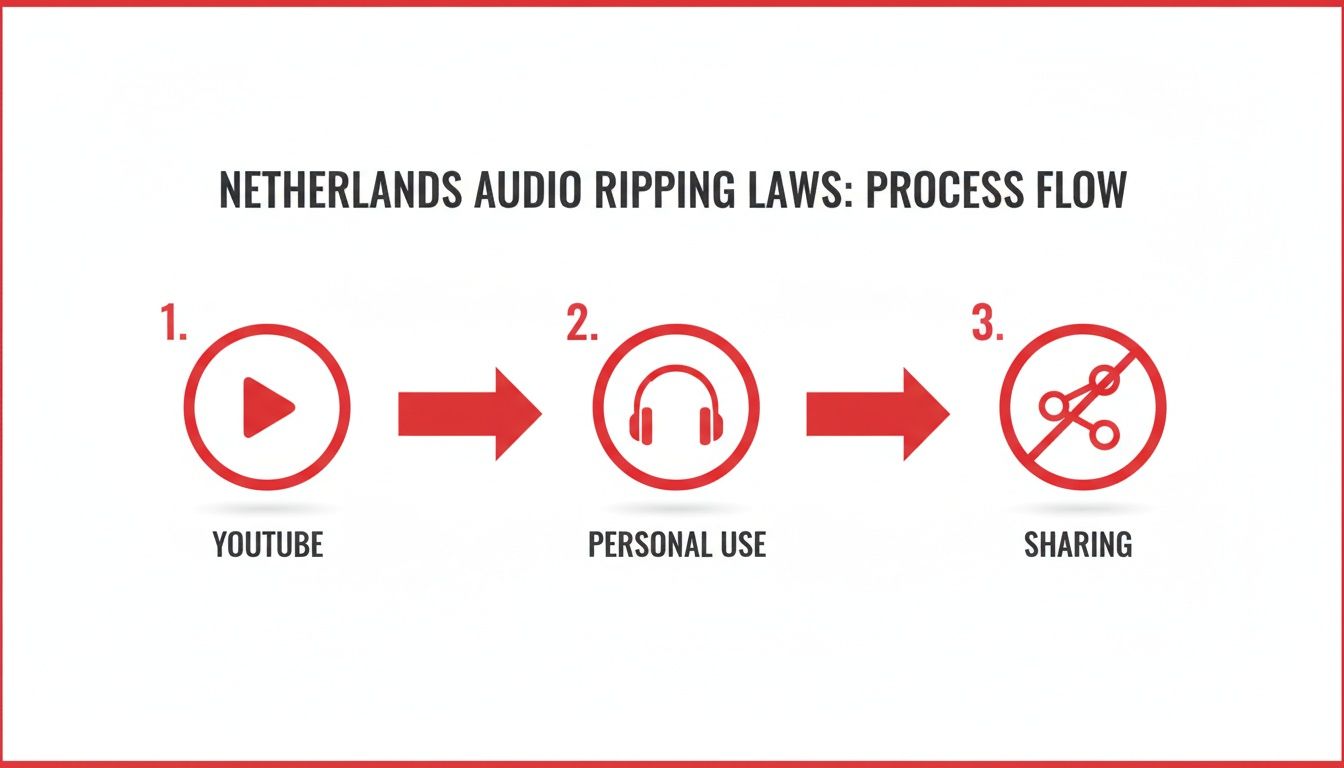
The key takeaway is that downloading for your own use is fine, but sharing that file is where you run into trouble.
It’s no surprise these tools are popular. Global market analyses consistently show that the Netherlands is one of the top countries for search queries about Youtube audio extraction. This interest means there are plenty of tools available, often with Dutch language support and EU-friendly payment options.
Powerful Desktop Software For More Control
When audio quality is non-negotiable, you’ll want to use dedicated desktop software. These are applications you install on your computer, and they offer a lot more power and flexibility than any web-based tool.
With desktop software, you can often download entire playlists with a single click, choose from high-quality audio formats (like FLAC for lossless audio), and set higher bitrates for richer, more detailed sound.
Here’s another scenario: A podcaster in Amsterdam is sourcing a few short, high-quality sound effects from Youtube for their next episode. To make sure their final production sounds professional, they need the audio to be crystal clear.
- First, they install a well-reviewed desktop sound ripper.
- They gather up the links for all the sound effect videos they need.
- Inside the software, they can paste the whole list of links for a batch download.
- Crucially, they set the output format to WAV (an uncompressed format) to preserve every bit of quality.
- The software then gets to work, saving all the files in one place, ready for editing.
This is the kind of precision you need for professional work. If you're looking to take it a step further and get a written version of your audio, our guide on how to extract sound from Youtube and transcribe it is a great place to start.
Seamless Browser Extensions For Frequent Use
What if you find yourself ripping audio all the time? A browser extension might be your best friend. These little add-ons integrate a download button right onto the Youtube page, so you don't have to constantly copy and paste links. With just one click, you can grab the audio without ever leaving the video.
My Pro Tip: Be smart about extensions. They’re incredibly handy, but always get them from official sources like the Chrome Web Store or the Firefox Add-ons site. Take a minute to read the reviews to make sure it's safe and actually works as promised.
Let's consider one last person: A music lover in Rotterdam is building a huge personal playlist of rare live concerts that only exist on Youtube. They plan on saving dozens of tracks and want the process to be as painless as possible.
- They install a trusted sound ripper extension for their browser.
- From now on, a "Download Audio" button appears right under every Youtube video they watch.
- When they find a performance they want, they just click that button.
- The extension handles the conversion in the background and prompts them to save the MP3.
This one-click workflow is a game-changer for anyone who regularly saves audio from Youtube. It turns a chore into a simple, instant action. Once you understand these three approaches, you can easily pick the right one for any situation you find yourself in.
Choosing Safe Tools for High-Quality Audio
Not every sound ripper youtube tool is created equal. When you're pulling audio from a video, the two things that matter most are your online safety and the quality of the final file. It can feel like walking through a digital minefield out there, but knowing what to look for makes a world of difference.
A good tool should feel professional and straightforward. It needs to do what it promises without demanding weird permissions or bundling in software you never asked for. You’re here for an audio file, not a computer virus.
Spotting the Red Flags of Unsafe Tools
The first step in protecting yourself is learning to recognise the classic warning signs of a dodgy service. A trustworthy sound ripper won’t make you jump through sketchy hoops.
Keep an eye out for these common red flags:
- Excessive Pop-Up Ads: A few ads on a free site are expected. But if your screen is swamped with aggressive, flashing pop-ups, it's time to leave.
- Forced Software Downloads: A web-based converter should work right in your browser. If a site pressures you to install an ".exe" file or an unwanted extension, that's a huge red flag.
- Suspicious Redirects: You click "convert," and suddenly you're on a completely unrelated, spammy-looking website. Don't stick around to see what happens next.
- Vague or Missing Privacy Policies: Any legitimate service will tell you what data they collect. If you can't find a clear privacy policy, it's best to find another tool.
These concerns are especially real for users in the Netherlands. Independent safety audits have shown that roughly 40–60% of browser-based converters carry risks, from intrusive ads to questionable redirects, directly impacting users with Dutch IPs. If you want to see which services passed muster for safety and EU-compliant privacy, you can learn more about these safety roundups.
Understanding Audio Quality and Formats
Once you've found a safe tool, the next challenge is getting the best possible sound. The quality of your ripped audio really comes down to two key factors: bitrate and file format.
Bitrate is measured in kilobits per second (kbps) and tells you how much data is being used to represent the audio. A higher bitrate means more detail and better sound, but it also means a larger file.
Here's a quick guide to common bitrates:
- 128 kbps: This is pretty standard. It’s perfectly fine for things like podcasts or lectures where you just need to hear someone speaking clearly. Many quick online tools default to this.
- 256 kbps: You'll hear a clear improvement here. It's a fantastic middle-of-the-road option for music, giving you great sound without eating up all your storage space.
- 320 kbps: This is what most people consider high-quality MP3 audio. It captures a lot more of the original sound's depth and is the go-to for anyone who really cares about how their music sounds.
Your choice of format is just as important. MP3 is everywhere and works on almost any device, but it isn't your only option. Some of the more advanced tools will let you download in formats like FLAC or WAV. These are "lossless," meaning they preserve the audio exactly as it was on Youtube with zero quality degradation.
Choosing the Right Format for Your Needs
The "best" format really depends on what you plan to do with the audio. You don't always need the biggest, highest-quality file.
Here’s a practical way to think about it:
| Use Case | Recommended Bitrate/Format | Why It's the Best Choice |
|---|---|---|
| Listening to a lecture or interview | 128 kbps MP3 | The file is small, downloads quickly, and is more than clear enough for the spoken word. |
| Creating a personal music playlist | 320 kbps MP3 | You get excellent sound quality for music without creating massive files. |
| Using audio in a creative project | WAV or FLAC (if available) | Lossless formats give you the highest fidelity, so your final project sounds professional. |
| Archiving rare live performances | 320 kbps MP3 or FLAC | High quality preserves the nuances, making it perfect for keeping a great copy. |
By keeping both safety and quality in mind, you can confidently use a sound ripper youtube tool to get exactly what you need: a clean audio file, without any of the drama.
Turn Ripped Audio into Usable Content
So, you've used a sound ripper on a Youtube video and now you’ve got an audio file sitting on your computer. Great! But what's next? For a lot of people, that’s where the process stops—they have an MP3 to listen to later. That file, however, holds so much more potential than just being a soundtrack for your morning commute.
The real magic happens when you turn that spoken audio into written text. This process, called transcription, solves the problem of inaccessible audio content and opens up a world of possibilities for productivity and repurposing. It effectively transforms a one-dimensional audio track into a versatile, searchable, and editable asset.
Just think about it: a two-hour lecture can become a perfectly organised set of study notes. You could instantly search for a specific term or concept without having to scrub endlessly through the audio file. That's the power of transcription.
From Listening to Leveraging
Simply listening to audio is a passive experience. Once you transcribe it, though, you create an active resource you can actually work with. This is exactly where a service like YoutubeToText.ai comes in handy, using AI to quickly convert hours of speech into an accurate text document.
Let's look at how this solves real problems:
- For Students: That university lecture you ripped can be transcribed into a searchable document. Reviewing key points, copying definitions, and preparing for exams suddenly becomes a whole lot more efficient.
- For Content Creators: Imagine you've recorded a great interview with an expert. Instead of just posting the video, you can transcribe it into a blog post, pull out snappy quotes for social media, or create a detailed article with minimal effort.
- For Researchers: Transcribing documentaries or panel discussions lets you properly analyse what was said. You can easily identify themes, pull evidence, and quote sources without having to re-listen to every single minute.
The core idea is simple but incredibly powerful: converting audio to text saves you a massive amount of time and opens up new creative doors. You stop being just a listener and become a creator who can reshape content for brand-new purposes.
Unlocking New Value with Transcription
Once you have a transcript, you can do far more than just read it. That text becomes the foundation for all sorts of tasks that are flat-out impossible with audio alone. You're no longer stuck with the linear nature of listening; you can jump to any point, search for keywords, and edit things with ease.
This shift from audio to text is a huge productivity booster. Manually transcribing is a slow, painstaking job. Automated tools, on the other hand, can deliver a full transcript in a fraction of the time, often with surprising accuracy. This efficiency makes content repurposing a realistic strategy for everyone, not just big teams with big budgets. If you want to dive deeper, our guide on converting Youtube content to text breaks down the entire process.
Practical Ways to Use Your Transcript
With an accurate text version of your ripped audio, the sky's the limit. You’ve essentially created a new master document that you can spin off into all kinds of other content.
Here are a few actionable ideas to get you started:
- Create Detailed Show Notes: If you've ripped a podcast, use the transcript to build out comprehensive show notes complete with timestamps, key takeaways, and links to anything mentioned.
- Generate Social Media Content: Pull out the most impactful quotes, interesting stats, or helpful tips from the transcript. You can easily create a week's worth of posts for Twitter, LinkedIn, or Instagram.
- Write Blog Posts and Articles: A 30-minute interview has more than enough meat for a detailed blog post. The transcript gives you the raw material and structure, so you're not staring at a blank page.
- Improve Accessibility: Providing a text version of your audio makes it accessible to people who are deaf or hard of hearing, not to mention those who simply prefer reading over listening.
By pairing a sound ripper with a transcription service, you create a seriously powerful workflow. You can take any spoken content from Youtube, make it portable, and then transform it into a flexible text document ready for whatever project you have in mind.
Got Questions About Ripping Youtube Audio?
Diving into the world of Youtube sound rippers usually brings up the same handful of questions. It's totally normal to wonder about the legal side of things, worry about your computer's safety, or just want to make sure you're getting the best possible sound. Let's clear the air and tackle these common questions head-on.
My goal here is to give you straight, simple answers so you can use these tools confidently and make smart choices.
Is It Legal to Use a Sound Ripper for Youtube in the Netherlands?
This is the big one, and the answer isn't a simple yes or no. In the Netherlands, the law has a concept called "thuiskopie," which is a private copy. This generally allows you to make a copy of content you've legally accessed for your own personal use. So, ripping the audio from a Youtube video to listen to on your phone later? That's typically fine, as long as it's just for you.
The line gets crossed the moment you share that file. Sending it to friends, uploading it somewhere public, or using it in your own video is a big no-no and falls under copyright infringement. That's illegal.
The golden rule: Keep it for personal use only.
Can Ripping Audio from Youtube Harm My Computer?
The act of ripping audio itself is harmless. The real danger comes from where you do it. Let's be honest, some of the websites that offer these services are sketchy. They're often loaded with aggressive pop-ups, misleading ads, and download links that can sneak malware or viruses onto your system.
To keep your computer safe, stick to well-known and positively reviewed tools. If a website seems cluttered with ads, tries to force you to download an installer you didn't ask for, or redirects you to weird pages, just close the tab. A clean, professional site with a clear privacy policy is always a safer bet.
Will the Audio Quality Be as Good as the Original Video?
Mostly, yes—but it depends on two things: the quality of the original Youtube video and the tool you're using. Youtube itself compresses audio, so you're never going to get a truly uncompressed, studio-master file.
A good sound ripper will give you options. Look for the ability to download at the highest possible bitrate. Many tools offer up to 320 kbps for MP3 files, which is excellent for most listening purposes. You can't magically create quality that wasn't there in the first place, so always start with a high-quality video for the best results.
Here’s a quick breakdown of what those numbers mean for your ears:
- 128 kbps: Standard quality. It's perfectly fine for things like podcasts, interviews, or lectures where clarity of speech is all that matters.
- 256 kbps: A solid step up. Music will sound much better, and it’s a great middle-ground for casual listening.
- 320 kbps: High-quality MP3. For music lovers, this offers a rich, detailed sound that’s very close to CD quality.
What’s the Best Audio Format to Choose?
For about 99% of people, MP3 is the way to go. It strikes the perfect balance between good sound quality and a small file size, and it'll play on literally any device you can think of.
However, if you're an audiophile or you need the audio for a professional project (like music production or video editing), you might want a "lossless" format. Some desktop tools let you rip audio into formats like FLAC or WAV. These files are huge because they don't use any compression, preserving every last bit of the original audio. For just listening on your commute, though, a high-bitrate MP3 is all you need.
Now that you have your audio, what's next? You can turn it into text with YoutubeToText. Instantly transcribe your ripped audio files into accurate, editable text. It’s perfect for turning lectures into study notes, interviews into articles, or audio clips into social media content. Unlock the full value of your audio. Start transcribing for free today at youtubetotext.ai.