Discover the best Youtube sound rip methods, from simple online tools to advanced software. Learn how to extract audio safely, legally, and turn it into text.
A Practical Guide to Every Youtube Sound Rip Method
Extracting audio from a Youtube video is a common task for many creators, researchers, and students. It’s a practical way to create offline study materials, grab a specific sound bite for a project, or repurpose video content into a new format. The process is simple: you use a tool to pull the audio track out of the video and save it as a file, usually an MP3, making it far more versatile.
Why Bother Ripping Sound from Youtube?
Ever found a brilliant podcast, an insightful lecture, or a video with a perfect soundtrack and wished you could turn it into something more? That’s where the real value of a Youtube sound rip lies. It’s about transforming a video stream into a portable, editable audio file that you can use for countless productivity, accessibility, and content repurposing tasks.
The use cases are incredibly diverse. Students can convert lectures into transcripts for easier revision, while content creators can repurpose a webinar into a podcast episode. It's not just for technical experts; there are tools for everyone, from simple web-based converters to powerful software that offers complete control over quality and format.
This guide will break down the best methods, helping you choose the right tool to solve your specific problem. This decision tree is a great starting point to figure out which approach will boost your productivity.
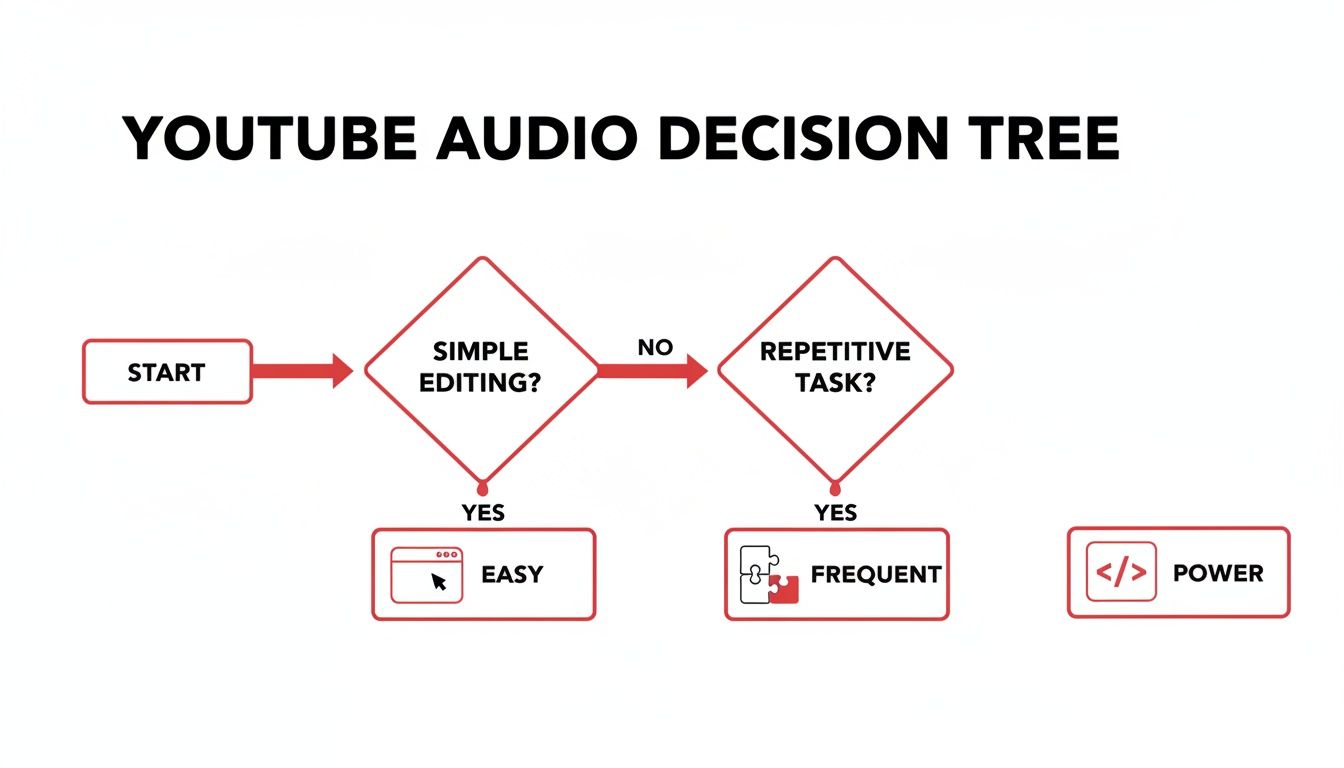
As you can see, the right choice really comes down to what you value most: convenience for a quick task, efficiency for repeated use, or advanced options for professional projects.
Quick Comparison of Youtube Sound Rip Methods
To make things even clearer, here's a quick rundown of the main methods we'll be covering. Think of this table as a cheat sheet to quickly find the best fit for your productivity and content goals.
| Method | Best For | Technical Skill | Key Feature |
|---|---|---|---|
| Online Converters | Quick, one-off downloads for personal use | Beginner | No installation needed; just paste the URL |
| Browser Extensions | Frequent, convenient downloads to speed up workflows | Beginner | Download button integrated directly on Youtube |
| Desktop Software (CLI) | Power users, batch processing & high-quality content repurposing | Intermediate/Advanced | Full control over format, quality, and metadata |
| Mobile Apps | On-the-go downloads for listening and learning | Beginner | Listen and download directly on your device |
Each method has its place, and the best one for you will depend entirely on your specific project, from creating subtitles to building a research archive.
The Huge Appetite for Audio
The sheer amount of audio people consume on Youtube explains why these tools are so essential for productivity. In the Netherlands, for example, the top music track—Suzan & Freek's 'Niemand'—hit an incredible 243,674 streams in a single day. That kind of number shows a massive demand for accessible audio. You can check out the daily Youtube charts yourself to see these trends in real-time.
But it's not just about listening. Once you have that audio file, you can unlock so much more value. By feeding it into a service like YoutubeToText.ai, you can instantly turn spoken words into a searchable transcript, blog post, or a set of subtitles. This completely changes the game for research, making content accessible, and repurposing what you've created.
Of course, with all this comes a responsibility. Throughout this guide, we'll also touch on the importance of respecting copyright and Youtube's terms of service, so you can make smart, ethical choices.
Using Simple Online Audio Converters
When you just need to grab the audio from a Youtube video quickly, an online converter is almost always your best bet. These are just websites—no software to install, no complicated setup. You find a site you like, paste in the Youtube link, and download the audio. It’s that simple.
Think about a student needing to save a two-hour lecture for revision. Instead of being chained to a Wi-Fi connection, they could use one of these tools to create an MP3 file. This simple action solves a real problem: making educational content portable and accessible anywhere, anytime.
How to Safely Rip Youtube Audio Online
The real trick with online converters isn’t figuring out how to use them—it's finding one that’s safe and reliable. The internet is flooded with sketchy sites loaded with aggressive pop-up ads and potential security risks. To avoid the junk, you need to know what to look for.
A trustworthy site will almost always use an HTTPS connection; you can check for the little padlock icon in your browser's address bar. Beyond that, a quick search for user reviews can tell you a lot. If you see people complaining about malware or endless ads, just move on to the next option.
A good rule of thumb: if a site prompts you to download extra software or asks for personal details, close the tab. A legitimate converter only needs the Youtube link. Stick to well-known services with a clean design and straightforward instructions.
Choosing the Right Audio Format
After you’ve found a decent converter and pasted in your link, you'll usually get to pick an audio format. For most everyday uses, the choice boils down to two main options.
- MP3 (MPEG Audio Layer III): This is the go-to format for almost everyone. It uses smart compression to keep file sizes small, which is perfect for phones or for sharing with others. For lectures, podcasts, and general music listening, MP3 offers a fantastic balance of quality and convenience.
- WAV (Waveform Audio File Format): Think of this as the high-fidelity, uncompressed option. It keeps every bit of the original audio data, giving you the best possible quality but at the cost of a much larger file. You’d really only need to choose WAV if you're an audio professional who needs perfect sound for serious editing or content repurposing.
For our student, an MP3 file is the clear winner. It's small, portable, and will play on any device they own. Once the conversion is done and the file is downloaded, they're all set. From there, they could even take it a step further and convert their Youtube audio to a transcript to make studying even easier.
Browser Extensions for One-Click Audio Grabs
If you find yourself needing to rip audio from Youtube on a regular basis, browser extensions are a game-changer for productivity. Forget about copying links and pasting them into another website. These add-ons put a download button right on the Youtube page, turning a multi-step process into a single click.
This is a huge timesaver for content creators and researchers. Imagine you’re editing a vlog and find the perfect sound effect on Youtube. With an extension, you can grab that audio in seconds without ever breaking your creative flow. This small efficiency boost can dramatically speed up your entire content creation workflow.
Finding and Installing Extensions Safely
The golden rule here is to stick to official sources. You'll want to head straight to the Chrome Web Store, Firefox Browser ADD-ONS, or whatever your browser’s official marketplace is. They have built-in checks that help weed out nasty software, but it's still smart to do a little homework yourself.
Before you hit 'install', run through this quick checklist:
- Read the reviews: What are people saying? A couple of grumbles are fine, but a sea of complaints about malware, ads, or privacy is a serious warning sign.
- Check permissions: When you install, it’ll ask for permission to do things. Does it make sense for an audio downloader to need access to all your browsing data? Probably not. Be critical.
- Look at the developer: A developer with a history of creating other solid, well-reviewed extensions is usually a much safer bet than a brand-new, anonymous account.
The Trade-Off Between Speed and Stability
While incredibly convenient, relying on browser extensions for a Youtube sound rip isn’t without its downsides. The biggest pro is definitely speed—nothing beats an on-page download button when you need to be efficient. You see it, you click it, you’ve got it.
But there are real drawbacks. These extensions live in a bit of a grey area regarding Youtube's terms of service, which means they can disappear from the store without any notice. Your go-to productivity tool could literally be gone overnight.
There's also the privacy angle to consider. By its nature, an extension can see what you're doing on Youtube. A shady one could misuse that information. You're essentially weighing convenience against potential risk.
In the end, browser add-ons are brilliant for anyone who needs to grab audio clips quickly and often. They’re built for users who prioritize speed in their workflow and are okay with the fact that their favourite tool might not be around forever. If you need something more reliable and powerful for larger projects, you might want to look at other methods.
Gaining Full Control with Command-Line Tools
If you're after real power and precision for your content projects, it's time to look beyond browser-based tools. For a truly clean and efficient Youtube sound rip, nothing beats command-line tools. My go-to is yt-dlp, a fantastic and well-maintained fork of the original youtube-dl. It gives you a degree of control that is essential for serious content repurposing and accessibility work.
Sure, a terminal window can look a bit intimidating if you're not used to it. But honestly, the basic process is much simpler than you might think. Once you get yt-dlp set up on your system (it works on Windows, macOS, and Linux), you can run incredibly specific tasks with just a single line of text. This approach completely bypasses the ads, dodgy websites, and download limits, giving you a direct, high-quality audio source.
Why Power Users Live in the Command Line
The magic of a command-line interface (CLI) is all about efficiency and automation. You can write a command to do exactly what you want, then save it, tweak it, or even build it into a larger script that runs automatically, massively boosting your productivity.
- Total Quality Control: You call the shots. You can specify the exact audio format you want—like M4A, Opus, or even uncompressed WAV—and the bitrate. This means you’re getting the best possible audio for creating high-quality derivative content.
- Downloading in Bulk: Picture a researcher needing to transcribe dozens of interviews from a Youtube playlist for a study. With a single command, yt-dlp can grab the audio from every single video. This solves a huge productivity problem, turning hours of manual work into a single automated task.
- Smart Metadata: These tools are smart enough to embed all the important details right into the audio file. Your downloads will have the correct title, artist, cover art, and even the upload date, which is a lifesaver for keeping your audio library organised.
The real game-changer is automation. Once you have a few core commands figured out, you've essentially built your own personal toolset for any audio-ripping job you'll ever have. It's a huge time-saver.
This kind of efficiency is becoming more critical. In the Netherlands, Youtube is a massive hub for audio content. With video-on-demand revenue projected to keep growing through 2027 and 74% of sports fans tuning into Youtube every week, the need for powerful audio extraction tools for research and analysis is undeniable. You can dive deeper into the trends for online video platforms in the Netherlands if you're curious.
A Few Practical Commands to Get You Started
It's easier to jump in than you might expect. Once yt-dlp is installed, just open your terminal (or Command Prompt on Windows) and you're ready to go.
Let's take a real-world scenario: A podcaster wants to grab a high-quality clip from a guest's recent interview on Youtube to repurpose for their next show.
All they'd need is a command like this:
yt-dlp -x --audio-format best "YOUTUBE_URL_HERE"
Here’s what that little line of code is doing:
-x: This flag tells it to extract audio only and ignore the video.--audio-format best: This part ensures you download the highest quality format available for your project.
What about that researcher archiving a whole playlist of conference talks? The command is just as straightforward:
yt-dlp -x --audio-format mp3 "YOUTUBE_PLAYLIST_URL"
That one instruction tells the program to work its way through the entire playlist, ripping the audio from each video and saving it as a neat MP3 file. This is the kind of powerful automation that makes command-line tools absolutely essential for anyone who deals with audio on a regular basis.
Navigating Copyright and Fair Use
Before you perform a youtube sound rip, it’s crucial to understand the rules of the road. While plenty of tools make the technical side easy, the legal and ethical landscape is a lot trickier. Think of this less as legal advice and more as a guide to help you make smart, responsible choices for your projects.
The first stop is Youtube's own Terms of Service. In simple terms, they say you shouldn't download content unless Youtube gives you a specific download button or link. It's their primary way of protecting creators and their platform.
But Youtube's rules are one thing; copyright law is another beast entirely.
Understanding Copyright and Fair Use
Just about every original piece of audio or video on Youtube is protected by copyright the second it's created. This gives the creator the sole right to say how their work is copied, shared, and used. Ripping their audio without permission is, in most cases, a direct infringement of that right.
However, the law has some flexibility built in. This is where the concept of "fair use" (or "fair dealing" in some countries) comes into play. It allows you to use copyrighted material without asking, but only for very specific, limited purposes like education, research, or accessibility.
So, what counts as fair use? It's always judged on a case-by-case basis, but a few classic examples include using audio clips for:
- Commentary and Criticism: Imagine a video essay that breaks down the composition of a song.
- News Reporting: A journalist including a short soundbite from a public speech.
- Research and Scholarship: An academic transcribing a historical interview for a study to make it searchable.
- Parody: Creating a new, comedic work that pokes fun at the original audio.
The key takeaway is that fair use often boils down to whether your new work is transformative. Did you add a new meaning or message? And, importantly, does your use harm the original creator's ability to make money from their work?
Staying on the Right Side of the Line
What does this all mean for you in practice? If you're ripping audio for personal use—say, to create a transcript of a lecture for your own study—the risk is minimal. But the second you plan to reuse or republish that audio, you need to tread carefully. For a deeper look into the legalities, this ultimate guide to licensing music for Youtube is a fantastic resource.
At the end of the day, the safest and most ethical path is to stick with royalty-free audio or get direct permission from the creator. Having a good grasp of these concepts ensures you can use your ripped audio files wisely, especially when they're part of a bigger project. For those looking to get the most out of their content, our guide on using a sound ripper for Youtube provides more tips on the tools and methods.
Turning Ripped Audio into Usable Text
Getting an audio file from a Youtube video is really just the starting point. The real magic begins when you turn that audio into text you can actually search, edit, and share. This simple step unlocks a huge amount of potential that was previously trapped in the sound waves, solving major problems in productivity and accessibility.
For a journalist, this could mean turning a one-hour interview into a digital transcript. Instead of endlessly scrubbing through the audio to find that one perfect quote, you can just hit Ctrl+F and find it in seconds. It's a massive time-saver and makes your work far more accurate.
If you're a student, a two-hour lecture can become a detailed set of notes you can actually use. You can highlight key sections, search for specific terms right before an exam, and easily share your insights with a study group, making your study time more effective.
From Sound Waves to Subtitles
One of the most powerful uses for this is for content creators themselves. Once you've ripped the sound from your own video, you can generate a precise subtitle file, usually in the common SRT format. This isn’t just a small tweak; it’s a major upgrade for your video's accessibility and overall reach.
By adding subtitles, you’re not just helping viewers who are deaf or hard of hearing. You’re also catering to the 85% of social media users who watch videos with the sound off. This simple act of repurposing makes your content inclusive and more effective.
When you’re thinking about turning audio into text, it’s worth looking into transcription methods. For example, tools that let you easily add subtitles to videos are brilliant for automatically transcribing what’s being said. This keeps viewers more engaged and guarantees your message lands, no matter how they're watching.
Automating the Transcription Workflow
Let’s be realistic: the sheer volume of audio on Youtube makes transcribing by hand a non-starter. Just look at the Dutch Youtube charts, where a track like HUNTR/X's 'How It’s Done' can hit 55,252 streams in a single day. Playlists like 'Top 100 Charts Holland 2026' pull in over 251k views, which represents a mountain of audio content. Check out more about Dutch Youtube trends from popular playlists to see the scale.
This is exactly where a tool like YoutubeToText.ai comes into its own. Rather than spending hours typing out every single word, you can just upload your ripped audio file and get a remarkably accurate transcript back in a few minutes. This kind of automation is perfect for tasks like:
- Turning video content into blog posts
- Creating detailed show notes for podcasts
- Producing accurate subtitles for social media clips
- Archiving searchable records of meetings or interviews
By automating this part of your process, you make your audio content infinitely more valuable. You can explore the best ways to do this in our guide on the market's top-tier audio-to-text converters. It's an approach that not only saves time but also opens up brand-new ways to repurpose your material.
Frequently Asked Questions
Let's tackle some of the common questions that pop up when you're looking to rip sound from Youtube. Getting these details right can save you a lot of hassle down the line.
Is It Illegal to Rip Audio from Youtube?
This is the big one, and honestly, it's a bit of a grey area. Technically, downloading content goes against Youtube's terms of service. But the actual legality often boils down to copyright law in your specific country.
The general consensus is that you're on safer ground if you're grabbing the audio for your own personal, non-commercial use—like listening to a lecture on your commute. Things get much riskier if you plan to reuse or distribute copyrighted material.
What Is the Best Audio Format to Choose?
The "best" format really just depends on what you're doing with the audio file.
Think of it this way: for most people just wanting to listen to something on their phone or laptop, MP3 is the perfect choice. It offers a great balance of decent quality and small file size.
However, if you're a content creator, researcher, or someone who needs pristine quality for a project, you'll want a lossless format like WAV or FLAC. Just be warned—these files are significantly larger.
Can You Rip Sound from a Youtube Live Stream?
In most cases, no—at least not while it's happening. The typical online converters and browser add-ons are built to handle standard, pre-existing videos. They just can't process a live feed.
Your best bet is to wait until the stream has finished. Once the video is archived and available for replay on the channel, a powerful tool like yt-dlp can usually grab the audio without any trouble.
Ready to turn that audio file into something more? With YoutubeToText, you can get accurate transcripts, subtitles, and even summaries in just a few minutes. Unlock the power of your content today at https://youtubetotext.ai.