Discover the powerful synergy between video and script. Learn how to transform video content into SEO assets, improve accessibility, and scale your marketing.
Unlocking Your Content With Video and Script Synergy
Behind every compelling video, there’s an unsung hero: the script. You can think of it like an architect's blueprint for a building. The blueprint provides the structure and vision, and the final construction brings it to life. This foundational document doesn't just guide your message before you hit record; it unlocks its true potential long after you’ve published by solving key challenges in productivity, accessibility, and content repurposing.
The Power Duo: Your Video and Its Script
The connection between a video and its script is a genuine two-way street. It boosts productivity during creation and distribution. A solid script ensures your final video is polished and coherent, stopping you from rambling and keeping your audience hooked from the first second to the last.
Once your video is live, that very same script—now in the form of a transcript—becomes an incredible asset. It turns your spoken words into searchable text, opening the door for search engines and entirely new audiences to find your content.
This table gives a quick overview of how a script functions at different stages.
Video and Script Workflow At a Glance
| Workflow Stage | Script Function | Primary Goal |
|---|---|---|
| Pre-Production | Blueprint | Plan and structure the video content for clarity and impact. |
| Post-Production | Transcript | Repurpose, improve SEO, and increase accessibility. |
Essentially, you start with a script to make a great video, and you end up with a script (transcript) that makes your great video work even harder for you.
Unlocking Your Content's Potential
Getting the hang of this synergy between video and script is central to any modern content strategy. It's not just about making a one-off video; it's about building a sustainable engine for growth. The benefits solve real problems for creators:
- Better SEO: A text transcript lets search engines crawl and index what you've said in your video, helping you rank for valuable keywords people are searching for. This solves the problem of video content being invisible to Google.
- Greater Accessibility: Scripts are the foundation for subtitles and closed captions. This makes your videos accessible to viewers who are deaf or hard of hearing, solving a major accessibility barrier.
- Effortless Repurposing: A transcript is the raw material for a dozen other pieces of content. This solves the problem of constantly needing new content ideas and boosts productivity. Think blog posts, social media snippets, and email newsletters.
When you script your videos, you're essentially pre-writing your blog posts. This simple step connects your Youtube traffic with your Google search traffic, creating a powerful loop that drives views and engagement across platforms.
This guide is all about giving you practical insights to maximise your content's reach. To really get a feel for how this works in practice, it’s worth exploring how to use an AI video generator from script to final video. We’ll dive into everything from the basics of scripting to advanced techniques for repurposing.
Why Your Video Needs a Script (It's Not Just About the Words)
A lot of creators think a script is just a guide for what to say on camera. And it is, but that's only half the story. A good script is a two-stage rocket, boosting your video's quality before you hit record and then launching its reach long after it's published. This dual role is what makes the connection between your video and script so powerful.
Think about it. Before you even think about filming, the script is your blueprint. It’s where you hammer out your ideas, trim the fat, and ditch all those "ums" and "ahs" that make viewers click away. This prep work is what separates a polished, professional video from a rambling, unfocused one. The result? Better viewer retention and a message that actually lands.
But the script's job isn't done once the camera stops rolling. That's when it gets a second life as a transcript, opening up a whole new playbook for growing your audience and making your life easier.
Get Found on Google with SEO
Search engines like Google are incredible at reading text, but they can't actually watch your video to figure out what it's about. All the brilliant advice you share is basically invisible to them. When you have a transcript, every single word you speak becomes searchable, turning your video into a keyword-rich page that can show up in search results.
This means you can start pulling in viewers who are looking for answers on Google, not just on Youtube. Someone searching for "how to fix a leaky tap" could land on your DIY video simply because your transcript includes those exact words. It’s a huge opportunity that most creators are sleeping on.
Here’s a simple way to think about it: Your video is for the Youtube audience, but your transcript is for the Google audience. By adding that script to your website or blog, you're building a bridge between the two biggest search engines on the planet and funnelling traffic from both.
Make Your Content Accessible and Work Smarter, Not Harder
A script is also your ticket to making content that everyone can enjoy. It's the source material for accurate closed captions and subtitles, which are non-negotiable for viewers who are deaf, hard of hearing, or just watching with the sound off (which is a lot of people!). Videos with captions don't just feel more professional; they consistently get higher engagement and watch time.
And this is where it gets really good for busy creators: a transcript is a content goldmine. That one script from a single video can be sliced and diced into a ton of other content without much extra effort.
- A full-blown blog post: Just clean up the transcript, add some headings, and embed the video right into the post.
- A week's worth of social media content: Pull out interesting quotes, stats, or quick tips for X, LinkedIn, or Instagram.
- An email newsletter: Give your subscribers the key takeaways and a link to watch the full video.
- A downloadable checklist or guide: Turn your how-to video into a handy resource people can save.
When you start thinking this way, you stop seeing a video as a one-and-done project. It becomes the starting point for a whole campaign of content, maximising the value of every minute you spend creating.
How to Get a Script From Any Video, Instantly
Let’s be honest: manually transcribing a video is a soul-crushing task. Nobody wants to spend hours hitting pause, rewinding, and typing out every single word. It’s not just painfully slow; it’s a surefire way to introduce mistakes that can mess up your entire content plan. Thankfully, that whole process is a thing of the past.
Modern tools have completely flipped the script. What used to take a full day of tedious work now takes just a few minutes, thanks to AI-powered platforms. This isn't just a time-saver; it’s a massive strategic advantage that lets you create more content, faster than ever before.
The Simple Automated Workflow
Forget juggling video players and text documents. Generating a polished script is now as simple as copy and paste. The whole process is hands-off and delivers an accurate transcript in a flash.
Take a look at the clean interface of a tool like YoutubeToText. It's built for one thing: speed.
As you can see, there’s no clutter. Just a single field to paste a URL and a button to get started. It couldn't be simpler.
Here’s what the typical workflow looks like:
- Find Your Video: Copy the URL of the Youtube video you need a script for.
- Paste the Link: Pop the URL into an automated transcription tool.
- Generate the Script: The AI gets to work, analysing the audio and spitting out an accurate text transcript, often with timestamps included.
- Download and Use: Export the script as a plain text file (.txt) or subtitle file (.srt) and you're ready to go.
This kind of speed is a game-changer for so many people. A journalist on a tight deadline can pull quotes for an article in minutes. A researcher can sift through hours of interview footage without the headache of manual transcription. For a closer look at how it works, check out our guide on using a video to text converter.
The beauty of automation is simple: it frees you from the boring job of typing so you can focus on the creative work of using the script.
Once you have that text, you can jump straight into repurposing your content, boosting your SEO, or making your video more accessible.
For marketing teams, this is huge. They can take a new customer testimonial video, generate a script, and immediately start turning it into a case study, a series of social media posts, and fresh website copy—all in the same afternoon. This quick turnaround transforms a single video into a full-blown campaign, squeezing every last drop of value out of it with almost no extra effort.
Turn One Video into a Content Goldmine
Think of your video's transcript as more than just a wall of text. It's the raw material for an entire content campaign. By smartly repurposing this script, you can solve the never-ending challenge of creating fresh content by squeezing every drop of value out of your original video production effort. It’s all about working smarter.
Let's say you've just finished a twenty-minute product review video. With its script in hand, you’re sitting on a potential goldmine. That single video can be spun into a whole range of assets that feed your marketing for days, or even weeks.
This diagram shows just how simple and powerful the flow is, from a finished video to a script you can actually use.
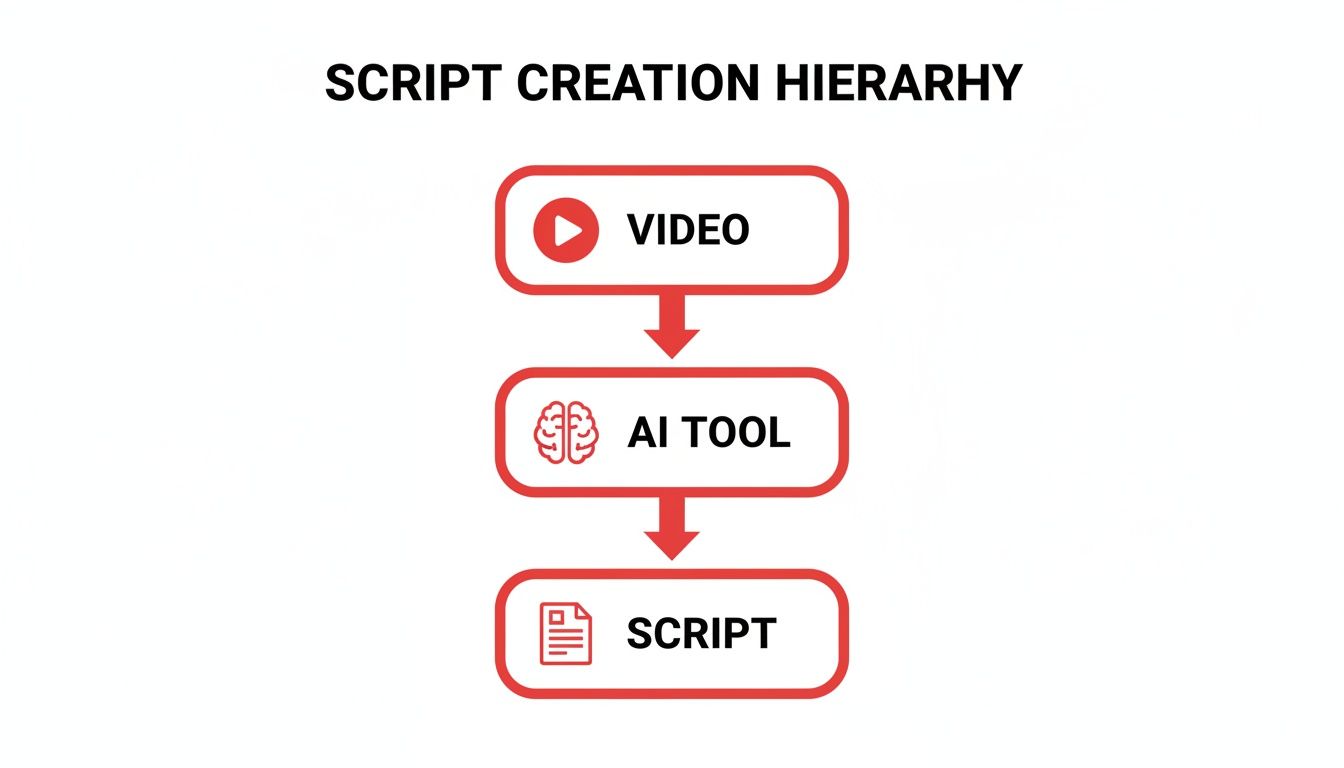
As you can see, an AI tool is the essential bridge here, quickly turning your video into versatile text.
Actionable Repurposing Strategies
The real trick to effective repurposing is tailoring the core message to fit different formats and the people who use them. A single video and script can be the launchpad for a huge variety of content, each piece designed for a specific channel.
Here are a few creative, real-world examples to get you started:
- Create a Comprehensive Blog Post: Give the transcript a quick clean-up, add some headings and relevant images, and pop the original video right at the top. Instantly, you have a valuable, SEO-friendly article ready to pull in traffic from Google.
- Generate Engaging Social Media Updates: Pull out the best quotes, the most surprising stats, or the most practical tips from your script. Turn these nuggets into a series of ten or more eye-catching graphics or short text posts for platforms like X, LinkedIn, or Instagram.
- Write a Compelling Email Newsletter: Summarise the key takeaways from your video in an email to your subscribers. This gives them a quick hit of value and nudges them to click through to watch the full video or read the companion blog post.
- Build a Downloadable PDF Guide: If your video is a tutorial or a deep dive into a topic, format the script into a polished PDF checklist or guide. This makes for a fantastic lead magnet to help grow your email list.
By publishing your video’s script as a blog post, you build a bridge between the world’s two largest search engines—Google and Youtube. You create a powerful loop where your blog ranks on Google, driving traffic to your website, and that traffic then watches the embedded video, boosting your channel’s watch hours.
Repurposing for Different Professionals
This strategy isn't one-size-fits-all; it can be adapted for pretty much any industry. A Youtuber, for example, can consistently build a complementary blog by publishing their video scripts, attracting a new audience that prefers to read. It's an incredibly efficient way to expand their digital footprint.
A business, on the other hand, could take a powerful video testimonial and turn the script into a compelling case study. This text-based format is perfect for sales materials and more detailed website content.
In the same way, an educator can transform a recorded lecture into invaluable study materials. The script can become summary notes, flashcards, or even quiz questions, giving students multiple ways to engage with the core ideas. If you want a few more ideas, you might find our article on how to convert Youtube audio content interesting.
The goal is always the same: get the absolute maximum value from every single video you create.
Best Practices for Effective Scripting and Transcription
A great video doesn’t just happen when you hit "record". It starts with a solid plan, and its impact doesn't end when you click "publish". To truly make the most of the powerful connection between a video and script, you need to focus on quality from the very beginning of the writing process right through to the final polish of your transcript.
By following a few straightforward guidelines, you can write a script that’s a breeze to deliver on camera and then turn it into a transcript that solves problems for search engines and new audiences.
Pre-Production Scripting Essentials
Think of your pre-production script as a roadmap for the shoot. Its main job is to make the actual recording process as painless and efficient as possible for you or your on-camera talent.
- Write like you talk: Ditch the formal, stuffy language. Your script should sound like you're having a natural conversation with your audience. It builds trust and keeps people engaged.
- Keep it simple: Use clear, direct language. Break down complicated topics into short, easy-to-digest sentences. If it's hard to read, it'll be even harder to say and follow.
- Add visual cues: A script is more than just words. Scribble in notes like [Show product close-up] or [Pause for emphasis]. These little directions guide the entire visual story, from filming to the final edit.
Your script shouldn't just be a feed for a teleprompter. It's a complete production guide that syncs up what you say with what happens on screen, making sure the final video feels polished and professional.
Optimising Your Post-Production Transcript
Once your video is out in the world, your script gets a second life as a transcript. This is your chance to prime it for SEO, improve accessibility, and create a springboard for all sorts of new content. An automated tool gives you the raw material, but it's up to you to refine it for maximum impact.
This is especially critical in markets where people consume a lot of online content. For example, with an expected 87% of Dutch households watching online videos by 2025, a well-optimised script is key to repurposing your videos to reach that massive audience. This is why tools that simplify the video-to-script workflow are becoming so popular—they help creators effortlessly turn vlogs into blog posts that climb the search rankings and connect with more people. You can read more about Dutch streaming trends from Broadband TV News.
First things first: give that AI-generated text a quick clean-up. Automated tools are incredibly accurate these days, but a quick human review will catch any weird phrasing or misunderstood niche terms.
Next, consider adding timestamps at important points. Viewers love being able to jump straight to the good parts, and it makes it way easier for you to find specific clips to chop up for social media. Finally, format the text for its new purpose. If you're turning it into a blog post, add headings, bullet points, and images to make it more readable and engaging. This whole process of converting spoken words into structured written content is a cornerstone of modern content strategy, and you can learn more about it by exploring how to convert audio to text.
The Future of Smart Content Creation
As we look ahead, the bond between a video and its script isn't just growing stronger; it’s becoming the engine for smarter, more accessible, and seriously effective content. For creators and businesses, this connection is completely changing the game by solving long-standing productivity bottlenecks.
AI transcription tools have come a long way from just saving us a bit of time. They're now becoming central to building an intelligent content strategy, letting one video fuel an entire marketing campaign. This really calls for a new way of thinking.
It's time to stop seeing your videos as the final product. Think of them as renewable resources, each one packed with potential for blog posts, social media clips, and in-depth guides.
Time to Put This into Action
The way forward is pretty clear. Don't let your amazing video library just sit there collecting digital dust. It's time to unlock all that hidden value by pulling scripts from your existing content and giving it new life for new audiences. This simple step can dramatically increase your content output without increasing your workload.
On your next project, why not try writing the script first? Getting your thoughts organised before you hit record can lead to a much more polished and impactful final video. If you want to dive deeper into using AI to turn your scripts into amazing visuals, check out this ultimate guide on AI script-to-video creation.
When you embrace this workflow, you're not just making more content. You're building a smarter, more efficient content machine that keeps working for you long after you've published. This is how you really level up your content strategy.
Frequently Asked Questions
Got a few more questions? You're not alone. Let's tackle some of the common queries that pop up when people start working with video scripts and transcripts.
Do I Need a Script for Every Single Video?
Not always, but it's rarely a bad idea. If you're shooting a casual, off-the-cuff vlog, you can probably get away with just a few bullet points.
But for anything where clarity is key—like a tutorial, a product review, or an educational video—a script is your best friend. It keeps you on track, ensures you don't forget any crucial points, and helps you deliver your message without a lot of "ums" and "ahs." The end result just feels more polished and professional.
How Accurate Are AI Transcription Tools, Really?
They've gotten surprisingly good. With clear audio, modern AI tools can hit 95-98% accuracy, which is incredible.
Of course, they might stumble over niche jargon, thick accents, or if multiple people are talking at once. But think of it this way: instead of spending hours manually typing everything out, you're spending maybe five minutes proofreading and making minor tweaks. It's a huge time-saver.
An AI-generated script gives you a near-perfect starting point. A quick five-minute review is all it takes to catch minor errors and prepare your text for repurposing, a massive improvement over the hours it would take to transcribe from scratch.
What's the Fastest Way to Get a Transcript?
Hands down, an automated service. No contest. Tools built specifically for this let you paste a video link and get a full, timestamped transcript back in minutes. The alternative is typing it out yourself, which is as slow and tedious as it sounds.
Can a Video Transcript Actually Help My SEO?
Yes, and it’s a bigger deal than most people realise. Search engines like Google are fantastic at reading text, but they can't "watch" your video to understand what it's about.
When you post a transcript on the same page, you're basically giving the search engine a complete cheat sheet of every word you said. This means you can start ranking for all the specific long-tail keywords and phrases you mentioned in the video, pulling in a whole new audience from search.
Ready to put all this into action? With YoutubeToText, you can instantly turn your videos into accurate, searchable scripts. Save time, boost your SEO, and open up a world of new content possibilities. Get your first transcript today.