Master speech to text Dutch with this practical guide. Learn how to get fast, accurate Dutch transcriptions for videos, interviews, and research.
A Practical Guide to Speech to Text Dutch Transcription
Turning spoken Dutch into text used to be a real chore. Now, with the right AI tools, it’s faster and more accurate than ever. This guide is designed to solve a common problem for creators, researchers, and businesses in the Netherlands: how to efficiently and accurately convert Dutch audio and video into usable text. By following these steps, you can save countless hours, make your content more accessible, and unlock new ways to repurpose your work.
Why Accurate Dutch Transcription Is a Game Changer
The need for good speech to text Dutch services is exploding. From content creators in Amsterdam to academics in Antwerp, a solid transcript is more than just a text file—it’s a powerful tool that solves real problems. It boosts your video's discoverability, simplifies the analysis of interview data, and makes digital content accessible to everyone, including those with hearing impairments.
This isn't a small trend. The voice and speech recognition market in the Netherlands was valued at USD 549.1 million in 2023 and is expected to climb to USD 1,591.6 million by 2030. This growth shows how integral voice technology is becoming in our professional lives. For creators in a country with over 2.5 million Youtube users, automated transcription is no longer a luxury; it's a must-have for productivity. You can dig deeper into these market trends over at Grand View Research.
Solving Real-World Problems
Let's be honest: transcribing by hand is painfully slow. AI-driven tools have completely flipped the script, providing a near-perfect draft in minutes that just needs a quick polish. This solves major productivity bottlenecks for many professionals:
- Youtubers and Content Creators: Quickly generate accurate Dutch subtitles (SRT files) to boost watch time and reach viewers who are deaf, hard of hearing, or watching with the sound off, dramatically improving accessibility and engagement.
- Researchers and Journalists: Turn hours of interviews into a searchable document, eliminating the tedious task of rewinding to find key quotes. This streamlines qualitative data analysis and accelerates the research process.
- Businesses and Marketers: Make webinars and promotional videos accessible to all, ensuring their message reaches the widest possible audience and complies with modern accessibility standards.
The real bottleneck for many isn't producing the content; it's what you do with it afterwards. An accurate Dutch transcript breaks through that barrier, turning one recording into endless possibilities for repurposing.
Overcoming Dutch Language Challenges
The Dutch language can be tricky for transcription software. Think about our long compound words (winkelwagentje), different regional accents, and all the subtle sounds that can confuse a machine. This is where the newest AI models really prove their worth.
Tools like YoutubeToText are built to handle these quirks. They use sophisticated algorithms trained on huge datasets of Dutch speech, so they can tell the difference between words that sound alike, understand various dialects, and make sense of complex sentences. The end result is a transcript that's incredibly accurate right from the start, saving you a ton of editing time so you can get back to what you do best.
Getting Your Audio Ready for a Perfect Transcript
Before you jump into transcribing, let's talk about a simple truth that solves the most common transcription problem: garbage in, garbage out. Even the smartest speech to text Dutch AI will struggle if it's fed poor-quality audio. Taking a few minutes to prepare your recording is the single most effective way to ensure an accurate transcript from the start, saving you hours of frustrating editing later.
Think of it this way: giving the AI a clean, clear audio file is like handing it a perfectly printed book. A noisy, muffled file? That’s like asking it to read scribbles in a dark room. You’re just making its job harder and your editing work longer.
It All Starts with the Right Microphone
Look, you don't need a professional studio setup. But for any project that matters, the tiny microphone built into your laptop just isn't going to cut it. A small investment in a decent external mic pays for itself almost immediately by solving audio quality issues.
Here are a couple of solid options that work for most people:
- USB Microphones: These are my go-to for anything recorded at a desk, like interviews or voiceovers. You just plug it into your computer, and the quality is instantly miles better than any internal mic.
- Lavalier Mics (Lapel Mics): If you're recording a video and moving around, these are essential. Clipping a small mic to your collar keeps your voice clear and consistent, cutting down on that awful echo and background noise.
The main idea is to capture your voice as directly as possible. If a recording sounds like you’re speaking from the other side of the room, the AI will have a tough time picking it up accurately.
Find a Quiet Place to Record
Background noise is the absolute enemy of a clean transcription. Every little hum, buzz, or distant bark forces the AI to guess what's speech and what's noise, leading to errors.
The cleaner your audio is from the start, the less heavy lifting the transcription software has to do. That translates directly to a more accurate result. Honestly, every minute you spend finding a quiet spot can save you ten minutes of painful editing later.
Before hitting that record button, run through this quick problem-solving checklist:
- Shut the doors and windows. Obvious, but easy to forget.
- Kill any humming appliances. Fans, air conditioners, even a noisy fridge can be a problem.
- Silence your phone and computer notifications. You don't want a random ping ruining a perfect take.
- Pick a "soft" room if you can. Spaces with carpets, curtains, and sofas are great because they absorb sound. Hard surfaces like tiles or bare walls create echo, which muddies the audio.
What if the audio is already recorded, like in a Youtube video you need to transcribe? You don't have control over the original setting, but you can still clean things up. A good first step is to learn how to extract audio from video on Youtube; once you have the audio file, you can run it through editing software to reduce noise before transcribing.
How You Speak Dutch Matters, Too
Beyond the tech, the way you actually speak has a huge impact. This is especially true with all the nuances of the Dutch language. AI is getting incredibly good, but clear articulation is still your best friend for achieving high accuracy.
For the best speech to text Dutch results, keep these tips in mind:
- Speak clearly and at a natural pace. Don't rush or mumble. Just talk like you're having a clear conversation.
- Watch out for filler words. We all say 'dus', 'eigenlijk', and 'uhm', but a recording filled with them can make the final text messy and hard to read.
- Be aware of strong regional dialects. While modern AI can handle a lot of variation, you'll generally get the most accurate transcript by speaking closer to Algemeen Beschaafd Nederlands (ABN). This is good practice anyway if your content is for a wide audience.
This simple "pre-flight check"—a good mic, a quiet room, and clear speech—doesn't take much effort, but the payoff is massive. It's the foundation for building a flawless Dutch transcript you can actually rely on.
A Simple Workflow for Converting Dutch Videos to Text
Alright, now that your audio is clean and ready, let's get to the main event: turning that sound into words. This section solves the challenge of converting a Dutch video into an editable text document with a straightforward, practical workflow. It's less about wrestling with complicated software and more about following a few logical steps to get fast, accurate results.
I'll walk you through a real-world example using a popular online tool, YoutubeToText, to show you just how fast you can go from a video link to a fully editable transcript. This approach is perfect for anyone who needs results quickly, whether you're a Youtuber creating subtitles or a researcher analysing an interview.
This workflow really starts with the prep work we just covered—good audio is the foundation for everything that follows.
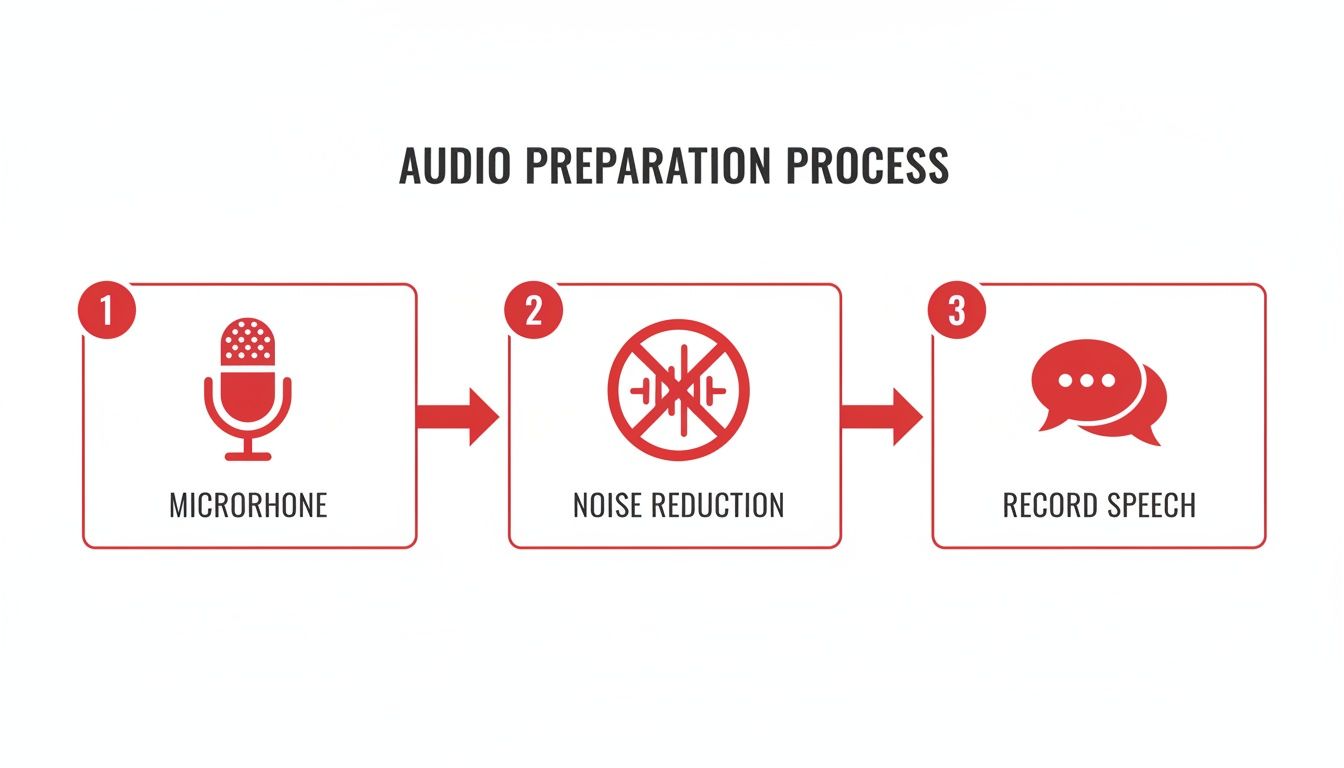
As the diagram shows, it all boils down to three things: a decent microphone, reducing background noise, and then recording your speech. Get these right, and the transcription part becomes a whole lot easier.
Starting the Transcription
Honestly, the first step couldn't be easier. All you need is the link to the Youtube video you want to transcribe. This could be your own content, a public lecture, or any interview you're studying.
Once you’ve got the link, head over to the transcription tool. The interface is usually dead simple—you just paste the URL into a box and hit go. The best part? You don't have to download the video or mess around with big files. The service pulls the audio directly from the source.
This is a massive time-saver. Not long ago, you’d have had to download the video, use another program to rip the audio, and then upload that audio file. This one-step process cuts out all that hassle.
Selecting Dutch: The Most Important Click
After pasting the link, the next step is critical: you have to tell the AI what language it's listening to. This is absolutely essential for getting an accurate speech-to-text Dutch conversion.
You'll almost always see a dropdown menu with a list of languages. Make sure you select "Dutch" from this list. If you forget and leave it on the default (usually English), the AI will try to make sense of Dutch sounds as English words. The result is pure gibberish.
So, take that extra second to double-check this setting. It’s a tiny action that makes the difference between a 95% accurate transcript and a completely useless one. Selecting 'Dutch' tells the system to use its specialised Dutch language model, which understands the nuances of Dutch vocabulary, grammar, and sentence structure.
The moment you select 'Dutch' and hit 'Transcribe,' you're activating a powerful AI engine trained on thousands of hours of Dutch audio. It’s designed to understand the specific nuances of the language, from compound words to common colloquialisms.
Looking at Your First Draft
Once you kick off the process, you'll usually see a progress bar. For most videos—say, around 10-15 minutes long—you'll have your first draft transcript in just a few minutes. The speed is one of the biggest wins of using these AI services.
When it's done, the tool will display the text, typically with timestamps. The first thing you'll probably notice is how readable it is. Modern AI has gotten pretty good at adding punctuation and paragraph breaks, so you're not just looking at a giant wall of text.
Here’s what to look for in these initial results:
- Speaker Labels: If multiple people are talking, many tools will try to differentiate them, tagging them as "Speaker 1," "Speaker 2," and so on.
- Timestamps: Each sentence or paragraph usually has a timestamp next to it, linking the text to that exact moment in the video. This is a lifesaver for editing and creating subtitles.
- Search Function: The entire transcript is searchable. You can instantly jump to specific keywords without having to scrub through the video manually.
This first output is your working draft. It's almost never 100% perfect, but it gets you incredibly close with very little effort. The next phase is all about polishing this draft, but the heavy lifting is already done. For those interested in the different technologies out there, you can explore various types of audio to text converters to see what fits your needs. And for a deeper dive into the entire process, this guide on how to convert audio to text is a great resource.
This simple workflow proves that a task that once took hours of painstaking manual work can now be done in the time it takes to brew a pot of coffee.
Editing Your Dutch Transcript for 100% Accuracy
An AI transcript gets you incredibly close—I'd say about 95% of the way there—in a tiny fraction of the time it would take to type it all out by hand. But that last 5%? That’s where you come in. This final editing pass is what elevates a decent draft into a perfect, professional transcript. Think of it less as starting from scratch and more as smart, targeted polishing.
Even the most powerful AI can get tripped up by the unique quirks of the Dutch language. The technology behind it, Speech-based Natural Language Processing (NLP), is evolving at a breakneck pace. In fact, it’s on track to become a US$953.01 million market in the Netherlands by 2025. This rapid growth means tools like YoutubeToText are constantly getting better at understanding Dutch phonetics and dialects.
This progress couldn't come at a better time, especially when you consider that 85% of Dutch Youtube content now features spoken Dutch. You can dig deeper into these trends in Statista's market forecast. Still, despite how far the tech has come, a quick human review is non-negotiable for catching the subtle errors that machines still miss.
Spotting Common AI Mistakes in Dutch
Once you start editing your speech to text Dutch output, you’ll begin to notice a few common slip-ups. Knowing what to look for makes the whole process much quicker.
AI often stumbles over:
- Homophones: These are words that sound the same but have different meanings and spellings. For instance, the AI might write 'ligt' (lies) when the speaker clearly said 'licht' (light). Context is everything, and the human brain is still the best tool for the job here.
- Proper Nouns and Place Names: Don't be surprised if the AI has a hard time with unique names like 'Scheveningen' or 'Nieuwegein'. It might also misspell a company name or a person's surname if it isn't a common one.
- Compound Words: Dutch is famous for its long, glued-together words (winkelwagentje, arbeidsongeschiktheidsverzekering). Sometimes, an AI will incorrectly split these into two or more separate words, which can completely change the meaning.
- Punctuation: AI is getting pretty good at placing commas and full stops, but it can struggle with the natural rhythm of a sentence. You might find it breaks up long, complex thoughts in awkward places.
The editing process isn't about finding fault with the AI; it's about collaborating with it. The machine does the heavy lifting, and you provide the final layer of nuance and context that only a human can.
Your Essential Proofreading Checklist
To make your editing pass as efficient as possible, it helps to have a simple checklist. This keeps you focused and ensures you don't miss anything important.
Here’s a quick guide I follow:
- Verify Speaker Labels: If your audio features more than one person, the AI will probably label them as Speaker 1, Speaker 2, and so on. Your first task is to swap these generic labels with the speakers' actual names. This is a must for interviews, podcasts, and meeting notes.
- Correct Grammar and Spelling: Read through the text to catch any typos or the common AI errors we just talked about. I always pay extra attention to verb conjugations and word endings in Dutch.
- Check for Tone and Intent: Does the written text feel like the original audio? Sarcasm, questions, and moments of excitement can get lost. A few simple punctuation tweaks—like adding a question mark or an exclamation mark—can go a long way in restoring the speaker's original tone.
- Confirm Technical Terms: If your content is full of industry-specific jargon, take a moment to double-check that the AI spelled everything correctly.
Following a structured approach like this will help you produce a flawless Dutch transcript every single time.
Verbatim vs Clean Read: Which Is Right for You?
Before you hit "save," there’s one last decision to make: what style of transcript do you need? Your choice really depends on what you plan to do with the final text.
There are two main styles to consider:
- Verbatim: This is a literal, word-for-word account of the audio. It includes every single filler word ('uhm', 'dus', 'eigenlijk'), stutter, and false start. This style is crucial for legal records, academic research, or any situation where the precise way something was said matters.
- Clean Read (or Intelligent Verbatim): This is the more common choice. Here, the editor polishes the text by removing all the conversational fluff—the filler words, repetitions, and stumbles. The goal is to create a clean, highly readable document. This is perfect for subtitles, blog posts, or any content meant for an audience.
For most content creators using speech to text Dutch services, a clean read is the way to go. It gives you a professional, polished document that’s ready to be shared or repurposed.
Putting Your Dutch Transcript to Work
Alright, so you’ve got your Dutch transcript perfectly edited and polished. Job done, right? Not even close. This is where you can truly get inspired and solve the bigger problem of content visibility and value. Your transcript isn't just a final document; it’s a powerful asset ready to be repurposed.
The true magic of speech to text Dutch technology isn't just in the conversion; it's in what you can build with the text afterwards. This is where a little extra effort can massively boost your content's reach, make it more accessible, and squeeze every last drop of value out of it.
Unlocking Video Content With Subtitles
One of the most immediate and impactful things you can do is turn that transcript into subtitles. It's a game-changer for accessibility and audience reach. Suddenly, your video is open to viewers who are deaf or hard of hearing, non-native Dutch speakers, and the vast majority of people scrolling through social media with their phones on silent.
When it comes to exporting, you’ll mainly run into two file types: SRT and VTT. Here’s the simple breakdown:
- SRT (.srt): This stands for SubRip Text, and it's the old reliable. It’s a basic text file with timestamps and your subtitle lines. It works everywhere—Youtube, Vimeo, LinkedIn, you name it. It's the universal standard.
- VTT (.vtt): Short for Web Video Text Tracks, this is the modern upgrade. It does everything SRT does but also supports extra styling like bold text, italics, and even positioning on the screen. It's fantastic for custom web players where you want more creative control.
Thankfully, tools like YoutubeToText let you download your transcript in both formats with a click, so you don't have to get bogged down in the technical details. But if you do want to get your hands dirty, you can build them from scratch. We’ve put together a handy guide on how to convert a plain TXT file into a perfectly timed SRT file.
From Spoken Word to Written Content
Your transcript is basically a pre-written draft for an entire suite of written content. This is the secret to smart content repurposing, solving the problem of constantly needing new content ideas. You save a ton of time and get your message out to people who’d rather read than watch.
Think about how one video transcript can be spun into multiple assets:
- Blog Posts: An interview or tutorial video is just a few edits away from being a comprehensive blog post. Clean up the conversational tone, add some headings, pop in a few images, and boom—you've got a new piece of content for Google to find.
- Social Media Snippets: Pull out the best bits. A killer quote, a surprising statistic, or a practical tip can easily become a compelling post for X (formerly Twitter), LinkedIn, or Instagram.
- Email Newsletters: Summarise the key takeaways from your video or webinar and send it straight to your subscribers' inboxes. It’s a great way to provide value and drive people back to the original content.
Your transcript is a content goldmine. Don't let it sit on your hard drive. Every sentence is a potential tweet, every paragraph a potential blog section, and every key idea a potential newsletter.
This isn't just a nice-to-have; it's becoming essential. The speech recognition market in the Netherlands is projected to grow at a 16.3% CAGR from 2023 to 2030, driven by the shift to remote work and digital content. With 70% of Dutch internet users aged 16-75 watching online videos every day, using speech-to-text to create searchable, multi-purpose content is how you stay ahead.
Powering Research and Analysis
For anyone in academia, journalism, or research, a transcript is a superpower. It solves the massive time-sink of manually reviewing audio files. Now you have a searchable, citable document.
This makes finding themes, pulling precise quotes, and analysing interview data incredibly efficient. You can use a dedicated podcast transcription tool to quickly turn spoken interviews into text, which streamlines the entire process. With a text version of your data, you can categorise responses, spot patterns, and build a much stronger foundation for your findings in a fraction of the time.
Answering Your Questions About Dutch Speech to Text
Even with a solid plan, you're bound to have questions once you start transcribing Dutch audio for your own projects. That's completely normal, especially given the nuances of the language. Let’s solve some of the most common queries to get you on the right track.
Getting these answers upfront helps you know what to expect and lets you use the technology a lot more effectively. The aim here is to make sure you feel ready to tackle any transcription job that lands on your desk.
How Well Does AI Handle Different Dutch Dialects?
This is a big one. The good news is that modern AI has gotten remarkably good at understanding a wide range of Dutch dialects, from Flemish to other regional accents. Of course, standard Dutch (Algemeen Beschaafd Nederlands) will always give you the cleanest results. But the best services are trained on huge, diverse audio libraries, so they're much better at recognising local variations than they used to be.
To put it in perspective, a crisp, clear recording in standard Dutch can easily hit 98-99% accuracy. Throw in a heavy regional accent, and that might dip a bit to the 90-95% range—which is still fantastic and leaves you with a very workable draft to edit.
The real takeaway here is this: while AI is great with dialects, the quality of your audio is what truly matters. A clear voice with minimal background noise gives the AI the best possible shot at getting it right, no matter the accent.
Can I Transcribe a Conversation With Multiple Dutch Speakers?
Yes, absolutely. The more advanced platforms are built to handle multiple speakers using a feature called speaker diarization. This is the clever bit of tech that helps the software tell different voices apart and label them accordingly in the final transcript.
For example, when you use a tool like YoutubeToText, the output will often break down the dialogue with labels like 'Speaker 1' and 'Speaker 2'. This is a lifesaver when you're transcribing things like:
- Interviews with a host and their guest.
- Podcasts with a few co-hosts riffing off each other.
- Recordings of team meetings or panel discussions.
For the cleanest results, it helps if the speakers try not to talk over one another. Once the transcript is generated, you can just pop into the editor and swap out the generic labels with the actual speakers' names. It makes for a much tidier and easier-to-read record of the conversation.
What’s the Best Format for Exporting Dutch Subtitles?
Once you’ve polished your transcript, you’ll want to export it as a subtitle file. The two formats you'll see everywhere are SRT and VTT. Knowing the difference between them will help you pick the right one for your video.
Here’s a quick breakdown to make it simple:
| Feature | SRT (.srt) | VTT (.vtt) |
|---|---|---|
| Compatibility | The gold standard. It works on Youtube, Vimeo, LinkedIn, and just about every video player out there. | A more modern format that’s great for web players but might not be supported by older desktop software. |
| Styling Options | No frills. It doesn't support text formatting like bolding, italics, or different colours. | Allows for much more styling. You can add bold, italics, and even control where the subtitles appear on the screen. |
| Best For | Maximum compatibility. If you want a file that will work everywhere, SRT is your safest bet. | Web videos where you want more creative control over the look and feel of your subtitles. |
When in doubt, SRT is always a solid choice. Luckily, you don't really have to choose. A good speech to text Dutch service will let you download your subtitles in both formats with just one click. This gives you the flexibility to use whatever format your project needs, making sure your Dutch content is ready for any platform.
Ready to turn your Dutch videos into accurate text in minutes? With YoutubeToText, you can generate transcripts, create subtitles, and repurpose your content effortlessly. Start transcribing for free and see how simple it can be at https://youtubetotext.ai.