Tired of messy meeting notes? Learn the essential minutes of meeting format with clear templates and AI-powered tips to capture decisions and actions perfectly.
A Modern Guide to Minutes of Meeting Format
A solid minutes of meeting format is more than just a formality; it's a powerful productivity tool. It’s the official record of what was discussed, what was decided, and who needs to do what next. It’s what turns a free-flowing conversation into a structured document that boosts productivity, keeps everyone accountable, and solves the problem of post-meeting confusion.
Why a Great Meeting Minutes Format Matters

Let’s be honest—most of us have seen meeting minutes that get filed away and are never looked at again. They often feel more like a bureaucratic chore than a genuinely useful tool. But what if they could actually solve the problem of projects stalling between meetings? That’s where a consistent, well-designed format changes everything.
When you use a structured document, you’re creating a single source of truth for the entire team. This simple act solves the frustrating problem of "I thought we agreed to..." moments that can derail progress. With a clear summary in hand, there’s no room for confusion about what was decided or who’s responsible for the next steps.
Turning Conversations into Concrete Outcomes
The real purpose of any good meeting minutes format is to translate talk into action. Without it, brilliant ideas and firm decisions can easily get lost once everyone logs off. A good format helps you pin down those crucial takeaways, solving the problem of valuable discussions leading nowhere.
- Ensures Accountability: When you list action items with names and due dates, everyone knows exactly what they need to do, solving the problem of tasks being forgotten.
- Prevents Misunderstandings: A written record means no one has to rely on memory. It’s an objective account of the discussion and the final verdict, improving accessibility for those who couldn't attend.
- Creates a Legal and Historical Record: In more formal settings, minutes are the official document you need for compliance and to look back on later.
The true power of meeting minutes isn't in transcribing every word. It's about boiling down a complex discussion into a simple, actionable plan that keeps your team aligned and productive.
The Evolution from Paper to Pixels
Keeping formal records of meetings isn't a new concept. Take the Netherlands, for example, where detailed minutes have long been a cornerstone of corporate governance. By the 1980s, Dutch law mandated formal minute books to document resolutions and protect company directors.
This tradition has evolved. By 2015, more than two-thirds of large Dutch companies had moved to digital record-keeping. You can dig into the data on this digital shift in corporate governance on opendata.cbs.nl.
Today, that evolution is accelerating with AI-powered tools that solve the problem of tedious manual note-taking. Modern transcription services can transform a lengthy meeting recording into an accurate text file in minutes. This makes creating detailed, searchable, and shareable records easier than ever, making a modern minutes of meeting format a fundamental skill for anyone leading productive teams.
The Essential Elements of Effective Meeting Minutes

Think of your meeting minutes as a blueprint for action, not just a historical record. A well-structured document becomes a practical guide that your team can actually use to move forward. The secret is breaking it down into simple, digestible parts, creating a reliable format that works whether you're in a formal board meeting or a quick team huddle.
The goal here is to create something that’s thorough enough to be an official record but also scannable for someone who just needs the key takeaways. Let's walk through the non-negotiable components that really form the backbone of professional meeting minutes.
The Foundational Details
Before you dive into the nitty-gritty of discussions, you need to set the scene. Every set of minutes must start with the basics. This information gives instant context and is absolutely vital for anyone looking back at this document months or even years later.
Without these foundational details, your minutes are just a collection of notes floating in space.
- Meeting Title: Be specific. Instead of "Marketing Meeting," try "Q3 Marketing Strategy Review" or "Project Phoenix Kick-Off Meeting."
- Date and Time: List the full date along with the exact start and end times.
- Location: Was it physical ("Conference Room B") or virtual ("Microsoft Teams")?
- Attendees: Create a simple list of everyone who was there. I find it’s also a good habit to note down any apologies for absence from those who were invited but couldn't make it.
Documenting the Discussion and Decisions
Once you've got the basics down, you get to the heart of the matter: what was actually discussed and, more importantly, what was decided. This is where your minutes transition from simple notes into a genuine record of progress and commitment. If you’re too vague here, you’re just setting the stage for future arguments over what was really agreed upon.
Your job is to capture the essence of the conversation for each agenda item, not to transcribe it word-for-word. The focus should always be on the outcome.
A classic productivity mistake is trying to write down every single thing that's said. Don't do it. Your energy should be focused on capturing what was decided. Minutes are a record of outcomes, not a transcript of conversations.
For instance, if an agenda item is "New Website Launch," your notes should briefly summarise the key discussion points (e.g., "Debate over platform A vs. B") and then clearly state the final decision. For a closer look at how to lay this all out, you can explore our detailed minutes of meeting template.
The Action Items Blueprint
Let's be honest—this is probably the most important part of the entire document. Action items are the tangible tasks that come out of the meeting. They are the whole reason you met in the first place! Without a clear list of who's doing what by when, meetings can feel like a complete waste of time. This section solves the problem of meetings that don't lead to action.
To make sure things actually get done, every action item needs to be crystal clear.
- The Task: What exactly needs to happen? Use strong, action-oriented verbs. (e.g., "Draft the initial project brief").
- The Owner: Who is taking responsibility for this? Assign it to one person to ensure accountability.
- The Deadline: When is it due? A specific date prevents tasks from drifting into oblivion.
For example, don't just write "Someone should look into the budget." That’s useless. A powerful action item looks like this: "Action: Alex Jansen to finalise the Q4 budget proposal and share it with the team by Friday, 25 October." There’s zero ambiguity there. Everyone knows what's happening next.
Choosing the Right Format: Formal vs. Informal
Let's be honest, not all meetings are created equal. A weekly team huddle is a world away from an annual board meeting, so why would we document them in the same way? Picking the right minutes of meeting format is less about following a rigid rulebook and more about making a smart choice that solves a specific need. The goal is to create a record that’s genuinely useful, not a bureaucratic chore.
A common mistake I see is people using a one-size-fits-all template for everything. Trying to force a casual brainstorm into a super formal structure can kill creativity. On the flip side, scribbling a few quick notes after a board meeting could create serious legal or compliance headaches. It all comes down to context. You have to be adaptable and know when to be detailed and when to be brief.
When to Use a Formal Minutes Format
Think of formal minutes as the official, legally sound record of a meeting. They need to be precise, objective, and perfectly structured because they’re often required for high-stakes situations where decisions have binding consequences or could be audited later.
This is the format you absolutely must use for your organisation’s most important governance meetings.
- Board Meetings: Every motion, vote, and resolution needs to be documented for legal compliance and to hold directors accountable. There's no wiggle room here.
- Shareholder Meetings: These minutes are the legal record of decisions that affect the company's ownership and future.
- Official Committee Meetings (Finance, Audit, etc.): You need a detailed trail to demonstrate due diligence and show exactly how key financial or oversight decisions were made.
The language in these documents is deliberately impersonal and sticks strictly to the facts and outcomes. The format follows the agenda to the letter, carefully noting who proposed and seconded motions, and the exact tally of any votes. This isn't the place for colour or personal opinions; it’s a factual, defensible account of what was formally decided.
The real purpose of a formal format isn’t to capture the vibe of the conversation. It's to create an iron-clad record of official actions that can stand up to scrutiny.
Embracing an Informal Minutes Format
On the other end of the spectrum, you have informal minutes. These are all about speed, clarity, and driving action within a team. This is your go-to format for most internal meetings where the main goal is to solve the problem of keeping projects moving forward.
Think of these as practical tools for day-to-day productivity, not legal documents.
- Team Syncs and Daily Stand-ups: A quick, scannable list of updates, what’s blocking progress, and what happens next is perfect.
- Brainstorming Sessions: Here, the focus is all on capturing the flood of ideas and creative sparks—not meticulously recording who said what.
- Project Kick-offs: Documenting the main takeaways, immediate action items, and who owns them is key to building momentum right from the start.
This style is much more conversational and often just uses simple bullet points or a basic table. The priority is making it easy for people to scan the document and see exactly what they need to do. An informal minutes of meeting format is brilliant for turning talk into action without getting bogged down in red tape.
Formal vs Informal Minutes: A Quick Comparison
Deciding which style to use can be tricky at first. This table breaks down the main differences to help you quickly choose the right approach for your next meeting.
| Feature | Formal Minutes (e.g., Board Meeting) | Informal Minutes (e.g., Team Sync) |
|---|---|---|
| Tone | Objective, impersonal, and official. | Casual, collaborative, and direct. |
| Structure | Rigidly follows the agenda with motions and votes. | Flexible, often using bullet points for key takeaways. |
| Focus | Decisions, resolutions, and legal compliance. | Action items, ideas, and immediate next steps. |
| Audience | Board members, shareholders, and legal teams. | Internal team members and project stakeholders. |
Ultimately, knowing your audience and the meeting’s purpose is the key. Once you’re clear on that, picking the right format becomes a simple and logical next step.
How AI Can Perfect Your Meeting Minutes
Let's be honest: trying to listen, participate, and type comprehensive meeting notes all at once is nearly impossible. This common frustration is a major productivity killer. You’re so busy trying to capture what one person said that you completely miss the next crucial point. But what if you could solve this problem and move from frantic typing to focused listening?
Think of AI transcription as your secret weapon for productivity. It takes your meeting recordings and turns them into accurate, readable text. This simple change completely overhauls how you approach creating your minutes of meeting format. Instead of having your head down, you can actually engage in the conversation, confident that a perfect record is being created in the background.
From Recording to Transcript in Minutes
Getting started is surprisingly simple. Most modern tools are designed to slot right into your workflow, whether you're on Zoom, Microsoft Teams, or Google Meet. The whole point is to get a clean, accurate transcript without any hassle, solving the problem of inaccurate, incomplete notes.
Here’s what that process usually looks like:
- Hit record. This is the most important part. Just make sure you get a clear audio recording of your online meeting.
- Upload your file. Grab the audio or video file and upload it to a transcription service.
- Get your transcript. The AI gets to work, and in just a few minutes, you’ll have a full, time-stamped text version of the entire conversation ready to go.
This flowchart shows just how much this simple step can improve the traditional process for both formal and informal minutes.
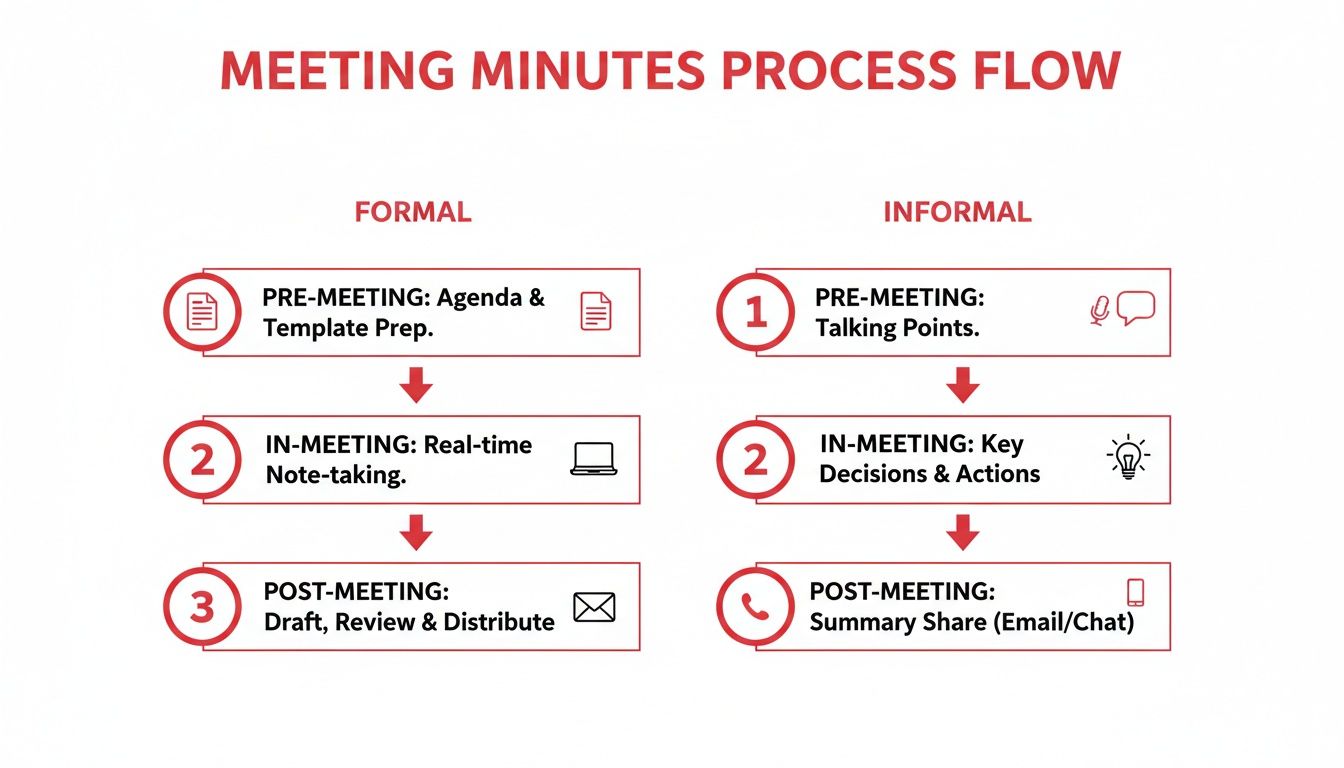
As you can see, automating the transcription part makes everything faster and far more accurate. It completely removes that manual bottleneck, boosting your productivity.
Turning Transcripts into Actionable Minutes
Okay, so you have the raw text. Now for the good part. Instead of wracking your brain to remember who said what, you have a word-for-word record at your fingertips. You can quickly scan or search the transcript for key decisions, pull out exact quotes, and assign action items with total confidence. This also enhances accessibility, allowing team members to review the full context of a discussion later.
The biggest win with an AI-generated transcript is accuracy. You're no longer just paraphrasing a decision; you're copying the exact wording. This simple act eliminates any room for misunderstanding down the line.
This approach has been a game-changer, especially for remote and hybrid teams. In the Netherlands, for example, the shift to online meetings has made reliable digital records more important than ever. In fact, some studies show that Dutch firms which switched to online meetings saw their recorded meeting documents grow by 25% to 40% as they started including transcript excerpts and time-stamped action items. You can see some of Eurostat's findings on remote collaboration for more details.
For instance, using a tool like YoutubeToText.ai, you can upload a private video of your Teams call. The process is incredibly straightforward—just a few clicks and your file is on its way to being transcribed. From there, it's a simple copy-and-paste job to pull the precise information you need into your minutes. This is a perfect solution for content repurposing, too—key insights from a meeting can easily become part of a blog post or internal training document.
This method doesn't just save you hours of mind-numbing work; it significantly boosts the quality and reliability of your final document. If you're curious about the tech behind it, it's worth learning more about how an audio file to text converter actually works. It's quickly becoming an essential tool for anyone looking to be more productive.
Getting it Right: Best Practices for Writing and Sharing Minutes
Jotting down notes during a meeting is just the start. Your real work isn't done until those notes are reviewed, approved, and filed away somewhere people can actually find them. After all, even the best minutes of meeting format is useless if it's just sitting on your hard drive.
A few smart habits can turn your minutes from a simple transcript into a genuinely useful productivity tool that keeps everyone aligned and accountable. Let’s walk through the steps to solve the problem of minutes getting lost or ignored.
Keep it Objective and Neutral
The biggest trap people fall into when writing minutes is adding their own spin or getting bogged down in the he-said, she-said of a debate. Your goal is to create a factual record of what was decided, not a dramatic retelling of the conversation.
To do this, you have to stay objective.
- Focus on what was decided, not how you got there. Instead of writing, "After a heated debate, the team finally agreed," just get to the point: "Decision: The Q4 marketing budget was approved."
- Attribute actions, not opinions. The minutes should reflect the group's final decisions. It's not the place to call out who championed which idea.
- Stick to simple, clear language. Cut the jargon and complex sentences. You want anyone, even someone who missed the meeting, to understand the outcomes without any confusion. This improves the accessibility of the document.
Think of yourself as an impartial reporter. You're there to document the official actions and commitments made by the group, not to share your interpretation of the meeting's vibe.
This discipline is what makes the minutes a trustworthy source of truth for the whole team.
Get Them Sent Out and Signed Off Quickly
Meeting minutes lose their punch if they land in inboxes a week late. To keep the momentum going, you need a quick and easy system for sending them out for review and approval. I always aim to get the draft out within 24 hours, while the discussion is still fresh in everyone's minds.
Here’s a simple workflow that solves the problem of post-meeting delays:
- Draft and Polish: Write up the minutes, then give them a quick once-over to check for clarity and typos.
- Send the Draft: Email the document to all attendees. Make sure you clearly label it as a draft and give people a firm deadline for feedback (e.g., by the end of the next day).
- Finalise and Approve: Fold in any corrections, then send out the final version. This is now the official record.
Having a clear process like this cuts down on delays and makes sure everyone agrees on what was recorded.
Store Your Minutes for Easy Access
The last piece of the puzzle is putting the approved minutes somewhere safe and sensible. There's nothing more frustrating than needing to find a decision from six months ago and having no idea where to look. A messy storage system creates a black hole for important information.
Your filing system should be:
- Centralised: Everyone needs to know the one place to go for meeting records. A shared space like Google Drive or SharePoint is perfect for this. This enhances accessibility for the whole team.
- Organised: Don't just dump files into one giant folder. A logical structure, like organising by year and then by team (e.g.,
2024 > Marketing Team Meetings), makes a world of difference. - Named Consistently: Adopt a standard naming convention so files are easy to scan and find. Something like
YYYY-MM-DD_Meeting-Name_Minutes.pdf(for example,2024-10-25_Q4-Strategy-Review_Minutes.pdf) works wonders.
This kind of simple organisation ensures your minutes become a reliable knowledge base for your organisation’s decisions. If you're looking for more ideas on structuring the document itself, you might find our guide on creating a solid minute notes template helpful.
Common Questions About Meeting Minutes
It’s one thing to know the rules, but putting them into practice often brings up some tricky questions. Even those of us who have been taking minutes for years still pause and wonder about the finer points. Am I writing too much? Is this legally binding? When’s the best time to send this out?
Let's clear up some of the most common uncertainties I hear, so you can finalise your meeting minutes with total confidence.
How Much Detail Is Too Much?
This is the big one. It's so easy to fall into one of two traps: either you end up with a word-for-word transcript, or your summary is so lean it's practically useless. Finding that sweet spot is an art, but the trick is to constantly ask yourself what problem the minutes are solving. Their job is to record decisions and assign actions, period.
You absolutely do not need to capture every single comment or back-and-forth. Just focus on the essentials:
- The Gist of the Debate: Briefly note the main arguments for and against a key proposal. No need for a play-by-play.
- The Final Decision: What was the outcome? State it clearly, leaving no room for interpretation.
- The Action Plan: Who is doing what, and by when? Be specific with names and deadlines.
As a rule of thumb, I always aim for a document that someone who missed the meeting can read and understand in under five minutes. If they can grasp the outcomes and their tasks that quickly, you’ve nailed it.
Your goal is not to write a novel; it's to create a clear, scannable record of what was decided. If a detail doesn't contribute to clarifying a decision or an action, it probably doesn't belong in the final minutes.
Are Meeting Minutes a Legal Document?
This is a crucial question, and the answer is a firm "it depends," but often, yes. For formal meetings—think board meetings, shareholder gatherings, or official committees—the minutes are absolutely a legal record of the organisation's actions. They’re the official proof that proper procedures were followed.
This is precisely why a factual, objective tone is non-negotiable in those contexts. These documents can be pulled into legal disputes or audits to show that a decision was made by the book.
Now, for your daily team stand-up? The legal stakes are obviously much lower. But they still act as an official record of commitments, which is incredibly important for holding everyone accountable.
When Should I Send Out the Minutes?
Don’t let your hard work go to waste by sitting on the minutes. Timing is everything. If you send them out too late, the momentum from the meeting evaporates, and people forget the details. This is a critical step for maximizing team productivity.
The gold standard is to get the draft minutes into everyone’s inbox within 24 to 48 hours after the meeting wraps up.
This quick turnaround does two things. First, it keeps the agreed-upon actions top of mind. Second, it gives everyone a chance to review and suggest corrections while the conversation is still fresh. If you wait a week, you're not just losing urgency—you're risking accuracy.
Tired of solving the puzzle of your scribbled notes or re-listening to long recordings? You can turn meeting audio into a precise transcript in minutes with a tool like YoutubeToText. It makes pulling out key decisions and action items incredibly simple, solving your note-taking problems and boosting your productivity. Stop juggling notes and start focusing on what matters by checking out how it works at https://youtubetotext.ai.