Discover our simple, effective meeting minutes template. Learn how to transform your meetings with clear action items and accountable follow-ups.
The Ultimate Meeting Minutes Template to Drive Productivity
A great meeting minutes template isn't just for note-taking; it's a powerful tool for turning conversations into a clear, official record that solves a critical business problem: lack of clarity and accountability. It becomes the single source of truth that keeps everyone aligned and ensures projects move forward based on a shared understanding of decisions and next steps.
Why Your Team Needs a Meeting Minutes Template
Let's be honest—we've all left a meeting feeling a bit lost, wondering what was actually decided. This is the exact problem a solid meeting minutes template solves. It’s the tool that transforms messy discussions into clear, actionable outcomes that actually push projects forward, boosting team productivity and reducing post-meeting confusion.
Whether you're a marketing team nailing down a new Youtube strategy or a research group documenting crucial findings, a reliable template is the backbone of productive work. It makes sure valuable insights and key decisions don't just vanish into thin air the moment the call ends.
Create a Single Source of Truth
Without a formal record, it’s amazing how quickly memories of a discussion can differ. A consistent meeting minutes template cuts through that fog by creating an official account of what happened. This single source of truth is vital for solving several productivity-killing problems:
- Clarity on Decisions: It documents the final resolutions and the reasoning behind them, eliminating ambiguity.
- Tracking Progress: It creates a historical log that helps everyone understand how a project has evolved, preventing repeated conversations.
- Onboarding New Members: Newcomers can get up to speed much faster by reviewing past discussions, improving accessibility to project history.
Take the Netherlands, a place known for its efficient business culture. A study found a surprising 67% of meetings there last over one hour. For sessions that long, a well-organised template isn't just helpful; it's essential for capturing every important detail. According to Doodle's 2023 State of Meetings Report, this simple practice can slash post-meeting confusion by up to 30%, directly solving the problem of miscommunication.
Drive Accountability and Action
A meeting that doesn't end with clear next steps is a major drain on productivity. This is where a template truly shines—by putting the focus squarely on action items and solving the problem of tasks getting dropped.
By clearly assigning tasks, owners, and deadlines, you create a culture of accountability. Team members know exactly what they are responsible for delivering, which prevents tasks from falling through the cracks.
This approach works best when paired with a well-thought-out agenda. If your agenda sets the stage for a productive discussion, your minutes capture the results effectively. You can learn how to create the perfect precursor to your minutes in our guide to the best meeting agenda template. It’s this simple document that helps turn all that talk into real, tangible results.
Anatomy of a Powerful Meeting Minutes Template
Before you download the first template that pops up, let's understand what makes one truly effective. A good template is more than just a document with headings; it’s a smart framework designed to solve the problem of information chaos in meetings by turning discussions into a logical, actionable record. Each component has a specific job.
Once you know the essential building blocks, you can tweak any template to fit exactly what your team needs. A content team brainstorming new ideas will need something different from a research team making precise methodological decisions. The right structure ensures nothing important gets lost, no matter the meeting type.
The Essential Header Information
Every set of minutes needs to start with the basics. This isn't just about being tidy; it solves the future problem of contextless documents. Without it, a file named "Meeting Notes" is useless a month later.
Make sure you have these details right at the top:
- Meeting Title or Purpose: Be specific, like "Q4 Youtube Content Strategy Kick-off."
- Date and Time: The exact date and the start and end times.
- Location: Was it in the main conference room or on a Zoom call?
This section sets the scene, letting people know what they're looking at without having to read a single discussion point.
Who Was There (And Who Wasn't)
Next up, a quick list of who attended and who was invited but couldn't make it. This simple list is surprisingly important for accountability. It shows who was part of a decision and who needs to be looped in later, solving the problem of stakeholder alignment.
For example, if the lead designer was absent from a project sign-off, that explains why design-related action items were pushed to the next meeting. It’s an objective record of who was in the room when things were decided. A solid template helps make this clear, and you can get even better at this by mastering document structure for all your documents.
Agenda Items and Discussion Points
This is the real meat of your minutes. A great template will follow the meeting agenda, giving each topic its own section. This makes the notes incredibly easy to scan and helps keep the conversation itself from wandering off-topic—a direct solution for unproductive meetings.
Under each agenda item, you’ll want to summarise the main points of the discussion, any different opinions that came up, and any data or documents that were shared. The idea isn't to write down every single word but to capture the core of the conversation that led to a decision.
A classic productivity mistake is writing down too much. Just focus on the 'what' and the 'why'—what did we discuss, and why did we land on this decision? That gives all the context you need without creating a novel nobody will ever read.
Key Decisions and Action Items
Alright, this is the most important part of any meeting minutes, full stop. This is where you solve the problem of "what happens next?" by turning talk into tangible work. There's no better way to organise this than with a dedicated table. It makes everything crystal clear and hard to ignore.
A simple table can break down all the essential parts of your meeting minutes template, making it easy to see what needs to be done at a glance.
Core Elements of a Meeting Minutes Template
| Component | Purpose | Example |
|---|---|---|
| Key Decisions | A clear and concise summary of every final decision made. | "Approved the Q4 budget for the social media campaign." |
| Action Item | A specific, actionable task that needs to be completed. | "Draft initial ad copy for the new campaign." |
| Owner | The single individual responsible for completing the action item. | "Anna Schmidt" |
| Deadline | The specific date by which the task must be completed. | "25 October 2024" |
Having a clear table like this is non-negotiable. It’s the difference between a meeting that creates clarity and one that just creates more confusion.
Ready-to-Use Meeting Minutes Templates for Any Occasion
Alright, let's get to the templates that solve real-world problems. I’ve learned over the years that there’s no such thing as a one-size-fits-all approach to meeting minutes. A quick daily check-in has completely different needs than a formal board meeting, so your template should reflect that.
The right template doesn’t just record what happened; it sets the tone and reinforces the meeting’s purpose. To solve the problem of "where do I start?", I've put together three of the most useful templates I've come across, each designed for a specific type of meeting. You can copy and paste these right away.
Not sure which one to choose? This simple flowchart can help you solve that problem.
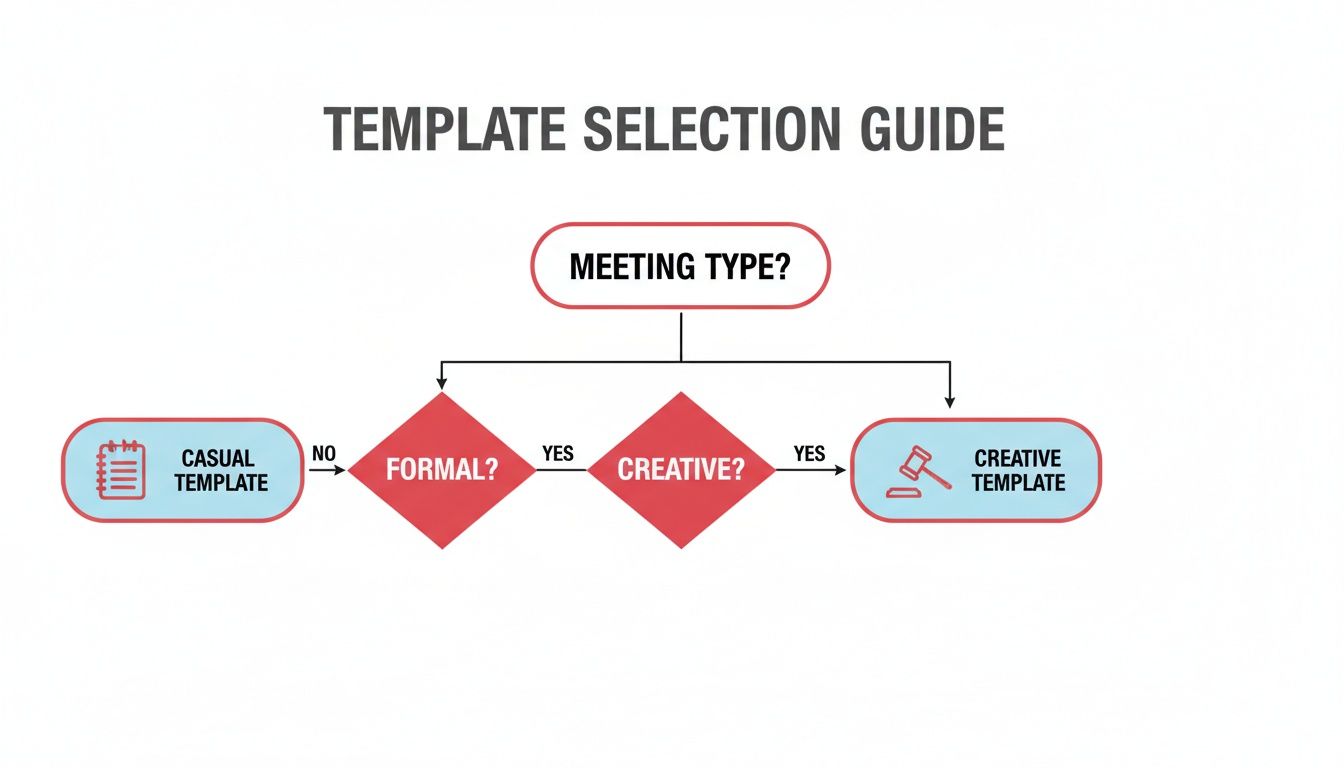
The main idea is to match the template's structure to what you're trying to achieve, whether that's efficiency, formality, or pure creativity.
The Simple Action-Oriented Template
This is your productivity workhorse. It’s built for speed and clarity, making it perfect for those recurring, fast-paced meetings where the whole point is to align on progress and solve the problem of "who’s doing what next?". Think daily stand-ups, weekly team check-ins, or project status updates.
It cuts out all the fluff and gets straight to the point: what needs to get done, who owns it, and when it’s due. This is a lifesaver in agile environments. For instance, in the Netherlands, recurring meetings make up nearly 50% of all sessions but average just 28 minutes. You can't afford to waste a second, so crisp documentation is key. MyHours has some fascinating stats on how meeting habits affect productivity if you want to dig deeper.
Best For:
- Daily scrum or stand-up meetings
- Weekly team syncs
- Quick project check-ins
Template:
Meeting Title: [Project Name] - Daily Stand-up
Date: [Date]
Attendees: [List of Names]
Key Updates & Blockers:
- [Team Member Name]: [Brief update on progress and any obstacles]
- [Team Member Name]: [Brief update on progress and any obstacles]
Decisions Made:
- [Decision 1]
- [Decision 2]
Action Items:
| Task | Owner | Deadline |
|---|---|---|
| [Action Item 1] | [Name] | [Date] |
| [Action Item 2] | [Name] | [Date] |
Filled-in Example:
Meeting Title: "Project Phoenix" - Daily Stand-up
Date: 23 October 2024
Attendees: Anna, Ben, Chloe
Key Updates & Blockers:
- Anna: User testing script is drafted. Blocked by lack of final UI mockups.
- Ben: Backend API is 80% complete. No blockers.
Decisions Made:
- We will proceed with placeholder UI for user testing if final mockups are not ready by EOD tomorrow.
Action Items:
| Task | Owner | Deadline |
|---|---|---|
| Provide final UI mockups | Chloe | 24 Oct 2024 |
| Prepare testing build | Ben | 25 Oct 2024 |
The Formal Board Meeting Template
When the stakes are high, you need an official record that solves the problem of legal ambiguity. This template is designed for board meetings, committee sessions, or any gathering where decisions have legal or long-term organisational weight.
It’s structured to include formal motions, seconds, and voting records, ensuring you have a compliant and auditable trail of what was decided. This format is less about capturing the back-and-forth of a conversation and all about documenting official actions. We break this down even further in our comprehensive guide to the minutes of a meeting template.
Best For:
- Board of Directors meetings
- Official committee sessions
- Shareholder meetings
Template:
Organisation Name: [Organisation Name]
Meeting Type: [e.g., Q4 Board Meeting]
Date & Time: [Date], [Time]
Location: [Location]
Attendees: [List of Names]
Absentees: [List of Names]
Quorum Established: [Yes/No]
1. Call to Order:
- Meeting called to order at [Time] by [Presiding Officer].
2. Approval of Previous Minutes:
- Motion: To approve the minutes from the [Date of Previous Meeting] meeting.
- Moved by: [Name]
- Seconded by: [Name]
- Vote: [Approved/Rejected/Abstained - Tally if needed]
3. Agenda Item: [Agenda Item Title]
- Discussion Summary: [Brief, objective summary of discussion]
- Motion: [Specific motion made]
- Moved by: [Name]
- Seconded by: [Name]
- Vote: [Result]
4. Adjournment:
- Meeting adjourned at [Time].
Minutes Submitted By:
[Your Name], [Your Title]
The Creative Brainstorming Template
Not every meeting is about ticking boxes. Sometimes, it’s about creating the boxes in the first place. For creative sessions, you need a template that solves the problem of capturing fleeting inspiration.
This one is designed to handle a more free-flowing exchange of ideas, concepts, thought-starters, and even whiteboard doodles without trying to cram them into a rigid format. The goal here is to document inspiration, not just assign tasks, so great ideas don't get lost.
Best For:
- Brainstorming sessions
- Marketing campaign kick-offs
- Product innovation workshops
Template:
Session Title: [e.g., New Youtube Series Brainstorm]
Date: [Date]
Participants: [List of Names]
Objective:
[What is the primary goal of this session?]
Core Idea Themes:
- Theme 1: [Name of Theme]
- [Idea A]
- [Idea B - with a brief note on its potential]
- Theme 2: [Name of Theme]
- [Idea C]
- [Idea D]
Visual Concepts / Whiteboard Notes:
[Describe or link to photos of whiteboards, mind maps, or sketches]
Next Steps (for Exploration):
- Idea to Prototype: [Which idea is worth exploring further?]
- Assigned Researcher: [Who will do the initial research?]
How to Write Meeting Minutes People Actually Read
Taking notes is one thing. Crafting a record that solves the problem of team misalignment is something else entirely. The secret to writing minutes that don't get immediately archived (or ignored) is to see it as a three-part process. Great minute-taking starts long before the meeting begins and continues well after everyone has left.
When you take this approach, you stop being a passive note-taker and become the person creating a vital productivity tool for your team. Let’s break down how to get it right at every stage.
Before the Meeting Kicks Off
Preparation is the most overlooked part of the process, yet it's the key to solving the problem of chaotic note-taking. A little bit of groundwork beforehand makes a world of difference.
First, get your chosen meeting minutes template ready. Fill in all the details you already know—the date, meeting title, and the list of attendees. This simple step frees up a surprising amount of mental energy during the meeting itself, letting you focus on the actual conversation.
Next, grab the agenda. A solid agenda is the backbone of clear minutes. Use the agenda items as the main headings in your template. It’s a simple trick that helps keep both the conversation and your notes structured and on track.
During the Meeting
This is go-time. Your mission isn't to write a word-for-word transcript; it's to capture decisions, not just discussions. This is how you solve the problem of lengthy, unreadable notes. Active listening becomes your superpower here.
Zero in on these key things:
- Decisions Made: What was the final call for each agenda item? Write it down clearly and without ambiguity.
- Key Discussion Points: Briefly summarise the main arguments that shaped each decision. What were the critical factors everyone considered?
- Action Items: This is the most important part. Capture every single task, assigning it a clear owner and a specific deadline. This is non-negotiable for accountability.
Be objective. Your job is to be a neutral recorder of facts, not to inject your own opinions or interpretations into the record. Document what was decided, not what you think about it. Stick to the facts and steer clear of adjectives that imply judgement.
A recent survey uncovered a massive disconnect: while 86% of meetings produce minutes, only 54% of teams say the action points are actually followed up on. You close that gap by writing with absolute clarity during the meeting, making every task impossible to misinterpret.
After the Meeting Wraps Up
Your work isn't done when the meeting ends. Getting the finalised minutes out quickly is crucial for keeping momentum going and solving the problem of delayed action.
Review your draft immediately. Polish the wording for clarity, fix any typos, and double-check that every action item is assigned correctly. If you're unsure about anything, now's the time to ask the meeting host for clarification before you send it out.
Once it's looking good, send the draft for approval—usually to the meeting chair. After a quick once-over from them, distribute the final version to all attendees and anyone else who needs to be in the loop. I always aim to get this done within 24 hours. It keeps the energy high and ensures people start tackling their tasks right away.
Let AI Handle Your Meeting Minutes for You
Are you tired of the productivity-killing task of manually transcribing conversations after a meeting ends? There’s a much smarter solution. By simply recording your meetings and using an AI transcription service, you can create a perfect, searchable record in just a few minutes, solving the problem of time-consuming manual work.
This transcript becomes your single source of truth. Forget trying to decipher scribbled notes or relying on memory. You can now fill out your meeting minutes template with complete accuracy, freeing you up to focus on the work that actually matters.
The clean interface of tools like YoutubeToText makes it clear: just provide a video, and the AI does the rest. It solves the technical problem of transcription, leaving you with a fast, accurate text file.
Turn Your Conversations into Actionable Text
Let's say your marketing team just wrapped up their Youtube strategy call. Instead of someone being tasked with writing up notes, they can use a tool like YoutubeToText to get an instant, precise transcript. From there, it's easy to populate their meeting minutes template, capturing every decision and action item perfectly and ensuring no great ideas for content repurposing are lost.
The whole process is incredibly straightforward:
- Record your meeting on any video conferencing platform you use.
- Upload the video file or provide the link to an AI transcription tool.
- Get the complete text back in a matter of moments.
- Copy and paste all the key decisions, direct quotes, and next steps right into your template.
This simple workflow solves the accessibility problem for team members who couldn't attend, giving them a full account of the discussion. If you're curious about the tech behind this, our guide on converting audio to text breaks down how it all works.
Get Your Time Back and Get More Done
In the Netherlands, making meetings more efficient is a constant challenge. With 42% of meetings having 6-10 participants, having a standard way to document who said what is crucial. Without it, professionals waste an average of 91 minutes every day on confusing follow-up tasks. Using accurate transcripts within your templates helps Dutch professionals reclaim that lost time and push projects forward.
This isn't just about saving time; it’s about improving the quality of your records. AI transcription captures the exact phrasing and subtle details that are almost always missed when taking notes by hand.
The real game-changer with AI transcription is that you move from a simple summary to a complete, searchable archive of the meeting. You solve the problem of "who said what?" forever.
This approach turns meeting minutes from a tedious chore into a powerful productivity asset. For a closer look at tools designed for this, it's worth exploring whether platforms like Otter AI for note-taking can help busy professionals get their documentation in order. The end goal is always the same: to create a smooth path from conversation to documented action.
Got Questions About Meeting Minutes? We've Got Answers
Even with a great template in hand, you're bound to run into some tricky situations. Getting the details right is what turns a simple page of notes into a powerful tool for your team.
Let's solve a few of the most common problems that come up.
How Much Detail Is Too Much?
This is a classic problem. The simple answer? Aim for clarity, not a novel. You don't need a word-for-word transcript of every single thing that was said. In fact, that's often counterproductive.
Your goal is to capture the essentials: what was decided, why it was decided, and who is doing what next.
Here's a good rule of thumb: could someone who skipped the meeting read your minutes and know exactly what happened and what their next steps are? If so, you've solved the problem of detail level perfectly.
Whose Job Is It to Take and Send Out Minutes, Anyway?
This organizational problem depends on your team's structure. Sometimes, a dedicated person like a project manager or an administrative assistant owns this task. Other times, teams rotate the responsibility. Rotating the role is a great way to share the load and give everyone a deeper appreciation for the meeting's outcomes.
No matter who writes them, the meeting organiser should always give the minutes a quick review for accuracy before they go out. The note-taker then sends them to all attendees and any other relevant stakeholders. Try to get this done within 24 hours to keep the momentum going.
Are Meeting Minutes Actually Legal Documents?
This is an important one. For formal groups, like a company's board of directors, the answer is a firm yes. Those minutes are official, legal records of the board's actions and decisions, crucial for audits and compliance.
For your typical internal team meeting, they aren't a legal document in the same way. Instead, their power lies in solving the problems of team alignment, accountability, and progress tracking. It's always a good idea to check your own organisation's policies on how documents should be handled and stored.
Ready to solve the problem of tedious note-taking forever? YoutubeToText can automatically transcribe your recorded calls, giving you an accurate text record in just a few minutes. All you have to do is upload your video and let our AI give you the raw content you need to fill out your template perfectly, boosting your productivity and accuracy. Try YoutubeToText for free today and see how much easier your meetings can be.