Learn how to download youtube video with subtitles using simple tools, step-by-step methods for content reuse and accessibility.
How to Download a Youtube Video with Subtitles: A Practical Guide
Downloading a Youtube video with its subtitles is a straightforward process that unlocks a world of possibilities for your content. The most efficient method is using a dedicated online service. For example, YoutubeToText.ai lets you paste a video link to get a transcript as a subtitle file (like SRT or VTT) in a single click, solving the problem of manual transcription.
Why Download Subtitles from Youtube Videos?
Have you ever watched an insightful video and wished you could easily extract its text? You're not alone. Whether you're a content creator aiming to repurpose a video into a blog post, a student needing to analyze dialogue for a research paper, or a video editor requiring accurate captions quickly, downloading subtitles is a huge productivity booster. Bringing video content offline, complete with its text, makes it a flexible and accessible resource.
Ultimately, this is about transforming passive video consumption into an active, creative process. It’s the first step for anyone looking to repurpose, study, or enhance content for accessibility, solving real-world challenges for creators, educators, and businesses.
Unlocking Your Content's Potential
Downloading subtitles isn't just about getting a text file; it's about turning a video into a workable asset you can use to boost productivity and accessibility.
Consider these practical applications:
- Content Repurposing: A marketer can take a 20-minute product demo, download the subtitles, and instantly generate a detailed blog post, a series of social media snippets, and an FAQ for their website. This solves the problem of creating multi-format content from a single source.
- Academic Research: A researcher studying public speaking can download subtitles from dozens of news clips to analyze the text for key themes and phrases, solving the time-consuming problem of manual transcription.
- Enhanced Accessibility: An advocate for accessibility can download accurate captions to embed into an educational video, solving the critical issue of making content available to deaf and hard-of-hearing audiences.
Here in the Netherlands, Youtube's massive reach means the demand for productivity and accessibility tools is huge. Ads on the platform can reach 15.3 million Dutch users—that's a staggering 83.3% of the entire population.
For Dutch creators, teachers, and marketers, the ability to quickly download an SRT file is a game-changer for productivity. It helps them analyze content, improve accessibility, and create SEO-friendly summaries. It’s no surprise, then, that 91% of marketers plan to maintain or increase their Youtube budgets. You can explore these insights further at DataReportal.
The Easiest Way to Download Subtitle Files
For those who value productivity, the most direct way to get subtitle files is with a specialized online tool. Forget wrestling with complex software or unreliable browser extensions. The modern approach solves this problem with just a couple of clicks.
Imagine you've found an inspiring lecture perfect for your research. Instead of spending hours transcribing it, you can simply copy the video's URL, paste it into a service like YoutubeToText.ai, and download the complete subtitle file almost instantly. This process is designed to save you time and effort.
The Power of a Simple Workflow
This one-click method solves the technical challenges often associated with downloading subtitles. You don't need to know command-line interfaces or worry about the security risks that can come with generic online converters. It’s a clean, quick process that delivers exactly what you need.
Here’s why this has become the go-to solution for productivity:
- It’s Fast: The entire process takes seconds, not hours. You can gather resources from multiple videos in the time it would take to manually transcribe just one.
- It’s Accurate: These tools pull subtitle data directly from Youtube, giving you the most accurate version available, whether creator-uploaded or AI-generated.
- You Get Format Options: Good tools provide both SRT (SubRip Text) and VTT (WebVTT) files, offering flexibility for use in video editors, media players, or web projects.
When accuracy and speed are what matter most, a dedicated tool isn't just a nice-to-have—it’s an essential part of a productive workflow. It turns a technical chore into a simple copy-and-paste task.
This straightforward approach sets the standard. While other methods exist, the simplicity and reliability of a dedicated online service make it the perfect starting point for anyone looking to download youtube video with subtitles efficiently.
A Practical Example in Action
Imagine you're a journalist creating a story based on a lengthy press conference on Youtube. You need to find specific quotes quickly to meet a deadline.
Manually scrubbing through the video would be a productivity nightmare. Instead, you can paste the URL into a tool and download the SRT file. By opening the file in a text editor and using the "Find" function (Ctrl+F), you can jump directly to keywords. You've just transformed an hour-long video into a searchable document, solving a major time-sink. You can learn more about how to download a Youtube transcript to make your research more effective. This is how professionals work smarter, not harder.
Exploring the Best Ways to Download Subtitles
While a simple one-click tool is fantastic for speed and productivity, it's worth knowing about other methods. Different projects have different needs, and the right tool can make all the difference. Let's walk through the main ways you can get a Youtube video along with its subtitles.
Think of this as a guide to solving your specific problem. Whether you're saving a lecture for personal notes or archiving an entire channel for a research project, each approach has its own strengths and weaknesses.
Online Downloader Websites
For many, this is the first option that comes to mind. You find a website, paste the Youtube link, and hit 'download'. The appeal is clear—it's quick, there’s nothing to install, and it seems ideal for a one-off job.
However, this convenience can come with productivity roadblocks. These sites are often cluttered with aggressive pop-up ads, confusing download buttons, and trackers. They can solve the immediate problem, but for regular use, the experience can be frustrating.
My Take: Online downloaders are best for rare, one-off situations where you need a file immediately and are willing to navigate a few digital annoyances.
If you find yourself needing to convert video to text more often, a safer, more reliable process will boost your productivity. To see the benefits of a dedicated tool, our guide on using a video to text converter can be very helpful.
Desktop Software Applications
For more power and reliability, dedicated desktop software is a significant step up. These applications, installed on your computer, come packed with features that solve more complex problems, such as batch processing.
With a good desktop tool, you can often download entire playlists or channels at once, select specific video quality settings, and manage multiple downloads efficiently. Because the software runs on your machine, you also avoid the privacy issues and ads that plague many online services. The only real downside is the initial setup, but for anyone who regularly works with video content—like editors, researchers, or archivists—the time invested pays off in control and productivity.
Browser Extensions
Browser extensions offer a middle ground between online sites and desktop software. Once installed, they typically add a download button directly to the Youtube page, creating a smoother, more integrated workflow.
The main challenge is that quality and safety can vary widely. Some extensions are excellent and well-maintained, while others may break with Youtube updates or pose a risk to your browsing data. A good extension can solve the problem of convenience, but requires careful selection.
To make the choice clearer, let's compare these options.
Comparing Youtube Subtitle Download Methods
This table breaks down the key differences, helping you choose the method that best solves your problem.
| Method | Ease of Use | Speed | Installation Required | Key Feature |
|---|---|---|---|---|
| Online Websites | Very Easy | Fast | No | Instant access with no setup. |
| Desktop Software | Moderate | Very Fast | Yes | Powerful batch processing and high customisation. |
| Browser Extensions | Easy | Fast | Yes | Integrated directly into the Youtube interface. |
Ultimately, choosing a good browser extension means doing your homework—reading reviews and checking the privacy policy is crucial. For those who frequently download Youtube videos with subtitles and want a user-friendly experience without leaving their browser, a well-chosen extension can be the perfect balance of convenience and power.
How to Permanently Burn Subtitles into a Video
You've successfully downloaded both the video file and its subtitle file (like an SRT or VTT). For many purposes, having two separate files is perfect.
But what if you're repurposing that video for Instagram, TikTok, or LinkedIn? These platforms often autoplay videos silently. In that context, visible captions are essential for engagement. They solve the problem of capturing audience attention without sound.
This is where burning (or hardcoding) subtitles comes in. This process makes the text a permanent part of the video image, ensuring everyone sees the captions, regardless of their device, platform, or settings. It's a simple but powerful technique for boosting accessibility and engagement.
Choosing Your Burning Tool
To burn subtitles, you'll need a video editing tool. The good news is you don't need expensive professional software to solve this problem; there are fantastic free options available.
- Professional Editors (Paid): If you already use tools like Adobe Premiere Pro or Final Cut Pro, they offer precise control over subtitle appearance and placement.
- Free Alternatives (Powerful): For a zero-cost solution, HandBrake is an excellent choice. It's a powerful open-source video transcoder that works on Windows, Mac, and Linux, and it's completely free.
The Practical Steps to Hardcode Captions
Let’s walk through the process using a tool like HandBrake. First, open your source video—the MP4 file you downloaded.
Next, navigate to the 'Subtitles' tab or menu and import your SRT or VTT file.
This diagram illustrates the different paths you can take to get your video and subtitle files ready for this final, crucial step of content repurposing.
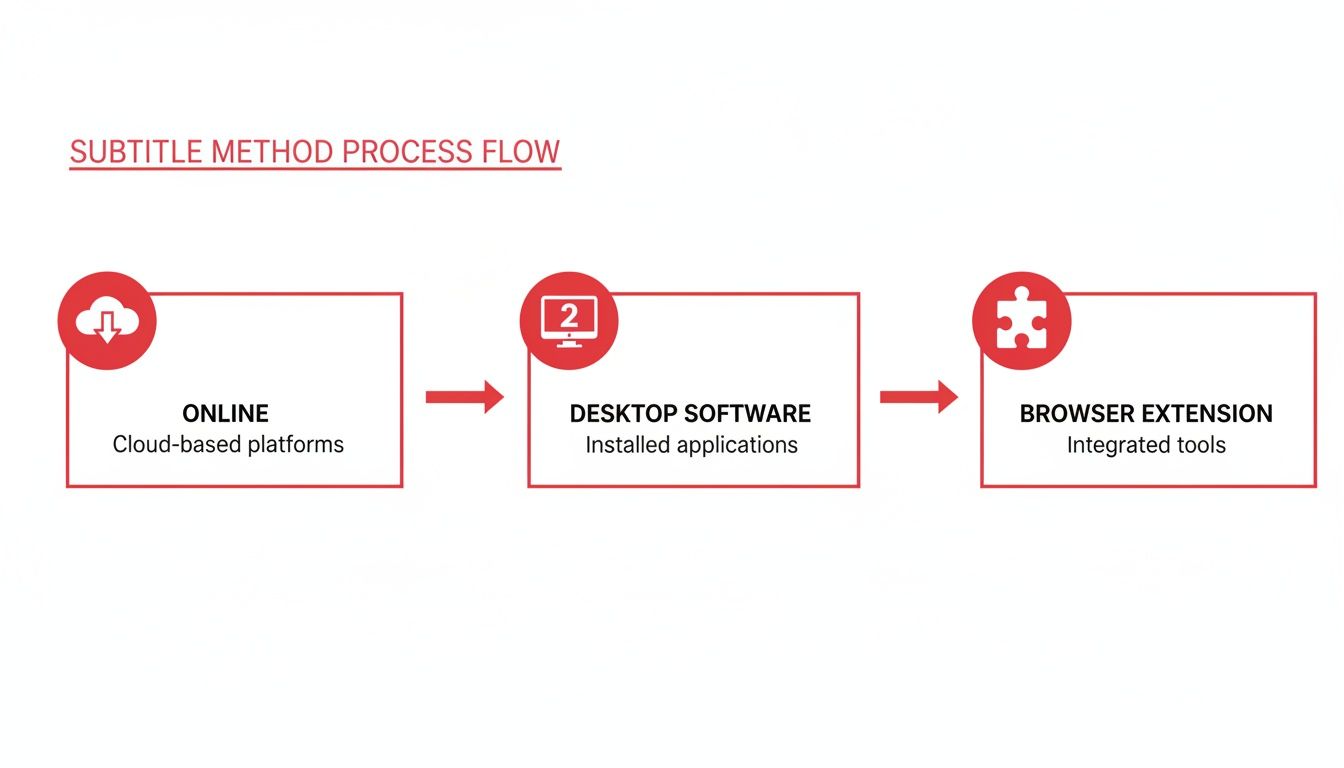
As you can see, whether you've used an online service, a desktop app, or a browser extension, you end up with the two key components needed: a video file and a subtitle file, ready to be combined to create more accessible content.
Once your subtitle file is loaded, select the “Burn In” checkbox. This is the critical instruction that tells the software to render the text directly onto the video frames. After that, choose your output settings and click 'Start'. The software will then create a new video file with the captions permanently embedded.
And if you ever start with a plain text transcript, our guide on converting TXT files to the SRT format will help you prepare it for this process, solving another common workflow problem.
Key Takeaway: Hardcoding subtitles elevates them from an optional feature to an integral part of your video. This simple action significantly boosts your video’s reach and accessibility, solving the challenge of engaging audiences in a sound-off world.
Important Legal and Quality Considerations
Before you begin downloading Youtube videos and subtitles, it's important to understand the ethical considerations. This is about respecting the creators who invest their time and effort into producing valuable content.
The key distinction lies between personal use and redistribution. Think of it like buying a book: you can highlight passages and write notes for your own study, but you can't photocopy the entire book and distribute it.
The same principle applies here. Downloading a video to watch offline or grabbing subtitles for personal research or accessibility is generally acceptable. The line is crossed when you re-upload, publicly share, or use the content in a commercial project without permission.
Navigating Copyright and Fair Use
According to Youtube's official Terms of Service, you should not download content unless Youtube provides a dedicated ‘download’ button. This rule is designed to protect content creators.
However, the concept of "fair use" adds nuance. This legal doctrine permits the limited use of copyrighted material without permission for purposes such as commentary, research, and education.
For example, a student downloading a lecture for private study is a strong case for fair use. This use is transformative and educational; it doesn't detract from the creator's ability to monetize their work.
To stay on the right side of ethical guidelines:
- Never Re-upload or Share: This is the golden rule. Downloaded content should be for your personal use only.
- Stick to Public Videos: Only work with content that is publicly available.
- Give Credit and Support: If a creator's work is valuable, support them by liking, subscribing, or using official membership options.
The Big Difference in Subtitle Quality
Beyond legalities, consider the quality of the subtitles themselves. There's a significant difference between creator-uploaded captions and those generated automatically by Youtube's AI.
Creator-Uploaded Subtitles: These are the gold standard. The creator or a professional has reviewed them for accuracy, timing, grammar, and punctuation.
Auto-Generated Subtitles: These are a helpful starting point but can be unreliable. The AI often struggles with:
- Strong accents or fast speech
- Technical jargon or brand names
- Correct punctuation and speaker identification
Always assume you'll need to proofread auto-generated subtitles. A quick review can fix embarrassing errors and ensure the text is accurate and usable, which is crucial for both accessibility and professional content repurposing.
A Few Common Questions
When you start downloading subtitles from Youtube, a few common questions will likely arise. Answering these early on can solve potential problems and streamline your workflow.
Let's clarify some of the most frequent points, from file formats to what to do when no captions are available.
What’s the Real Difference Between SRT and VTT Files?
This is a common question with a simple answer. Both SRT and VTT are text files that store subtitles and their timing, but they are designed for different environments.
- .SRT (SubRip Text): This is the universal standard. It’s a basic format compatible with nearly all video players and editing software, from VLC to Adobe Premiere Pro.
- .VTT (WebVTT): This is the modern format built for the web. It supports advanced styling—like bold text, colors, and screen positioning—making it ideal for HTML5 video players.
My rule of thumb? For offline use or editing, SRT is the safest bet. If your video is destined for a website and you want more control over the captions' appearance, choose VTT.
Can I Still Get Subtitles if a Video Has None?
Absolutely. This is a common problem with a simple AI-powered solution. If a Youtube video lacks official or auto-generated subtitles, a downloader cannot extract what isn't there.
This is where AI transcription tools are invaluable. A service like YoutubeToText.ai can analyze the video’s audio and generate a new, highly accurate transcript from scratch. You can then download this transcript as a perfectly formatted SRT or VTT file. In essence, it creates the subtitles for you, solving the problem of inaccessible audio content.
Is It Actually Legal to Download Youtube Videos and Subtitles?
Navigating the legal landscape is important. While Youtube's terms of service generally prohibit downloading content without permission, the intended use is a key factor.
Many uses are widely considered fair and ethical, solving personal productivity and accessibility needs:
- Downloading your own videos for backup or offline editing.
- Saving a video for personal viewing without an internet connection (e.g., on a flight).
- Using excerpts of video and text for educational purposes, research, or commentary under "fair use" principles.
The guiding principle is to respect the creator and their copyright. Never re-upload or claim downloaded content as your own.
How Can I Fix Mistakes in Auto-Generated Subtitles?
Youtube's auto-captions are a great productivity starter, but they are rarely perfect. They often misinterpret brand names, technical terms, or fast speech. Fortunately, fixing them is easy.
The most effective method is to open the SRT or VTT file in a simple text editor (like Notepad on Windows or TextEdit on Mac). Play the video in another window and follow along, pausing to manually correct spelling errors, add punctuation, and adjust timing. This small investment of time greatly improves the final quality, ensuring your subtitles are accurate and professional.
Ready to turn any Youtube video into accurate text or subtitles with a single click? YoutubeToText removes all the manual work, giving you the content you need for everything from research notes to social media videos. Stop typing and start creating. Get Your Free Transcript Now at https://youtubetotext.ai.