Learn how to audio Youtube rip with our complete guide. Discover the best tools, legal considerations, and how to transcribe audio to text in minutes.
Audio Youtube Rip: Your Guide to Extracting Sound for Transcription and More
"Ripping" audio from Youtube is the process of extracting the sound from a video and saving it as a standalone audio file, like an MP3. This technique unlocks a world of possibilities beyond just listening offline. For professionals, students, and creators, it's a powerful first step toward transforming passive video content into actionable assets for transcription, productivity, and content repurposing.
Unlocking the Power of Youtube Audio
While many associate ripping audio with downloading music, its true value lies in converting video into a more flexible and accessible format. This unlocks powerful workflows for anyone looking to work smarter with digital content, turning passive viewing into an active process of analysis, creation, and learning.
By extracting the audio, you're not just saving a file; you're creating a portable, editable, and transcribable resource that can be used to boost productivity, improve accessibility, and repurpose content in innovative ways.
Why Professionals Rip Youtube Audio
For many, extracting audio isn't just a technical trick—it's a core part of their daily workflow. It’s about efficiently capturing information and creating new value from existing content. This is particularly true in professional fields where information needs to be captured, analyzed, and repurposed quickly.
Here are a few real-world problems solved by ripping audio:
- Content Repurposing for Marketers: A marketing team can rip the audio from a successful webinar and transcribe it to create a series of blog posts, social media snippets, and an email newsletter, maximizing the return on their content investment.
- Accessibility for Creators: By ripping and transcribing their own video audio, content creators can generate accurate subtitles and full transcripts, making their work accessible to audiences who are deaf, hard of hearing, or non-native speakers.
- Productivity for Researchers and Students: Hours of academic lectures and interviews live on Youtube. Ripping the audio allows students and researchers to listen on the go or, more importantly, run the files through an AI transcription tool to get searchable notes and accurate citations in minutes.
"Beyond just personal listening, the ability to rip and transcribe Youtube audio is a productivity superpower. It turns passive video consumption into an active process of analysis, content creation, and knowledge archiving."
Navigating the Legal and Ethical Waters
Before you start, it's crucial to understand the legal landscape. Ripping audio from Youtube can be a grey area, so responsible use is key. Downloading copyrighted material without the owner’s permission is against Youtube's terms of service and can violate copyright law.
However, the legal concept of "fair use" (or "fair dealing" in regions like the UK and Canada) allows for limited use of copyrighted material without permission for purposes like criticism, news reporting, teaching, or research. Whether your use case qualifies depends on four main factors:
- Your Purpose: Is it for commentary, education, or creating something transformative?
- The Content's Nature: Is the original work factual or highly creative?
- How Much You Use: Are you using a small clip or the entire work?
- The Effect: Does your use harm the original creator's ability to profit from their work?
For example, ripping a full movie to re-upload is a clear violation. But extracting a 30-second clip from a press conference for a news report would almost certainly be considered fair use. The key is to respect the creator's rights and use their content in a way that adds new value. Before using any method, including those in our guide on how to extract an MP3 from Youtube, always consider your purpose and the source of the content.
With its massive global reach, Youtube is a vast repository of information. The demand for efficient ways to access and repurpose this content for productivity and accessibility is constantly growing.
Choosing the Right Tool for the Job
The best tool to rip audio from Youtube depends entirely on your goal. Are you looking for a quick, one-off download, or do you need high-quality audio for a professional project? The right choice hinges on your specific needs for speed, quality, and control.
Your options fall into three main categories, each with distinct advantages and disadvantages.
To choose correctly, consider the problem you're solving. A student needing to transcribe a two-hour lecture for study notes has different requirements than a video editor who needs a pristine, lossless audio clip for a documentary. Your use case—be it for productivity, content repurposing, or accessibility—will point you to the right solution.
Quick and Easy Web-Based Converters
For speed and simplicity, web-based tools are the fastest entry point. There’s no software to install; simply paste a Youtube URL, select a format (usually MP3), and download. This convenience is perfect for casual, one-off tasks.
For example, if you need to quickly grab the audio from a short interview to share a key quote with your team, a web tool is a fast and effective solution. You can get the MP3 file in under a minute on any device with a browser.
However, this simplicity comes with trade-offs. Web-based converters offer limited control over audio quality and formats. They are also often supported by ads, which can be intrusive or lead to untrustworthy sites. They are best suited for quick, non-critical tasks where speed is the top priority.
Powerful Desktop Software
When your project demands higher quality and more control, desktop software is the superior choice. These applications, installed directly on your computer, provide a rich feature set designed for more serious workflows.
Imagine you're a podcaster creating a segment that analyzes a keynote speech. To ensure professional sound, you need the audio to be crystal clear. With a desktop app, you can select high bitrates like 320kbps or even extract the audio in a lossless format like WAV or FLAC, preserving every detail.
Desktop applications transform audio ripping from a simple download into a controlled extraction process. They empower you with options for format, quality, and batch processing that web tools simply cannot match.
Furthermore, many of these programs support batch processing. This is a huge productivity booster. You can queue up an entire playlist of tutorials or interviews and let the software extract the audio from all of them automatically. For researchers or content creators dealing with large volumes of material, this feature saves hours of manual work. To dig deeper, check out this complete guide to extracting audio from video.
Flexible Command-Line Utilities
For users comfortable working without a graphical interface, command-line utilities like yt-dlp offer the ultimate power and flexibility. While they have a steeper learning curve, they provide unparalleled control over every aspect of the download.
A developer could use a command-line tool to script an automated workflow that rips audio from new videos on a specific channel and sends them directly to a transcription service via an API. This level of automation is impossible with other methods. You can specify exact audio formats, bitrates, and even extract specific time-stamped segments, making it incredibly efficient for advanced productivity and data-gathering tasks.
Comparing Youtube Audio Ripping Methods
This table will help you choose the right tool to solve your specific problem, whether it's a quick task or a complex, automated workflow.
| Feature | Web-Based Tools | Desktop Software | Command-Line Utilities |
|---|---|---|---|
| Ease of Use | Very Easy | Moderate | Difficult (Requires setup) |
| Audio Quality | Basic (Often limited to 128kbps MP3) | High (Multiple bitrates and formats like WAV, FLAC) | Highest (Complete control over codecs and quality) |
| Batch Processing | Rarely supported | Commonly available | Fully scriptable for automation |
| Security Risk | Moderate to High (Ads, pop-ups, potential malware) | Low (From reputable sources) | Very Low (Open-source and transparent) |
| Best For | Quick, single-file downloads for non-critical tasks. | High-quality audio, playlist downloads, professional use. | Automation, scripting, and maximum control over output. |
Ultimately, the "best" tool is the one that fits your immediate needs. A web converter is fine for a quick grab, but for any serious project focused on quality, productivity, or repurposing, investing time in desktop or command-line software pays significant dividends.
Your Guide to Ripping Audio with Desktop Software
When your goal is to create high-quality assets for transcription or content repurposing, desktop software offers a significant upgrade over web-based tools. These applications provide the control and efficiency needed for professional results, turning a simple audio youtube rip into a precise and powerful workflow.
Instead of accepting a website's default settings, a desktop program puts you in command. You can fine-tune the file format and audio quality to ensure the final output is perfectly suited for your project, whether it's for AI transcription, audio editing, or creating accessible content.
Getting Started with Desktop Audio Ripping
To demonstrate the process, we'll use 4K Video Downloader, a popular and reliable tool known for its clean interface and robust features. The core workflow is similar across most quality desktop applications.
First, download and install the software from its official website. Once running, the interface is typically straightforward, centered around a single action: pasting the Youtube video's URL.
This flowchart can help you decide which tool best solves your problem based on your priorities for speed, quality, or advanced editing and repurposing capabilities.
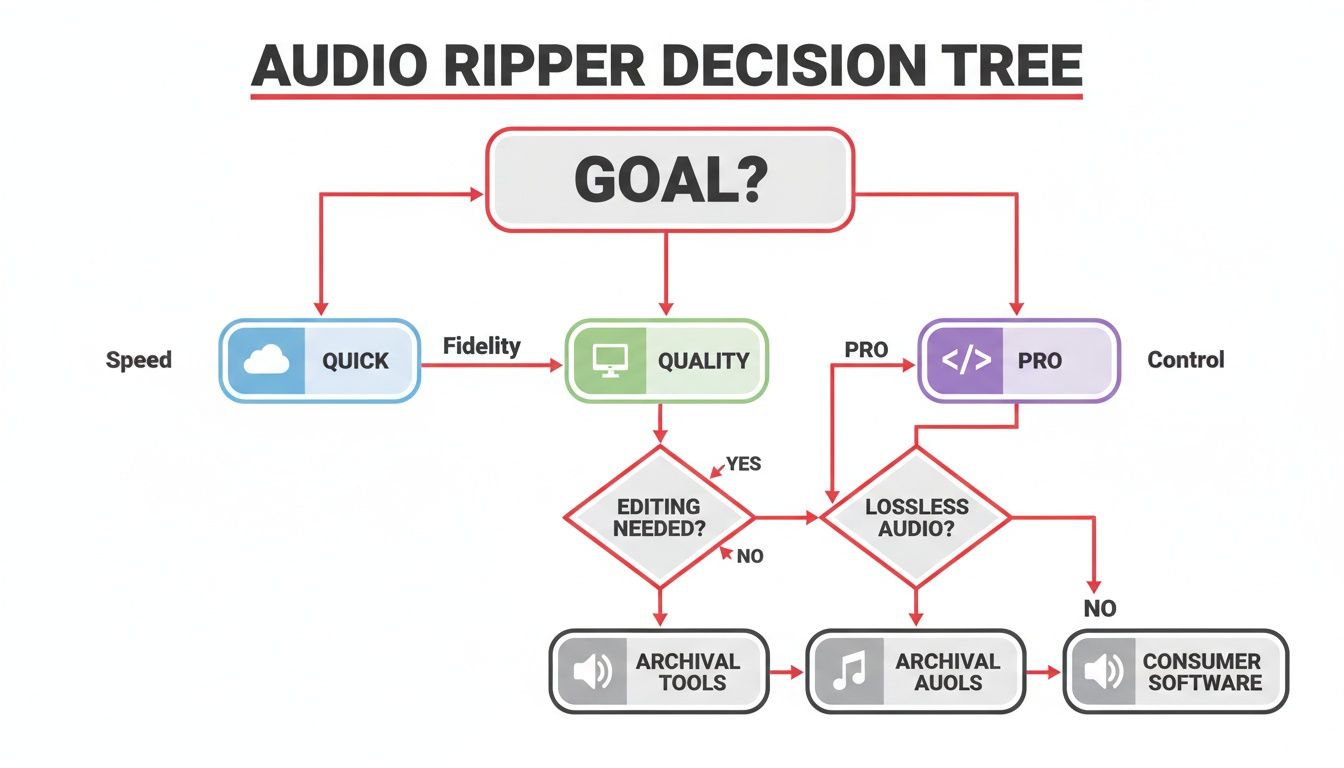
As the chart illustrates, desktop software is often the ideal solution for achieving high-quality results, balancing the simplicity of online tools with the power of command-line utilities.
Choosing Your Audio Format and Quality
After you paste the link, the software analyzes the video and presents a list of download options. This is where desktop tools shine. You are no longer restricted to a single, often low-quality, MP3 file.
Look for an "Extract Audio" option, which will allow you to choose from various formats and bitrates.
- MP3: The universal standard for compatibility. A bitrate of 192kbps is excellent for most spoken-word content destined for transcription, while 320kbps provides richer sound for music or high-production content.
- AAC (M4A): A more modern format that offers slightly better quality than MP3 at the same bitrate, ideal for Apple device users.
- WAV: An uncompressed, lossless format. The files are large, but they preserve the audio in its original, pristine quality. This is the best choice for professional audio editing, archiving, or when you need the absolute best source material for a critical project.
The ability to choose your format and bitrate is the single biggest advantage of desktop software. For simple transcription, a small MP3 might do, but for any serious audio editing or professional use, a higher bitrate or a lossless format is non-negotiable.
For example, a content creator might rip an interview as a WAV file to ensure maximum quality for creating audiograms. A student, however, could choose a 128kbps MP3 of a lecture to save device space while still getting a file clear enough for transcription. For a more detailed walkthrough, see our guide on how to extract audio from a Youtube video.
Power-User Features Like Playlist Downloads
One of the greatest productivity features of desktop software is the ability to download entire playlists or channels at once. Instead of manually copying and pasting dozens of links, you can paste a single playlist URL, and the app will process all the videos it contains.
This is a game-changer for large-scale projects. A researcher analyzing a 20-part interview series can set the tool to extract audio from every video in a single batch operation. This massive time-saver streamlines data collection and content preparation, directly boosting productivity.
This functionality addresses a growing need. As more educational and professional content moves to platforms like Youtube, the ability to efficiently process this information in bulk becomes a critical skill for learning, research, and content strategy.
Turn Your Ripped Audio into Actionable Content
You've completed the audio youtube rip and have the file on your computer. This is where the real value creation begins. By converting that raw audio into text through transcription, you transform a simple audio file into a searchable, shareable, and repurposable asset.
For creators, marketers, researchers, and anyone working with spoken-word content, transcription is the essential next step. It's the bridge between passively listening to an idea and actively putting it to work to solve problems related to content creation, accessibility, and productivity.
Why Transcription Is Your Next Essential Step
Manually typing out audio is a tedious and time-consuming task. AI-powered transcription services eliminate this bottleneck, delivering accurate text in minutes. The benefits go far beyond saving time, enabling powerful new workflows.
Here are a few problems transcription solves:
- Content Repurposing: A Youtuber can transcribe a video and instantly generate a blog post, social media updates, and an email newsletter. It’s the ultimate productivity hack for getting more value from existing work.
- Enhanced Accessibility: Adding transcripts and subtitles makes video content accessible to people who are deaf or hard of hearing. It also benefits viewers in noisy environments or those who prefer to read along, broadening your audience reach.
- Improved SEO: Search engines can't listen to audio, but they excel at crawling text. A transcript provides a keyword-rich version of your video, significantly boosting its discoverability on Google.
- Efficient Research: Students and researchers can transcribe lectures or interviews to create a searchable knowledge base. Finding a specific quote becomes as easy as using CTRL+F.
Turning audio into text isn't just about documentation; it's about making your content more discoverable, accessible, and versatile. It’s the key to unlocking the full potential of every audio file you create or capture.
From Audio File to Accurate Transcript
Once you have your MP3 or WAV file, using a dedicated tool like YoutubeToText.ai makes transcription effortless. Simply upload your audio, and the AI platform does the rest.
The AI handles the heavy lifting of converting speech to text with high accuracy, freeing you to focus on how to use the content rather than the manual labor of creating it. This accelerates your workflow and boosts productivity.
After ripping audio from Youtube, converting it into text is a logical next step for many projects. For a complete walkthrough of this process, check out a modern guide to translating audio to text.
Unlocking Powerful Features for Productivity
Modern transcription tools are more than just text converters; they are productivity platforms. YoutubeToText.ai, for example, includes features designed to help you do more with your content.
Need subtitles to improve video accessibility and engagement? The platform lets you download them in standard formats like SRT or VTT with one click. This saves creators hours of manual work.
Additionally, the built-in AI can generate a concise summary of your transcript. This is invaluable for quickly grasping the key takeaways from a long interview or lecture without reading the entire text. To compare different tools, our guide on the best audio to text converters provides a detailed breakdown. By leveraging these features, you turn a simple audio file into a powerful asset for communication, marketing, and learning.
Troubleshooting Common Audio Ripping Issues
Even with the best tools, you'll sometimes encounter issues when trying to rip audio from Youtube. A download might stall, or the final audio file might sound distorted.
Fortunately, most of these problems are common and have simple solutions. Before frustration sets in, let's walk through the most frequent issues and how to fix them.
Downloads Failing or Getting Stuck
A download freezing halfway through is incredibly frustrating. In most cases, the culprit is an unstable internet connection. A brief drop in your Wi-Fi can interrupt the connection to the server, causing the download to fail. Try moving closer to your router or using a wired ethernet connection for maximum stability.
If your internet is stable, the server of the web tool you're using might be overloaded.
- Try again in a few minutes. Often, patience is the best solution.
- Clear your browser's cache. Old data can sometimes interfere with new download requests.
- Update your desktop app. If you're using desktop software, ensure it's the latest version. Youtube frequently updates its platform, which can cause older software to break.
Dealing with Low-Quality or Distorted Audio
If your ripped MP3 sounds muffled, tinny, or noisy, it's likely a case of "garbage in, garbage out." The quality of your ripped audio can never exceed that of the original video. If the source video has poor audio—recorded with a cheap microphone or in a noisy environment—the ripped file will inherit those flaws. Always preview the video on Youtube first.
The other common cause is your export settings.
The bitrate you choose is the single most important setting for audio quality. A low bitrate like 128kbps will result in a smaller file but compromised sound. For clear spoken word, aim for 192kbps at a minimum, and use 320kbps for the best possible quality.
If the audio is still poor with high-quality settings, the tool itself may be the issue. Some free online converters apply aggressive compression that degrades quality. A reputable desktop application usually provides better results by grabbing the highest-quality audio stream directly from Youtube.
Why Some Videos Are Blocked or Unavailable
Seeing an error message that a video is unavailable or protected isn't a glitch; it's an intentional restriction.
- Regional Restrictions: Some content is licensed for viewing only in specific countries. If the ripping tool's server is located in a blocked region, the download will fail.
- Copyright Protection: Music and film industries use Youtube's systems to block unauthorized downloads of their content. Most ripping services respect these blocks.
- Private or Unlisted Videos: These tools only work with public videos. You cannot rip audio from content that is private or unlisted.
When you encounter these restrictions, there is often no workaround. The best course of action is to respect the creator's and platform's settings and find an alternative, publicly available source for the audio you need.
A Few Final Questions You Might Have
Even with a detailed guide, some questions about the practicalities of ripping audio often remain. Let's address the most common queries regarding legality, formats, and quality to ensure you can proceed with confidence.
Answering these questions will help you use audio ripping as an effective and responsible tool for your productivity, accessibility, and content repurposing goals.
Is It Actually Okay to Rip Audio from Youtube?
The short answer is: it depends entirely on what you do with the audio. Ripping copyrighted music for a personal collection without permission violates Youtube's terms and copyright law.
However, your use case may fall under the legal doctrine of "fair use" (or "fair dealing"). This principle allows limited use of copyrighted material without permission for purposes like:
- Commentary and Criticism: Using an audio clip in a review to analyze it.
- News Reporting: Including a soundbite from a press conference in a news segment.
- Education and Research: Transcribing a lecture to create personal study notes.
- Parody: Creating a transformative, comedic remix of an audio track.
The key considerations are purpose and transformation. Are you creating something new and not harming the original creator's market? If your goal is for personal study, education, accessibility (like creating a transcript for personal use), or transformative work, your position is generally much safer.
What's the Best Audio Format to Choose?
There is no single "best" format; the right choice depends on balancing quality with file size for your specific problem.
- MP3 (at 320kbps): This is the ideal balance for most use cases. It delivers excellent sound quality that is nearly indistinguishable from the original, while keeping file sizes manageable. It's perfect for listening, sharing, and generating high-quality transcriptions.
- AAC (or M4A): A more modern and efficient format than MP3. At the same bitrate, AAC can offer slightly better audio quality, making it a great choice, especially within the Apple ecosystem.
- WAV: The format for absolute, uncompromised quality. WAV files are uncompressed, meaning they contain the full, original audio data. The downside is massive file sizes. Choose WAV only for professional audio editing or archival projects where preserving every detail is critical.
For 99% of transcription tasks, a high-quality MP3 file ripped at 192kbps or, even better, 320kbps is perfect. The audio will be more than clear enough for an AI to generate a highly accurate transcript, and you won't be stuck with a massive file that’s a pain to upload or store.
Does the Original Video's Audio Quality Matter?
Yes, absolutely. It is the single most important factor. The "garbage in, garbage out" principle applies perfectly here. No tool or setting can fix audio that was poorly recorded at the source.
If the original Youtube video has muffled dialogue, excessive background noise, or distortion, your ripped audio file will have the exact same problems. This can significantly reduce the accuracy of an AI transcription. Clean, clear audio is the foundation of a good transcript.
Before you rip any audio, listen to the source video with headphones. If the speech is difficult to understand, be prepared to perform manual cleanup on the final transcript.
Ready to turn that clear audio into text you can actually use? YoutubeToText is built for this. Just upload your ripped audio file and get back a fast, accurate transcript, subtitles, or summary in minutes. Start transcribing for free today.