Discover how a subs Youtube download can transform your content. Learn to get accurate SRT files and transcripts with our simple, actionable guide.
Subs Youtube Download: A Guide to Accessible, Repurpose-Ready Subtitles
Yes, you can download subtitles directly from Youtube using its transcript feature, but dedicated tools often provide more accurate and versatile results. This process, commonly searched for as "subs youtube download", allows you to save video captions as a simple text file, solving critical challenges in accessibility, education, and content repurposing.
Why Downloading Youtube Subtitles Solves Real Problems
Grabbing a subtitle file from Youtube might seem like a simple technical task, but it’s a powerful strategy for transforming spoken content into a tangible, searchable, and repurposable asset. For professionals and creators, this isn't just a trick; it's a foundational step in a more productive and inclusive workflow.
Consider the problems this solves: A marketing team can analyze a competitor's messaging without hours of manual viewing. A researcher can instantly search a long interview for key terms, saving valuable time. For an educator, it means providing students with an accurate study guide from a lecture. A subs youtube download is the first step toward working smarter with video content, turning passive viewing into active creation and learning.
Unlocking Accessibility and Global Reach
One of the most profound problems solved by downloading subtitles is the creation of truly accessible content. While Youtube's on-screen captions are a start, having the subtitle file gives you full control to serve a wider audience.
- For Content Creators: You can take Youtube’s often flawed auto-generated captions, correct them for 100% accuracy, and ensure your message is perfectly clear for deaf or hard-of-hearing viewers. It also simplifies the process of translating your content, helping you connect with a global audience and overcome language barriers.
- For Educators: Imagine a professor providing international students with a precise transcript of a complex lecture. This allows them to study the material in their native language or at their own pace, removing a significant barrier to learning and fostering a more equitable educational environment.
This isn't just about compliance; it's a practical strategy to grow your audience and impact.
By making your content accessible, you aren't just serving a niche group; you're opening your doors to a wider, more appreciative global community that values inclusivity.
Powering Content Repurposing and SEO
When you download a subtitle file, you’re essentially getting a free, ready-made script for your video. This is a powerful solution to the endless demand for new content, allowing you to get more value from every video you produce.
Instead of letting a great video exist only on Youtube, use its transcript to solve other content needs:
- Create SEO-Friendly Blog Posts: Transform the transcript into a keyword-rich article that search engines can easily index, driving organic traffic.
- Generate Social Media Content: Pull out key quotes and statistics to create a week's worth of engaging posts for different platforms.
- Build an Email Newsletter: Summarize a long webinar into a concise, valuable update for your subscribers.
Each new format helps you connect with different segments of your audience on their preferred platforms, all while boosting your content's visibility through SEO.
Using Youtube's Own Transcript Feature
Often, the simplest solution for grabbing subtitles from a Youtube video is built right into the platform. Many users are unaware that Youtube has a native transcript feature, offering a direct path to the video's text without needing third-party tools.
This feature is an excellent productivity tool for quick tasks. If you're watching a tutorial and need to copy a specific command, or you want to pull a single quote from a lecture, the transcript panel lets you do it in seconds instead of constantly pausing and rewinding.
How to Find and Use the Transcript Panel
Accessing the transcript is straightforward. Look for the three-dot menu (...) below the video player, next to buttons like "Share" and "Save".
Click it and select "Show transcript". A panel will appear, typically to the right of the video, displaying the full script with timestamps.
- Toggle Timestamps: For a cleaner view, click the three-dot menu within the transcript panel and turn off timestamps. This creates a simple block of text that's easier to copy and read.
- Copy and Paste: Highlight the text you need—whether it's a single line or the entire script—and copy it to your clipboard.
This method works beautifully when a creator has uploaded their own high-quality, manually corrected captions. However, that’s often not the case.
Understanding the Limits of Auto-Generated Captions
It's crucial to recognize the source of the transcript you're using. The vast majority are auto-generated by Youtube's AI, which, while improving, is far from perfect.
You'll frequently find errors with proper nouns, technical jargon, or in videos with speakers who have strong accents. For casual use, this might be fine. But if you're repurposing the text for a professional blog post, academic research, or accessibility, these inaccuracies can undermine your credibility and create confusion.
This is a significant issue in regions with large Youtube audiences, such as the Netherlands, which has one of the highest user penetration rates globally. With around 85.9% of the population using the platform, the demand for accurate, professional content is immense. You can review the data on Youtube's global user base to appreciate its scale.
When precision is non-negotiable, you'll need a more reliable solution. To learn more, see our guide on how to effectively get a Youtube video transcript. Youtube's native feature is a great starting point, but knowing its limitations helps you understand when to escalate to a more powerful tool.
Better Ways to Download Any Youtube Subtitle File
What do you do when Youtube’s built-in transcript is missing, or the auto-generated captions are too inaccurate to be useful? This is where third-party tools come in to solve the problem, allowing you to download subtitles from nearly any video, regardless of whether the creator provided them.
This flowchart illustrates the decision-making process.
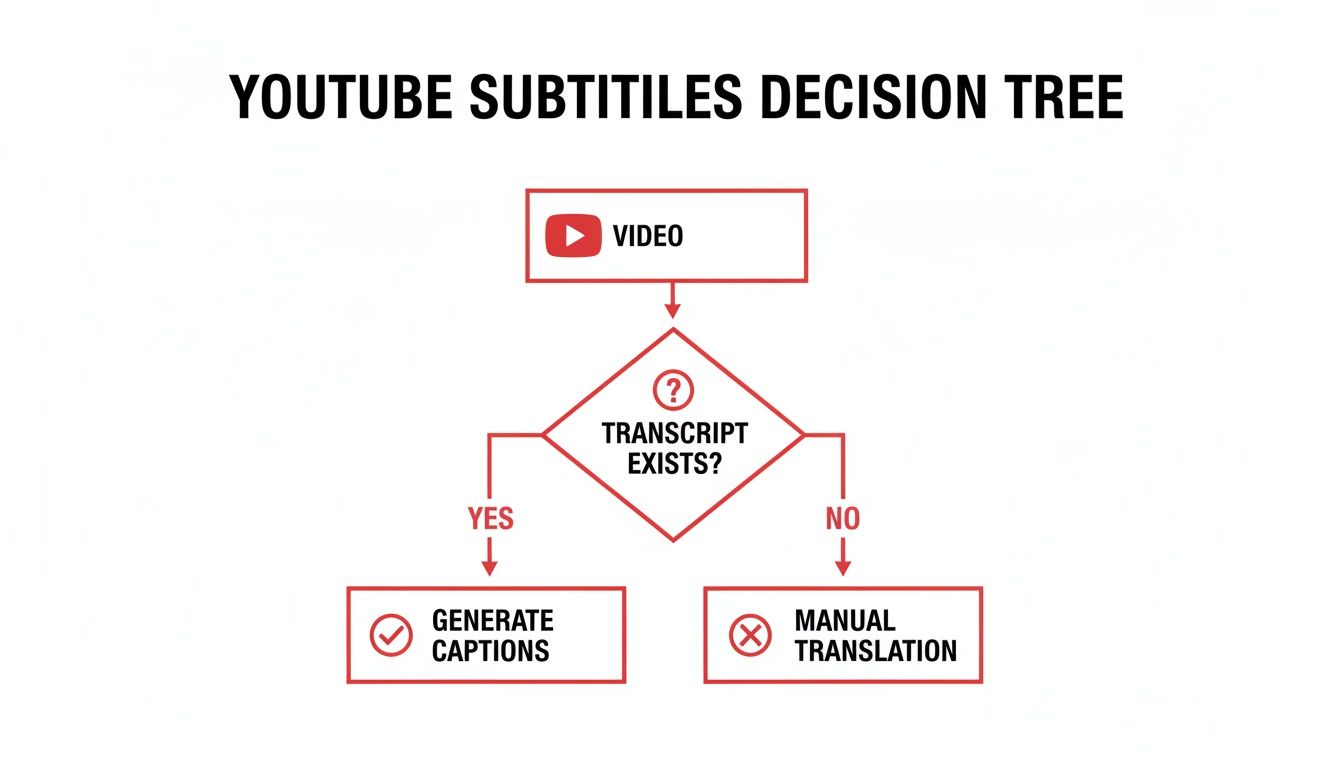
As you can see, checking for an existing transcript is the first step. If one isn't available or suitable, you simply choose a different tool to get the job done.
Browser Extensions for Effortless Downloads
For many users, browser extensions offer an ideal balance of convenience and power. These add-ons integrate directly into your browser, often placing a "Download" button on the Youtube page itself, streamlining your workflow.
Imagine you're an online learner watching a complex tutorial. Instead of juggling tabs, a good extension makes grabbing the subtitle file a one-click process, allowing you to follow along with the text offline.
- User-Friendly: They require no technical expertise to install and use.
- Efficient Workflow: You never have to leave the Youtube page, which saves time.
- Format Options: Many allow you to choose your desired format, like a standard SRT or a simple TXT file.
A word of caution: stick to extensions from reputable developers. Always check reviews and permissions before installing to protect your privacy and security.
Command-Line Tools for Power Users
For maximum control, automation, and flexibility, command-line interface (CLI) tools are the ultimate solution. Tools like yt-dlp are free, open-source, and incredibly powerful, though they require comfort with a terminal or command prompt.
While they may seem intimidating, learning a few basic commands can solve productivity challenges on a massive scale, such as downloading all subtitles from an entire playlist with a single command.
With a CLI tool, you can automate repetitive tasks. A researcher analyzing 50 video interviews could write a simple script to download all the transcripts overnight. This level of automation is a huge productivity booster that graphical tools can't match.
Large-scale analysis is increasingly relevant. For example, Youtube’s ad reach in the Netherlands is projected to hit 15.3 million by late 2025. For Dutch researchers and students, automated transcription tools can turn vast video archives into searchable data. You can find more data on the growth of Youtube's audience in the Netherlands on Statista. These tools make it possible to unlock the knowledge within this enormous library.
Comparing Youtube Subtitle Download Methods
To help you choose the right tool for your problem, here’s a quick comparison of the different methods.
| Method | Best For | Ease of Use | File Formats | Key Limitation |
|---|---|---|---|---|
| Built-in Transcript | Quick copy-pasting for personal notes. | Very Easy | TXT (manual copy) | Only works if a transcript exists; no timestamps. |
| Browser Extension | Convenient, on-page downloads for everyday use. | Easy | SRT, TXT | Relies on the extension being up-to-date. |
| CLI Tool (yt-dlp) | Bulk downloads, automation, and advanced options. | Difficult | SRT, VTT, and more | Requires comfort with the command line. |
| YoutubeToText | Fast, highly accurate transcripts and one-click downloads. | Very Easy | SRT, VTT, TXT | Free tier has limits for longer videos. |
The best method depends on your goal. For a one-off download, a browser extension is sufficient. For serious, repetitive work that demands efficiency, learning a CLI tool is a worthwhile investment.
Getting Accurate Transcripts with YoutubeToText
While extensions and CLI tools are useful, they share a critical limitation: they can only download subtitles that already exist. If the original captions are inaccurate, that's what you get. This is where a more intelligent solution is needed—one that shifts from simple downloading to true AI transcription.
A dedicated tool like YoutubeToText was built to solve this accuracy problem. Instead of grabbing an existing file, it uses advanced AI to listen to the audio and generate a new, highly accurate transcript from scratch. This fundamentally improves the quality of the text you work with.
For anyone who relies on accurate text—creators enhancing accessibility, researchers analyzing interviews, or marketers studying competitor content—this level of precision is transformative. It turns an unreliable process into a dependable workflow.
From Clunky Workflows to One-Click Simplicity
The real value of a specialized tool is its ability to remove friction and save time. The process is incredibly simple: paste a Youtube link, and in moments, you receive an accurate, editable transcript ready for download. No extensions to update, no commands to memorize.
This simplicity is a massive productivity gain. For Dutch creators and businesses serving an audience where Youtube's ad reach is projected to hit 15.3 million users (83.3% of the population), manual transcription is not scalable. A tool that automates this work makes it feasible to serve that vast market with high-quality, accessible content.
A smooth workflow isn't just about convenience; it's about removing friction so you can focus on creating, analysing, or learning, rather than fighting with technology.
This approach solves the common problems of other methods. You no longer have to worry if a video has captions or if its auto-generated text is usable. The tool handles it, delivering a clean, reliable result every time.
More Than Just a Transcript
A truly useful transcription service provides more than just text; it delivers the professional files and features you need to turn a transcript into a versatile asset.
Key features that solve real-world problems include:
- One-Click File Exports: Instantly download your transcript as an SRT or VTT file, complete with accurate timestamps, which is essential for video editing and accessibility.
- Multilingual Support: Top-tier tools can transcribe videos in dozens of languages, solving a major challenge for global creators and international teams.
- Speaker Identification: The ability to differentiate between speakers in a video is a huge time-saver when transcribing interviews, meetings, or panel discussions.
With a platform like YoutubeToText, you get an all-in-one solution that takes you from a video link to a polished, professional subtitle file in minutes.
When Accuracy Is Non-Negotiable
While modern AI transcription is remarkably accurate, some situations demand perfection. For legal proceedings, medical records, or other critical applications where every word counts, human verification remains the gold standard.
Though tools like YoutubeToText approach human-level accuracy, it's good to know the reasons to consider professional transcription services for cases where absolute certainty is required. For the vast majority of creators, marketers, and students, however, an AI-powered tool provides the ideal blend of speed, cost, and high-level accuracy to turn video content into a valuable text asset.
Putting Your Downloaded Subtitles to Work
You’ve completed your subs youtube download and have an SRT or VTT file ready. What's next? The real value comes from putting this file to work to solve specific problems.
For video editors, the solution is immediate. Import the SRT file into Adobe Premiere Pro, DaVinci Resolve, or Final Cut Pro. You can now style the captions to match your brand's aesthetic—no more generic Youtube overlays. This creates burned-in, professional subtitles that are an integral part of the video, not an afterthought.
Repurposing Video Content with Transcripts
For content creators, that transcript is the key to solving the "content treadmill" problem. It's a pre-written script, ready to be repurposed into numerous formats, maximizing the ROI of your original video.
Here are a few ways to turn one video into multiple content assets:
- Create a Blog Post: Clean up the transcript, add headings, and publish a detailed, SEO-friendly article.
- Fuel Your Social Media: Extract key quotes, stats, or takeaways to generate a week's worth of content for X, LinkedIn, or Instagram.
- Draft an Email Newsletter: Summarize the video's highlights into a concise, valuable email for your subscribers.
This strategy allows you to meet your audience on their preferred platforms. For advanced audio projects, you can even modify and re-generate voice using existing transcripts.
Think of your video transcript as a content multiplier. A 10-minute video can fuel a blog post, five social media updates, and a newsletter, all from one initial download.
Ethical Use and Proper Attribution
A crucial note on ethics: using subtitles from someone else's video requires responsible handling. While downloading a transcript for private study or research is generally acceptable, publishing content based on it requires clear attribution.
It’s simple: give credit to the original creator. A statement like, "Content adapted from [Creator's Name]'s video, '[Video Title]'" shows respect for their work and maintains transparency with your audience.
If you start with a plain text file and need to format it for video, our guide on how to convert a TXT file to SRT can be a lifesaver.
Got Questions About Downloading Youtube Subtitles?
Navigating the world of subtitle downloads often brings up questions about legality, file formats, and multilingual content. Understanding these points will help you download and use subtitles confidently and effectively.
This isn’t about getting lost in technical details; it’s about making informed choices to avoid common pitfalls and maximize the value of every transcript.
Is It Actually Legal to Download Someone Else's Subtitles?
This is a common concern, and the answer lies in the concept of "fair use." While Youtube's terms of service generally discourage downloading content without permission, using it for personal, non-commercial purposes like education, research, or private study is often considered fair use.
Think of it like photocopying a chapter from a library book for your study notes. You are not republishing it or claiming it as your own. As long as your intent is private and educational, you are generally on safe ground.
The legal lines blur when you redistribute or republish the content. If you use the subtitles in your own public work, you must provide proper attribution to the original creator. A simple credit is usually sufficient to show respect and maintain transparency.
SRT vs. VTT: What's the Real Difference?
When you download subtitles, you will typically encounter two file types: SRT and VTT. They look similar, but their differences are important depending on your intended use.
SRT (SubRip Text): This is the industry standard, compatible with nearly every video player and editing software. It’s a plain text file containing numbers, timestamps, and the subtitle text. Its universal compatibility makes it a safe choice for most applications.
VTT (WebVTT): This is the modern format designed for the web. It includes all the features of SRT and adds advanced styling options like text formatting (bold or italics), caption positioning, and metadata comments.
For most offline video editing, SRT is your safest and simplest bet. If you are embedding captions directly into a web video and need more control over their appearance, VTT is the superior choice.
How Do I Deal with Subtitles in Different Languages?
Handling multilingual content is a common challenge for global creators and researchers. If a video includes manually uploaded captions in several languages, most download tools will allow you to select the one you need. CLI tools, for instance, can list available language codes (e.g., en for English, nl for Dutch) and let you specify your choice.
But what if you need subtitles in a language the creator didn't provide? This is where a powerful multilingual transcription tool becomes essential. A high-quality service can generate a new transcript directly from the video's audio in dozens of languages, providing you with accurate subtitles even when official ones don't exist. This is a game-changer for making content truly accessible to a global audience.
Ready to get fast, accurate transcripts with one-click SRT/VTT exports? YoutubeToText can convert any Youtube video into clean, editable text in minutes. Just paste your link and see how it works.