Discover how a great minute notes template can transform your meetings. Get actionable tips, free templates, and learn to capture decisions that drive results.
Master Your Meetings With A Better Minute Notes Template
A solid minute notes template is your secret weapon for productive meetings. It’s what transforms a chaotic discussion into a clear, official record of what was decided, who’s doing what, and when it’s due. Think of it as the framework that provides structure, keeps everyone on the same page, and builds real accountability within your team. This guide will show you how to create and use a template that not only documents your meetings but supercharges your team's productivity.
Why A Great Minute Notes Template Is So Important
We’ve all been there. You leave a meeting feeling like you talked for an hour but got absolutely nothing done. It's a common productivity killer, and it almost always comes down to a lack of structure. When there's no standard way to capture discussions, decisions, and action items, crucial information simply vanishes into thin air.
A well-designed minute notes template solves this by creating a single source of truth. It's more than just a document—it's a strategic tool that brings much-needed clarity, purpose, and efficiency to every meeting you run.
Driving Accountability and Action
At their core, meeting minutes are about documenting outcomes to boost productivity. A good template forces you to consistently capture the most critical bits, especially the action items. By standardising how you record tasks, assign them to people, and set deadlines, you completely eliminate that dreaded "wait, who was supposed to do that?" moment.
This structured approach naturally creates a culture of accountability. When team members know their commitments are being officially recorded and shared, they’re far more likely to see them through.
A great template doesn't just record what happened; it provides a clear roadmap for what needs to happen next. It transforms passive attendance into active participation and commitment.
Ensuring Consistency and Compliance
Beyond keeping people accountable, a template brings consistency to all your meetings. Every set of minutes will follow the same logical flow, making them a breeze to read, compare, and find later on. This is a game-changer for recurring meetings like weekly project sync-ups or monthly board reviews, where tracking progress over time is essential.
And in some cases, proper documentation isn't just good practice—it's a legal requirement. For example, corporate governance in the Netherlands is strictly regulated by the Dutch Civil Code. Over 85% of newly formed companies must file 'First Meeting Minutes' within just eight days. Using a reliable template is critical for meeting these standards and avoiding hefty fines. You can even explore specific Dutch legal templates to see just how detailed these requirements can be. It really shows how a simple document can become an essential tool for legal compliance.
What Makes a Great Minute Notes Template?
A really solid minute notes template is so much more than a blank document. Think of it as a purpose-built tool, designed from the ground up to bring clarity to conversations and, most importantly, to drive action.
While the basics are a given, what separates a good template from a great one are the elements that help turn a simple discussion into real, tangible progress. It’s about creating a logical flow that guides you, ensuring you capture every critical detail consistently, every single time.
Let's break down the essential components that every effective template should have. These sections ensure you have a clear, compliant, and actionable record of every meeting.
Key Elements Of A Comprehensive Minute Notes Template
| Template Section | Purpose and Key Details |
|---|---|
| The Basics | This covers the who, what, when, and where. It includes the meeting title, date, time, location (physical or virtual), a list of attendees, and a list of apologies (who couldn't make it). |
| Agenda Items & Discussion | This is the core of the meeting. Each agenda topic should have its own section to summarise the key discussion points, major arguments, and questions raised. It’s not a transcript; it’s the story of the conversation. |
| Decisions Made | A clear, unambiguous list of all final resolutions. Each entry should be a concise statement, like "Approved the Q4 budget proposal." This leaves no room for misinterpretation. |
| Action Items | This is the accountability section. It lists specific tasks, assigns an owner to each, and sets a clear deadline. This turns talk into action. |
| Next Meeting Details | Note the date, time, and location for the next follow-up meeting to keep the momentum going. |
By structuring your template around these key areas, you create a document that not only records what happened but also serves as a roadmap for what needs to happen next.
Nail Down the Foundational Details First
Every set of minutes has to start with the non-negotiables. These are the details that give anyone reading them immediate context and make the document an official record. It’s like the file label on a folder—you need it to know what's inside.
- Meeting Title: Be specific. "Q3 Marketing Campaign Kick-off" is a hundred times better than just "Marketing Meeting".
- Date and Time: Don't forget to include the full date and both the start and end times.
- Location: Was it in Conference Room B or on a Google Meet link? Note it down.
- Attendees List: List everyone who was there, but also make a note of who was invited but couldn't make it (their apologies).
These might seem simple, but they're vital for proper record-keeping, especially for formal board meetings or big projects with lots of different people involved.
Capture the Heart of the Discussion
Once the basics are out of the way, your template needs to help you capture the real substance of the conversation. The goal here isn't to transcribe every single word. It’s about summarising the important points and outcomes for each topic on the agenda.
Your template should have a dedicated space for each agenda item. Underneath each one, focus on jotting down the main arguments presented, any significant questions that were asked, and the general feeling or consensus of the group. This is incredibly useful later when someone wants to understand the why behind a particular decision.
A truly effective minute notes template doesn't just list topics; it tells the story of the meeting. It connects the dots from initial discussion to final decision, creating a clear and logical narrative.
Turn Decisions Into Concrete Action Items
This is where your template stops being a record and starts being a productivity powerhouse. Vague conclusions are the enemy of progress. A good template forces you to be crystal clear by separating what was decided from the specific steps needed to make it happen.
Decisions Made: This should be a clean, simple list of all the final resolutions. State each one plainly so there's zero room for confusion. For example, "Approved the revised budget for the Q4 social media campaign."
Action Items: I'd argue this is the single most important part of any meeting's minutes. An action item without an owner and a deadline is just a wish. To build in real accountability, structure this section with dedicated columns.
| Task Description | Owner | Deadline |
|---|---|---|
| Finalise training materials | Sarah Peters | 15 September |
| Draft customer communications | Alex Chen | 20 September |
| Confirm budget allocation | Finance Team | 10 September |
This simple table makes it immediately obvious who is responsible for what and by when. It becomes an instant to-do list that drives the project forward and makes sure everyone walks away knowing exactly what they need to do next.
How To Build A Custom Minute Notes Template
While downloadable templates are a fantastic starting point, the best one you'll ever use is the one you build yourself. When you create a custom template, you're designing it to fit your team's workflow and the kinds of conversations you actually have, solving the problem of one-size-fits-all documentation.
The good news is you don’t need any special software. You can build a seriously effective, reusable template in the tools you already use, whether that's Google Docs, Microsoft Word, or a collaborative hub like Notion.
The process is straightforward. Start with the essential building blocks—the basics, agenda, decisions, and action items—and then start tweaking. Think of it less as making a document and more as designing a system for clearer communication and enhanced productivity.
Design For Different Meeting Types
Let's be honest, not all meetings are the same. A formal board meeting has a completely different vibe and purpose than a quick daily stand-up or a freewheeling creative brainstorm. So why would their minutes follow the same rigid structure?
It’s a great idea to create a few different versions of your core minute notes template.
- For formal board meetings: This one needs to be structured and precise. Include dedicated sections for approving previous minutes, recording formal motions, and tracking voting outcomes.
- For weekly project syncs: Keep this template focused on action. A simple table is perfect here, letting you track task progress, owner, and deadline, while also flagging any new roadblocks.
- For creative brainstorming: Ditch the rigid structure. The goal is to capture ideas, not assign tasks. Use large, open sections for mind maps, sketches, and interesting questions that come up. This format also makes it easier to repurpose ideas for future content or strategy sessions.
By matching the template to the meeting, you're guiding the note-taker to capture what truly matters, which makes the final minutes infinitely more valuable to everyone.
Use Smart Formatting To Boost Readability
How your minutes look is almost as important as what’s in them. Nobody wants to read a giant wall of text. Good formatting is all about making the minutes easy to scan, so your team can find what they need in just a few seconds—a key to accessibility and efficiency.
A simple table for action items is a classic for a reason—it works. It neatly lays out the task, who's responsible, and the due date, making accountability crystal clear.
But you can get more creative. For example, some teams I've worked with use simple colour-coding with great success. One report I read showed that consultants boosted their post-meeting efficiency by 50% just by highlighting their personal to-dos in yellow and tasks for others in blue. It’s a tiny change, but it makes a huge difference when you’re sifting through notes. For more ideas like this, you can get some practical tips on improving meeting minutes here.
The goal of formatting isn't just to make your minutes look nice; it's to make them functional. Every heading, bullet point, or table should help someone find, understand, and act on the information faster.
Don't be afraid to play around with the layout. Use headings to separate topics, pull out key takeaways with bullet points, and use bold text for critical decisions or deadlines.
Once you land on a format that clicks with your team, save it! In Word, save it as a template file (.dotx). In Google Docs, just keep a "MASTER TEMPLATE" document that you can copy for each new meeting. That way, a perfectly formatted document is always just one click away.
Free Templates To Get You Started Right Now
Building your own template is the best way to get a perfect fit, but let's be realistic—sometimes you just need something that works now. To help you solve the problem of disorganized notes immediately, we’ve put together a few ready-to-use templates for common meeting scenarios.
These aren't just blank pages. They’re thoughtfully structured documents designed to guide your note-taking. Each one is available in both Google Docs and Microsoft Word, so you can download a copy and start typing in seconds.
The Formal Board Meeting Template
This one is built for high-stakes meetings where precision and compliance are non-negotiable. It has dedicated sections for recording motions, tracking votes, and formally approving the minutes from the previous session. It provides a professional, structured format that ensures your official record is clear and unambiguous.
The Simple Team Sync Template
Perfect for your weekly check-ins and agile stand-ups, this template cuts straight to the point. It prioritises a clean, scannable layout focused almost entirely on progress updates and action items. We've used a simple table here, making it incredibly easy to see who is doing what and by when, keeping everyone aligned with minimal fuss.
A great template acts as a silent facilitator, gently guiding the conversation towards clear outcomes and decisions. The right format can make the difference between a chat and a productive meeting.
The Detailed Project Review Template
When you need to get into the weeds on project specifics, this is the template for you. It has dedicated space for discussing milestones, identifying roadblocks, and brainstorming solutions. This more detailed format helps you capture the nuances of complex project discussions, ensuring no critical information slips through the cracks.
For an even wider selection of options, you can explore our comprehensive guide to the best minutes of meeting templates for all sorts of business needs. These free resources are designed to give you a professional starting point so you can improve your meeting documentation today.
Turn Meeting Recordings Into Minutes With AI
With so many of us working in remote or hybrid teams, recording meetings has become the norm. This isn't just for accessibility; it’s a golden opportunity to solve the problem of frantic, manual note-taking. Why try to listen, understand, and type all at once when you can let AI transcription do the heavy lifting for you?
You can now take a full meeting recording and turn it into accurate, structured notes with the help of AI. It’s the perfect bridge between a rambling conversation and a polished minute notes template. AI tools can process hours of video and produce a clean text document in minutes, giving you an incredible productivity head start. Your role shifts from scribe to editor, which is a much smarter use of your time.
From Raw Recording To Actionable Minutes
The whole process is surprisingly straightforward. You start with your meeting's audio or video file—whether it's from Google Meet, Zoom, or Microsoft Teams—and simply upload it to an AI transcription service. A tool like YoutubeToText.ai, for instance, is designed to process these files quickly and accurately.
Once you have your transcript, you can decide which type of template best fits the meeting's purpose.
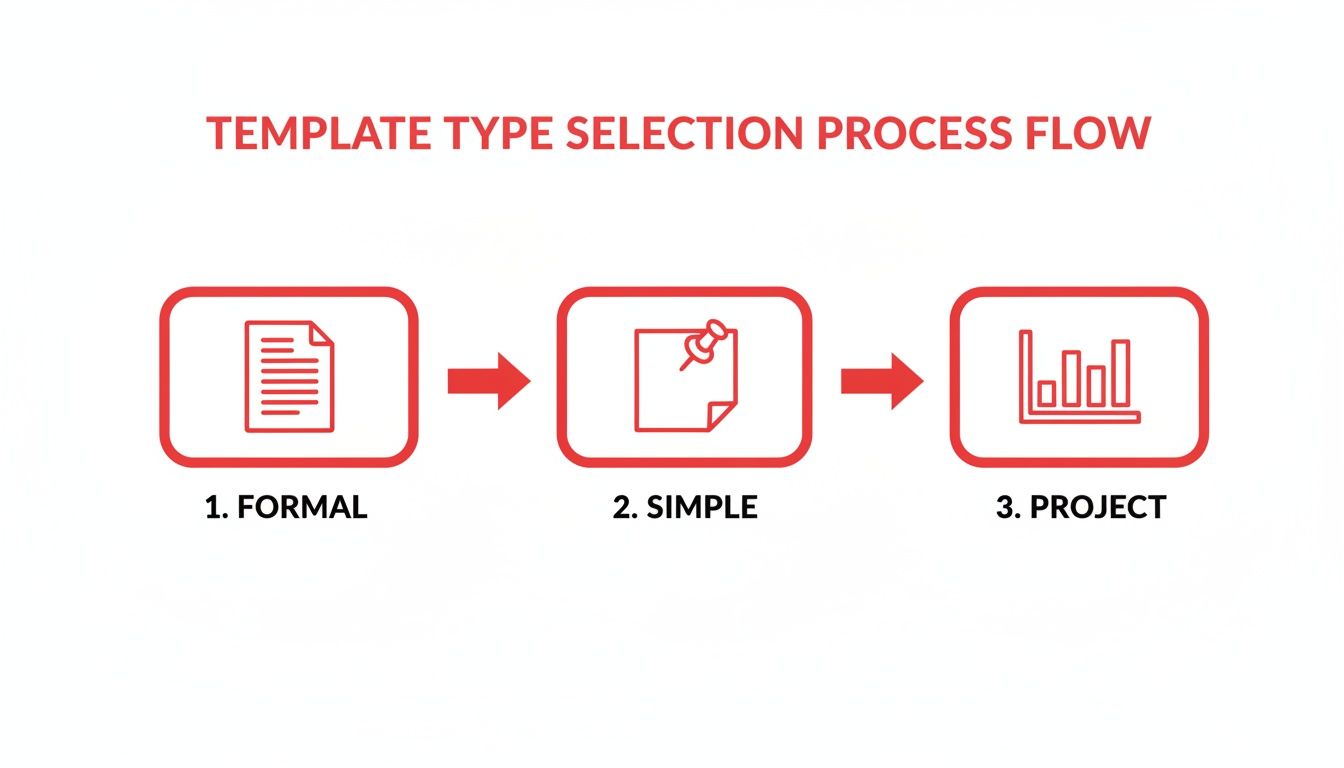
The AI gets to work and spits out a full, time-stamped transcript. This text is your raw material. Now, instead of starting from a blank page, you just need to review the transcript and pull the key details into your template. For a deeper dive into how this works, check out our guide on converting audio to text.
Editing The AI Output For Maximum Clarity
Let's be realistic: no AI is flawless. But it will get you 90% of the way there, and that’s a huge win for productivity. Your final step is to polish the machine-generated text into clear, concise minutes. This is where the human touch comes in, focusing on outcomes rather than capturing every single word that was said.
Here’s a productive workflow for editing:
- Hunt for keywords: Use the search function (Ctrl+F or Cmd+F) to instantly find terms like "decision," "agreed," "next steps," or "action item." This lets you jump right to the most important parts of the conversation without sifting through all the noise.
- Summarise the chatter: For each agenda item, I’ll read the relevant bit of dialogue and boil it down to a one or two-sentence summary. You’re just trying to capture the essence of the discussion, not a word-for-word account of the debate.
- Pull out the action items: Whenever I spot a task being assigned, I copy that section and rephrase it neatly in my action items table. I make sure it’s crystal clear who owns the task, what needs to be done, and when the deadline is.
By letting AI handle the initial transcription, you free yourself up to focus on what really matters: identifying the decisions and actions that drive your team forward. It's about working smarter, not harder.
This approach ensures you never miss a crucial detail, all while solving the time-consuming problem of manual transcription. It takes minute-taking from a dreaded chore to a quick, efficient process of review and refinement.
What Not to Do When Taking Minutes
Having a great template is half the battle, but it won’t save you from a few classic productivity blunders. Even the most organised note-taker can fall into traps that make their minutes confusing, ineffective, and a fast track to derailing a project's momentum.
One of the biggest mistakes is trying to become a court reporter, capturing every single word. Your job isn't to create a perfect transcript; it's to document what was decided, who's doing what, and by when. If you're frantically typing to keep up, you're not actually listening or processing the key takeaways. This just leads to a massive document that nobody has the time or energy to read—a classic productivity problem.
Vague Actions and Unassigned Tasks
Here’s another classic pitfall: jotting down action items that are fuzzy and unassigned. An entry like "look into Q4 budget" is basically a forgotten task waiting to happen. Who exactly is looking into it? And what's the deadline? Without those two critical pieces of information, that action item is almost guaranteed to fall through the cracks.
This isn't just a minor issue; it's a widespread problem. For instance, a recent survey showed that while 98% of Dutch organisations agree minutes are crucial for accountability, a mere 65% manage to record them consistently. That gap often stems from practices that make the whole process feel like a chore. You can learn more about bridging these efficiency shortfalls in meeting documentation.
To solve this, ensure every single one is:
- Specific: What, exactly, needs to happen?
- Assigned: Who is responsible for getting it done?
- Time-bound: When does it need to be completed?
Forgetting to Send Them Out Quickly
Finally, don't sit on the minutes after the meeting is over. Their value plummets with every day that passes. When you wait too long, people’s memories of the conversation get hazy, the initial energy fades, and team members might have already started working on tasks based on what they thought was agreed upon.
The most effective minutes are those shared within 24 hours. This promptness ensures everyone is aligned while the discussion is still fresh, allowing for quick clarifications and immediate action.
Delaying the send-off invites misunderstanding and wasted effort. To solve this problem, leverage AI to speed things up. For a step-by-step guide, check out our post on how to transcribe video into text to create a draft in minutes.
By sidestepping these common traps, your minutes transform from a simple record-keeping task into a powerful tool that keeps your team aligned and productive.
Got Questions? We've Got Answers
Let's clear up a few common questions that pop up when people start getting serious about their meeting minutes.
Meeting Minutes vs. Meeting Notes: What's the Real Difference?
Think of meeting minutes as the official, public record of what happened. They are structured, formal documents that focus squarely on the big stuff: key decisions made, final outcomes, and who's responsible for what. They’re built for accountability and serve as a legal record if needed, making them accessible to the whole team.
Meeting notes, however, are your personal cheat sheet. They’re the informal jottings you make for yourself during the meeting. They might include your own thoughts, reminders, or questions you want to follow up on later—things that don't necessarily belong in the official record.
How Soon Should We Send Out the Minutes?
The golden rule is to get them out within 24 to 48 hours.
Waiting longer is a recipe for forgotten details and lost productivity. Sending them out quickly, while the discussion is still fresh, makes it easier for everyone to spot any errors or omissions. Most importantly, it gives your team a running start on their action items.
Don't let the energy from a great meeting fizzle out. Promptly sending the minutes shows that the meeting was productive and that you expect things to start happening right away.
Who Gives the Final "OK" on the Meeting Minutes?
It's a team effort, but the process is usually quite straightforward. The minutes from the last meeting are typically approved right at the start of the next one.
The meeting chair will kick things off by asking everyone to give the document a final look-over. If the attendees agree that it's an accurate summary of what went down, the minutes are officially approved and become part of the organisation's formal records. This creates an accessible and official archive.
Tired of the transcribing grind? YoutubeToText can take your recorded meetings and turn them into accurate, ready-to-edit text in just a few minutes. Just upload your video, grab the transcript, and you can fill out your minute notes template in record time. Give it a try at youtubetotext.ai and see how easy meeting follow-up can be.
