Top tools for transcribing YouTube videos
If you're here to pick a tool, this is the short list. The full guide is below.
| Tool | Best for | Pricing | |
|---|---|---|---|
| YoutubeToTextFeatured | YouTube-first workflows | Free trial, then pay-as-you-go | Try it |
| Otter.ai | Live meeting transcription | Free tier with monthly cap | Compare |
| Rev | Human-grade accuracy | Per-minute, AI or human | Compare |
| Descript | Full audio/video editor | Free starter, then tiered | Compare |
Want the full ranked list? See our 9 best YouTube transcription tools for 2026 →
Wondering how can I download on Youtube? This guide covers official methods like Premium and smarter, safer alternatives for getting transcripts or subtitles.
How Can I Download on Youtube A Practical Guide to Safe Methods
Thinking about how you can download content from Youtube? The straightforward answer often points to official features like Youtube Premium for offline viewing or Youtube Studio if you're a creator needing to save your own work. But for many people, a much smarter move is to grab the text and subtitles instead of the entire video file, unlocking powerful new ways to boost productivity and repurpose content.
Your Quick Guide to Downloading From Youtube
Let's get right to it. You need Youtube content for offline use or to repurpose it in some way, and you've got a few solid options. Knowing which path to take from the get-go will save you a lot of hassle and keep you away from those dodgy third-party websites, solving the real problem of accessing video information efficiently and safely.
For watching on the move, nothing beats a Youtube Premium subscription. It’s the only official way to legally save videos right inside the app, which is a lifesaver for flights, train commutes, or anywhere with patchy internet. If you're a creator, on the other hand, Youtube Studio has your back. It lets you download an MP4 of any video you've uploaded, giving you a crucial backup copy.
But what if you don't actually need the massive video file? Often, the real gold is the information in the video. This is where a more efficient, modern approach comes into play. Instead of downloading gigabytes of data, you can simply pull the text to boost your productivity, create accessible content, or repurpose the information for new projects.
Finding the Right Download Path
This decision tree helps you visualise the best option based on what you’re trying to achieve.
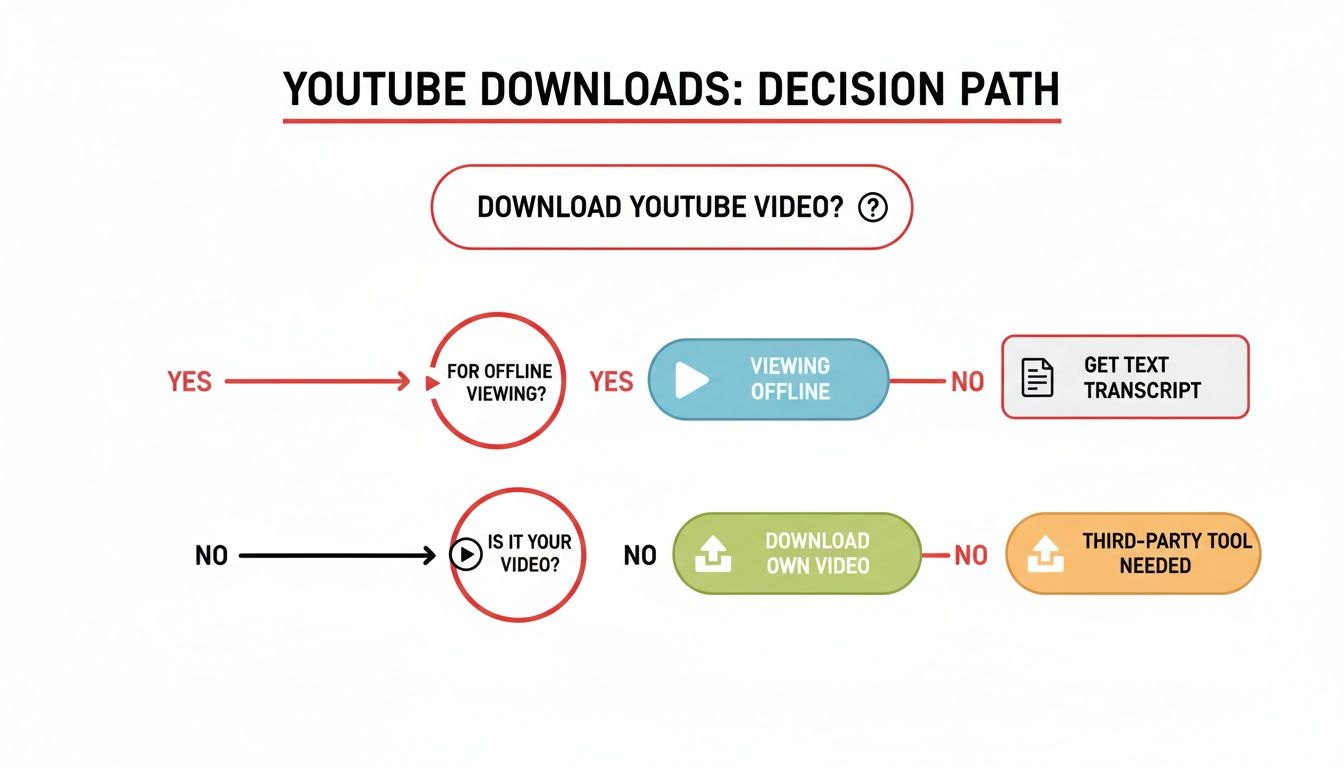
As the chart shows, your best bet really depends on whether you're just looking to watch offline, archive your own content, or pull information out for another project.
Here in the Netherlands, with Youtube's massive audience of 15.3 million users, we're seeing a shift. Many creators and researchers are opting for smarter tools over risky downloads. While our fast internet makes streaming a breeze, directly downloading videos can quickly land you in hot water with copyright violations.
The most useful question isn't how to download a video, but why you need it. If your goal is to study, quote, or repurpose the content, converting the video to text with AI is almost always faster, safer, and far more effective.
Youtube Download Methods at a Glance
To make it even clearer, here’s a quick comparison of the main ways you can get Youtube content for offline use or repurposing. This table breaks down the best use case for each method.
| Method | Best For | Primary Benefit | Key Limitation |
|---|---|---|---|
| Youtube Premium | Commuters, travellers, and anyone with unreliable internet. | Legally save videos within the app for offline viewing. | Content is locked inside the Youtube app; you can't export the files. |
| Youtube Studio | Content creators needing a personal backup of their work. | Download a clean, high-quality MP4 of your own uploads. | Only works for content you personally own and have uploaded. |
| AI Text/Subtitle Converters | Researchers, students, journalists, and content creators. | Quickly extract searchable, editable text without large video files, enabling content repurposing and improving accessibility. | You get the transcript/subtitles, not the visual video content. |
Each option serves a distinct purpose. For simple offline viewing, Premium is perfect. For creators, Studio is essential. But for anyone who needs to work with the information in a video, text extraction is the modern solution.
That’s exactly what tools like YoutubeToText.ai are built for. They offer a game-changing alternative for students, researchers, and creators who need transcripts or subtitles in a snap. For a deeper dive, check out our guide on how to download Youtube videos with their subtitles.
Using Youtube Premium for Official Offline Viewing
If you want to download Youtube videos without wading into murky legal waters, the platform’s own subscription service is your best bet. Youtube Premium is hands down the safest, most direct way to save videos for offline viewing. It's built for commuters, travellers, or frankly, anyone with a spotty internet connection.
The whole process is baked right into the Youtube app on your phone or tablet. When you're watching something you want to save, you'll spot a "Download" button just underneath the video player. A quick tap lets you choose the video quality, which is a brilliant touch for managing your device’s storage. You can grab a short clip in a lower resolution like 360p to save space, or go all out with 1080p for a crisp viewing experience.
Managing Your Offline Library
Everything you download gets tucked away in a dedicated "Downloads" section in your library. Think of it as your personal, on-the-go playlist that works perfectly without a single bar of signal. It's a lifesaver on a long flight or the daily underground commute.
To help you avoid a shocking mobile data bill, Youtube has added some clever settings. You can tell the app to download videos only when you're connected to Wi-Fi. It’s a simple tweak that ensures you build up your offline library without touching your data allowance. There's also a "Smart downloads" feature that can automatically save recommended videos for you based on what you've been watching, so there's always something new waiting for you.
Of course, a Premium subscription offers more than just downloads.
- Ad-Free Viewing: You get to watch everything on Youtube without a single ad interruption. It's a game-changer.
- Background Play: This is fantastic for listening to podcasts, music, or lectures. The audio keeps playing even if you lock your phone or switch to another app, boosting your productivity.
- Youtube Music Premium: Your subscription also bundles in full access to Youtube Music, which has its own offline download feature for songs and playlists.
Just be aware of the one major limitation: these downloads are encrypted and only work within the Youtube app. You can't move the file to your computer, pop it into a video editor, or play it with another media player.
Is Premium the Right Choice for You?
So, who is this for? If your main goal is simply to watch videos without needing an internet connection, Youtube Premium is the perfect solution. It’s secure, simple, and uses the app you're already familiar with. The steps are exactly the same on both iOS and Android, so it's a seamless experience for almost everyone.
While it won't let you grab a video file for a project, it completely solves the offline viewing problem. For content creators, researchers, or anyone else who needs to do more than just watch—especially for tasks related to productivity or content repurposing—you’ll probably need to look at other methods.
Downloading Your Own Videos From Youtube Studio
We’ve all been there. That heart-stopping moment when you realise a final project file is gone forever. Maybe a hard drive crashed, or you accidentally deleted the wrong folder. For content creators, losing your original video files can feel like a disaster.
Fortunately, Youtube has a built-in safety net. You can actually download a copy of any video you’ve ever uploaded, right from your Youtube Studio dashboard. Think of it as your personal, secure archive in the cloud, ensuring your hard work is never completely lost.
How to Find and Download Your Content
Getting your video back is surprisingly simple. You don't need any special software—just a few clicks.
First, head over to your Youtube Studio and find the "Content" tab on the left-hand menu. This is where your entire video library lives.
From there, just hover your mouse over the video you need. You'll see a small menu appear (the three vertical dots). Click it, and a dropdown will pop up with the "Download" option. One click, and an MP4 version of your video starts downloading straight to your computer. Easy as that.
A quick heads-up: The file you download will likely be a 720p or 1080p MP4, even if your original upload was in glorious 4K. Youtube optimises files for web playback, so while this is a fantastic high-quality backup, it probably won’t be the massive, raw file from your camera.
Why You’d Want to Download Your Own Videos
This feature isn't just for emergencies. Having local copies of your published videos is incredibly useful for repurposing your content and getting more mileage out of every piece you create. This is a core productivity strategy for successful creators.
Here are a few ways I've used it myself:
- Crafting a Killer Highlight Reel: I often pull the best moments from several videos to create a new channel trailer or a "best of the year" compilation.
- Content Repurposing: A quick download lets me re-edit a video for different formats. I can easily crop a horizontal video into a vertical clip for TikTok or Instagram Reels, multiplying my content output from a single recording session.
- Building a Professional Portfolio: When pitching to new clients, I need quick access to my best work. Downloading my top-performing videos makes it simple to showcase my skills.
Managing your content smartly across different channels is crucial for brand growth. Knowing the ins and outs of the best platforms for content creators is a great start, but mastering a fundamental skill like this gives you true control over the creative assets you’ve worked so hard to produce.
Navigating Third-Party Downloaders Safely and Ethically
Let's be honest: when you need a Youtube video offline in a hurry, those third-party downloader sites can look mighty tempting. They promise quick, easy downloads without any fuss.
But stepping into that world is a bit like walking through a minefield. These services often exist in a legal and technical grey area. One wrong click could lead you to malware, a barrage of sketchy ads, or even put your Youtube account at risk for violating their terms.
It really comes down to a few key dangers:
- Malware threats are a huge one. Some sites bundle nasty software with your video file.
- Intrusive advertising can hijack your browser, leading you to phishing scams.
- Terms of Service breaches are no joke; Youtube can penalise your account if they detect this activity.
This is exactly why getting a handle on copyright rules is so important. If a video is in the public domain or released under a Creative Commons licence, you're generally in the clear. But downloading copyrighted material without the creator's permission is where you cross a legal line.
Risks and Ethical Considerations
Knowing where the line is between fair use and outright infringement is key to downloading responsibly.
Think about a teacher who downloads a short clip to use in a classroom presentation. In many places, that would likely be considered "fair use." But even then, you have to be aware of the specific copyright laws in your country, as they can vary significantly.
Security is the other major piece of the puzzle. When you use these sites, you're trusting them with your connection. Hidden trackers and data breaches are real risks that can expose your personal info.
Here’s a quick mental checklist to run through:
- Does the site use HTTPS? Look for the little padlock in your browser's address bar.
- What are people saying? Check for genuine user reviews to get a feel for the site's reputation.
- Is it asking for weird permissions? Avoid any tool that insists you install a strange browser extension or application.
Evaluating Download Tools
Instead of just picking the first result on Google, it pays to be a bit of a detective. A credible tool will be upfront about what it does and how it works.
Look for a clear privacy policy and straightforward terms of service. If a website is plastered with blinking ads and fake "Download" buttons, that's a massive red flag telling you to back away slowly.
Here are a few things I always check:
- How old is the website? A long-standing domain is often a better sign than one created last week.
- Are the user reviews specific? Vague, five-star ratings can be faked. Look for detailed comments.
- Is the pricing clear? Be wary of hidden fees or surprise subscriptions.
If you are looking for a simple option, a dedicated Youtube video downloader tool can streamline the process. But remember, no third-party service is ever completely without risk. You have to balance the convenience against the potential security issues.
For those who only need the audio, you can often sidestep some of these risks. We've put together a guide on how to extract MP3 from Youtube that covers the process and legal tips.
Key Red Flags to Watch For
Some warning signs are subtle, but others are practically screaming at you.
One of the most common tricks is a page filled with fake download buttons that lead to ads or malware. If you find yourself in a loop of pop-ups or the site keeps redirecting you, it's a good time to close the tab.
Always prioritise tools that respect both your safety and the creator’s rights. This is where AI-driven solutions for transcription and subtitling offer a superior, ethical alternative for accessing information.
Slow or incomplete downloads can also be a sign of trouble, sometimes indicating the service is throttling your connection or mining data in the background. And if a site asks for personal information like your phone number just to download a video, that's a hard pass.
Ultimately, downloading safely comes down to being vigilant. Stick with official methods like Youtube Premium whenever you can, and only turn to third-party tools when you have no other choice.
A Smarter Alternative: Getting the Text Instead of the Video
Let’s be honest, sometimes when you want to "download" a Youtube video, you don't actually care about the video itself. What you're really after is the information—the words being spoken. For researchers, students, and content creators, the spoken content is the real gold.
Instead of messing around with huge video files, you can simply pull the spoken words directly into a text format. This is a game-changer for productivity and accessibility. It saves you time, frees up storage space, and helps you sidestep the sketchy security risks that often come with third-party downloaders.
The Power of Instant Transcription
Imagine just pasting a Youtube link into a simple tool and getting a full, accurate transcript back in seconds. That's exactly what AI-powered services like YoutubeToText.ai are built for. You get instant access to all the core information without the hassle of a massive video file.
It really is as simple as it sounds. You just drop in the URL to kick things off.
The focus shifts from downloading a bulky file to directly accessing the content you need.
This method is incredibly practical, especially somewhere like the Netherlands, where Youtube is a massive part of daily life. By late 2025, user numbers had climbed to an incredible 15.3 million. With such a large and active audience, the need to repurpose video content efficiently is more important than ever, making instant transcription a far better solution than clunky, old-school downloading. You can see more data on Youtube's growth in the Netherlands on Statista.com.
Real-World Scenarios Where Text Wins
The practical uses for this are endless. It’s not just about saving time; it's about making video content far more useful, accessible, and ready for repurposing.
Here are a few ways people are already using it:
- Students & Researchers (Productivity): A university student can turn a two-hour lecture into searchable study notes. They can easily find key concepts and pull direct quotes for an essay without having to scrub through the video over and over.
- Marketers (Content Repurposing): A marketing team could take a video of a customer testimonial and instantly turn it into a written case study, a bunch of powerful social media quotes, and a detailed blog post. That's a ton of mileage from one video.
- Creators (Accessibility): A Youtuber can generate perfect captions (SRT or VTT files) for their videos. This makes their content accessible to deaf or hard-of-hearing viewers and gives their SEO a nice boost.
This completely changes how we think about video. It turns passive viewing into an active process of grabbing, analysing, and reusing information, solving a major productivity bottleneck for many professionals.
Beyond Transcripts: Summaries and Subtitles
Many modern transcription tools go even further. They can often generate a quick, concise AI summary, pulling out the most important points from a long video. This is brilliant for getting the gist of a long presentation or documentary when you don't have hours to spare.
If you're interested in learning more, we have a complete guide on how to download a Youtube transcript that walks you through the whole process.
So, next time you find yourself thinking about how to download a Youtube video, ask yourself if what you really need is the information inside it. Grabbing the text is often the smarter, faster, and safer way to go.
A Few Final Questions About Youtube Downloads
Let's clear up a few of the most common questions that pop up when you're trying to figure out how to download from Youtube.
Is It Actually Legal to Download Videos From Youtube?
This is the big one, and it’s not a simple yes or no. The short answer is: it depends. Downloading is generally against Youtube's Terms of Service unless they give you an official way to do it.
So, using the offline feature in Youtube Premium? Totally fine. Downloading your own uploads from Youtube Studio? Absolutely.
The grey area is using third-party tools. If you’re saving copyrighted material without the owner's permission, you could be infringing on their copyright. Before you hit download, always make sure you have the right to do so.
Can I Download a Youtube Video to My Phone?
Yes, you definitely can. The safest and most straightforward way is with a Youtube Premium subscription. Both the iPhone and Android apps have a built-in download button for Premium members, which saves videos right inside the app for when you're offline.
Be very careful with third-party sites or apps on your phone. They can be a minefield of malware, phishing scams, and other security headaches you just don't need.
What's the Best Quality I Can Get for a Youtube Download?
The quality you get really hinges on the method you use. If you go the official route with Youtube Premium, you can usually download videos in resolutions up to 1080p, as long as the original upload supports it.
When you download your own content from Youtube Studio, you'll get an MP4 file that’s very close to your original upload quality, though it might be slightly compressed. Unofficial tools might promise 4K or even 8K downloads, but the results can be unpredictable, and the quality isn't always what they claim.
If there's one thing to remember, it's that official methods give you safe, predictable quality. Unofficial tools are always a bit of a gamble. For content that really matters, stick to what you know works.
How Can I Get Just the Audio or Subtitles From a Video?
Sometimes, you don't need the whole video—you just want what was said. Instead of using risky audio-ripping sites, an AI transcription service is a much smarter and safer choice.
Tools built for this can give you the full text of a video, which is perfect for quoting, research, or analysis. They also let you download accurate subtitle files (in SRT or VTT formats) with a single click. This is a game-changer for creators who need to add captions or anyone working to make their content more accessible and improve their productivity workflow.
Stop wasting time scrubbing through videos for key information. With YoutubeToText.ai, you can instantly turn any Youtube video into an accurate transcript, summary, or subtitle file, solving your content repurposing and accessibility needs in seconds. Try it for free today and see how easy it is.