Learn how to convert audio from Youtube to high-quality MP3 or WAV files. This guide covers the best online tools, desktop software, and advanced methods.
How to Convert Audio from Youtube for Transcription, Productivity, and More
Sometimes you just need the audio from a Youtube video. Whether you're saving a lecture for offline study, grabbing a soundbite for a project, or preparing a video for transcription, extracting the audio is a crucial first step. You can use online converter sites, dedicated software like VLC Media Player, or command-line tools like yt-dlp to save a video's soundtrack as a standard audio file—think MP3, WAV, or AAC.
This guide will show you how to efficiently convert audio from Youtube, transforming passive video content into a powerful resource for productivity, accessibility, and content repurposing.
Why Bother Converting Youtube Audio?
Ever find an exclusive interview on Youtube you'd rather listen to as a podcast? Or maybe you want to save a brilliant lecture to transcribe for your research. These are common reasons to convert audio from Youtube, but the applications go much deeper, solving real problems for students, creators, and professionals.
It’s not just about listening on the go. It’s a practical skill for unlocking the value trapped inside video content.
More Than Just Music: A Gateway to Productivity
The reasons for extracting audio are surprisingly varied, and they often have more to do with productivity, accessibility, and content repurposing than just listening.
Here are a few real-world examples:
- Students and Researchers: Converting academic talks or interviews into audio makes studying more flexible. Transcribing that audio turns a long lecture into searchable study notes.
- Content Creators: Pulling audio from a video is the first step to creating subtitles, which makes content accessible to a wider audience. It also allows for easy repurposing of quotes and soundbites for podcasts or social media.
- Musicians and DJs: Hunting down rare remixes or instrumental tracks that fans have uploaded exclusively to Youtube to use in their sets or for inspiration.
This ability to repurpose content is a huge deal. Youtube is a massive repository of information, with its advertising reach in the Netherlands alone equivalent to 80.9% of the total population. That level of integration means people are constantly finding new, creative ways to use the content they find.
Being able to convert audio from Youtube turns passive viewing into active creation. It lets you take valuable soundbites and work them into your own learning, creative projects, or accessibility workflows.
At the end of the day, it's about making video content more accessible and useful. Once you have that audio file, you open up a world of possibilities. For instance, you could use a tool to create searchable text from Youtube videos, making the content infinitely more useful. Learning to convert audio is the first step to smarter content consumption and creation.
Choosing Your Youtube Audio Conversion Method
So, you need to pull the audio from a Youtube video. It seems simple, but the best method depends entirely on your goal. Are you just grabbing a podcast for your commute, or are you preparing dozens of videos for transcription and subtitling?
The path you choose will be a trade-off between speed, quality, and control. Let’s break down the main options so you can pick the right tool for the job and focus on what comes next: turning that audio into something even more valuable.
The "why" is just as important as the "how." Thinking about your end goal helps you decide which approach makes the most sense.
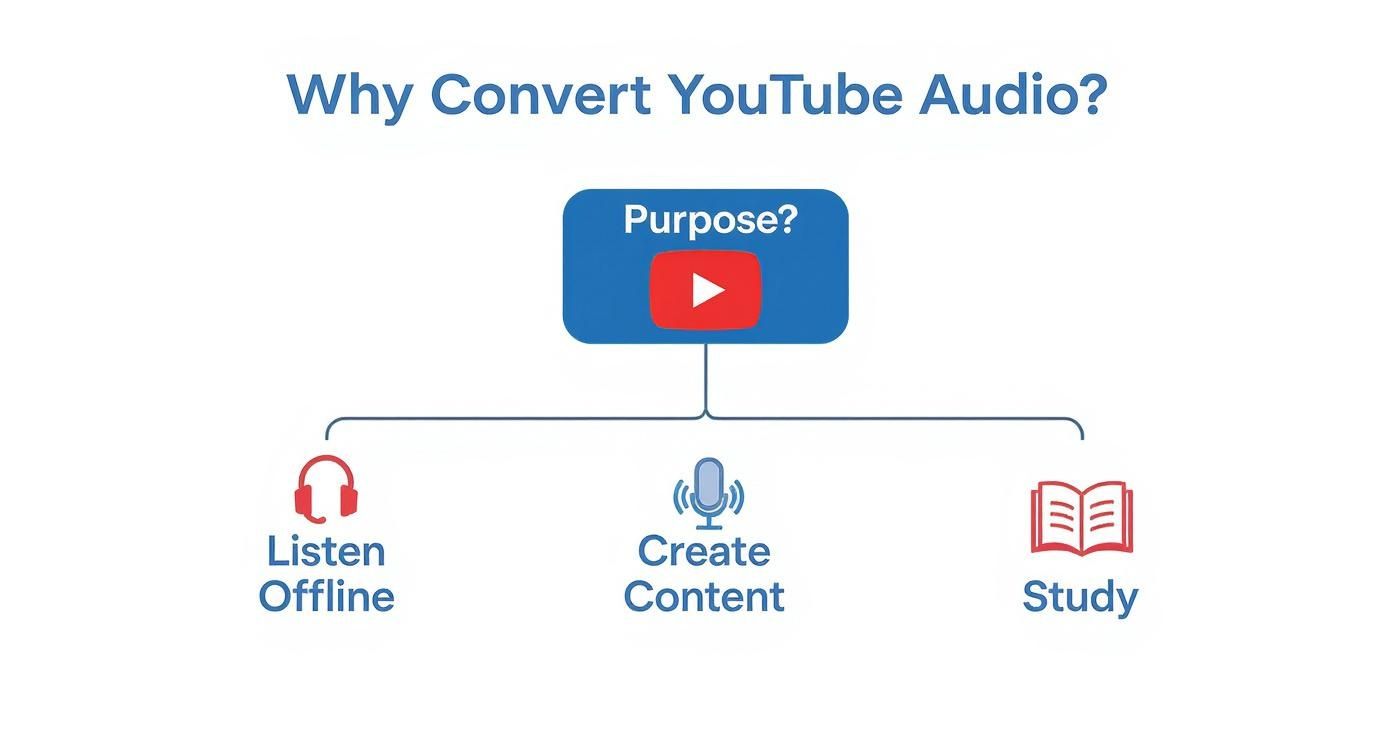
As the flowchart shows, whether you’re listening, creating, or studying, your purpose points you toward a specific type of tool.
Web-Based Online Converters
The quickest and easiest route is almost always a web-based converter. You've probably seen these sites—you paste in a Youtube link, pick a format like MP3, and hit a button. Done. For a one-off download, they're incredibly convenient.
But that convenience can come at a price. Many of these free services are littered with pop-up ads and confusing "Download" buttons. If you go this route, be careful. Stick to well-known sites and navigate the advertisements cautiously to avoid accidentally installing unwanted software.
Dedicated Desktop Software
If you plan on converting audio regularly, installing dedicated desktop software is a much better idea. Tools like the ever-reliable VLC Media Player or other specialised converters give you far more power and a safer, ad-free experience. This is ideal for content creators who need a reliable workflow.
With a desktop application, you unlock some seriously useful features for productivity:
- Batch processing: Queue up an entire playlist of interviews or lectures and let the software handle the conversion in one go.
- Higher quality options: Choose lossless formats like WAV or high-bitrate AAC for better fidelity, which is crucial for accurate transcription.
- Offline conversion: Once the video is downloaded, you can handle the conversion without needing an internet connection.
It takes a few minutes to install, but for anyone who regularly needs audio for transcription, subtitling, or content repurposing, this approach offers a fantastic balance of control and ease of use.
The key takeaway is to match your tool to your task. A quick online converter is fine for a single lecture, but for building a project library or creating accessible content, dedicated software offers the reliability you’ll need.
Command-Line Tools for Full Control
For those who want maximum efficiency and control, nothing beats command-line tools. A program called yt-dlp, combined with the audio-processing workhorse FFmpeg, gives you absolute, granular control over the entire process.
With a few keystrokes, you can automate downloading entire playlists in a specific format and bitrate. It’s the cleanest, most powerful method available for serious productivity and content creation workflows. No ads, no malware risks—just pure, scriptable control perfect for automating repetitive tasks.
Feature Comparison of Youtube Audio Conversion Methods
To help you decide at a glance, here’s a quick comparison. Each has its place, depending on your technical comfort level and what you need to accomplish.
| Method | Best For | Ease of Use | Quality Control | Key Feature |
|---|---|---|---|---|
| Web-Based Tools | Quick, one-off downloads | Very Easy | Limited | Instant access, no installation |
| Desktop Software | Regular conversions, projects | Moderate | Good | Batch processing, more formats |
| Command-Line (yt-dlp) | Power users, automation, transcription prep | Difficult | Excellent | Maximum control and flexibility |
Ultimately, the best tool is the one that fits your workflow. For a single song, a web tool is fine. For preparing a series of videos for transcription, desktop or command-line tools are ideal.
Using Online Converters for Quick Downloads
When you just need to grab the audio from a Youtube video without any fuss, an online converter is almost always the quickest way. These are simple, browser-based tools, meaning you don’t have to install any software. They’re perfect for one-off tasks where you need an audio file right now.
The process is incredibly simple: find the Youtube video, copy its URL, and paste it into the converter’s website. Most let you pick your preferred audio format—like MP3, WAV, or AAC—before you kick off the conversion.
It’s usually just a big, clear button waiting for you to click.
This straightforward approach is exactly why these tools are so popular for quick and simple tasks.
Navigating Online Converters Safely
While these tools are convenient, that ease of use can come with catches. Because they're free, many are funded by aggressive advertising, which can be confusing and sometimes risky.
To keep your computer safe, watch out for these red flags:
- Too Many Pop-ups: A good site keeps ads under control. If you’re drowning in pop-ups, it's a warning sign.
- Deceptive Buttons: Be wary of multiple "Download" buttons. Often, only one is legitimate; the others are ads.
- Asking for Personal Details: An audio converter has no reason to ask for your email or personal information.
My best advice? Go slow. Hover your mouse over any buttons before you click to check the destination link in your browser’s status bar. If any unexpected windows or tabs pop up, close them immediately.
This method has become common as on-demand audio grows. In the Netherlands, for instance, the digital audio advertising market is projected to reach US$70.98 million by 2025, a clear sign of our reliance on portable audio. You can dig into more of these trends over at Statista.com.
Of course, once you have that audio file, listening is just the beginning. If your goal is to repurpose video content, a reliable tool to download Youtube transcripts can turn that audio into useful, searchable text in minutes.
Mastering Audio Extraction with Yt-dlp
While online converters are convenient, they lack the quality and control needed for serious work like transcription or content creation. For the best audio fidelity and ultimate flexibility, the command line is where the real power lies. This is the territory of yt-dlp, a phenomenal open-source tool that’s the gold standard for this task.
Diving into a command-line interface might seem daunting, but it’s more straightforward than you think. You’re just giving your computer direct instructions. It’s the cleanest, most powerful method to convert audio from Youtube with total precision—perfect for building an efficient workflow.
Getting Yt-dlp and FFmpeg Set Up
To get started, you'll need two free, essential pieces of software. The first is yt-dlp, which communicates with Youtube. The second is FFmpeg, a powerful utility that handles the audio and video conversion. High-quality transcription starts with high-quality audio, and this setup ensures you get the best source file possible.
Getting them installed is a one-time task:
- On Windows: Use a package manager like Chocolatey, or download the
.exefile and add its location to your system's PATH. - On macOS: Homebrew is your best friend. A single
brew install yt-dlp ffmpegcommand in the Terminal takes care of everything. - On Linux: Use your distribution's package manager, like
sudo apt install yt-dlp ffmpegfor Debian/Ubuntu.
Once installed, they work together seamlessly. Yt-dlp grabs the data stream, and FFmpeg handles the conversion.
Practical Commands You Can Use Right Away
With the setup complete, you’re ready to pull audio. Open your command prompt (Windows) or Terminal (macOS/Linux) and try these commands. Just swap [YOUTUBE_URL] with the link to your video.
1. Download the Highest Quality Audio
This command gets the best possible audio-only stream in its original format (M4A or OPUS), ideal for archiving or professional use.
yt-dlp -f bestaudio [YOUTUBE_URL]
2. Extract and Convert to MP3
For universal compatibility, converting to MP3 is common. The -x flag extracts the audio, and --audio-format mp3 tells FFmpeg to convert it. This is a great all-purpose command.
yt-dlp -x --audio-format mp3 [YOUTUBE_URL]
This single command is a real workhorse. It automates finding the best audio, downloading it, and converting it to a high-quality MP3. For most productivity tasks, it’s often the only line you’ll need.
Advanced Techniques for Power Users
The true power of yt-dlp is its ability to automate and streamline your workflow. Imagine you need to transcribe an entire online course. Instead of converting each video one by one, you can process the whole playlist automatically.
Here’s the command to download an entire playlist as individual MP3 files:
yt-dlp -x --audio-format mp3 [YOUTUBE_PLAYLIST_URL]
This kind of automation is a massive time-saver for anyone who needs to process content in bulk, whether for research, creating subtitles, or building a content archive. You can start the download and let it run in the background. It’s the most efficient way to convert audio from Youtube for any large-scale project.
Turning Your Audio into Text and Subtitles
So, you’ve got that crisp audio file. What now? The download is just the beginning. The real magic happens when you repurpose that audio, turning it into searchable text, shareable quotes, and accessible subtitles. This is where you solve real problems.
Imagine you've saved a university lecture. Instead of scrubbing through the audio to find a key point, you could have a full transcript. Just hit CTRL+F to find any keyword. This transforms how you study, research, and create content.
What used to be a long, manual task is now remarkably fast. Automated AI transcription tools can process hours of audio and produce an accurate text document in minutes.
A Major Boost for Productivity and Accessibility
The moment you transcribe your audio, you unlock its true potential. It's a massive productivity hack that opens up entirely new ways to work with video content.
Here’s how it solves real problems:
- Content Repurposing: A podcaster can instantly find the best quotes from an interview to share on social media, expanding their reach.
- Academic Work: A student can cite precise timestamps from a documentary and create detailed study guides without re-watching.
- Accessibility & SEO: By adding a transcript or subtitles to your video, you make it accessible to deaf and hard-of-hearing audiences and indexable by Google, helping new people discover your work.
This need for smart repurposing is only growing. In the Netherlands alone, Youtube usage is expected to reach 87.7% by 2025. With 500 hours of video uploaded globally every minute, we need AI-powered tools to help us manage this information. If you're curious about Youtube's sheer scale, this video gives you a glimpse.
A text file is so much more than words on a screen. It’s a key that unlocks the value trapped inside your audio, turning a passive listening session into an active, searchable resource that drives productivity and inclusion.
From Text to Subtitles and Beyond
Once you have an accurate transcript, creating subtitles or closed captions (SRT or VTT files) is the logical next step. Adding captions makes your videos accessible to a much broader audience, including people who are deaf or hard of hearing and anyone watching with the sound off. This simple step can dramatically increase your content's impact.
Learning to turn audio into text is a fundamental skill for any modern creator, researcher, or educator. If you're ready to master this workflow, our guide on how to transcribe Youtube videos walks you through every detail.
Got Questions About Youtube Audio Conversion? Let's Clear Things Up
When you start pulling audio from Youtube, a few questions always pop up. Knowing the answers helps you work ethically, stay safe online, and get the best possible sound for your transcription and repurposing projects.
Is It Actually Legal to Convert Audio from Youtube?
This is the big one, and the answer is: it’s complicated. It boils down to what you’re downloading and how you plan to use it. While downloading is against Youtube's terms of service, the real legal line is copyright law.
Here’s a simple way to think about it:
- Copyrighted Material: Grabbing copyrighted music or audiobooks for anything beyond your own private listening is a no-go. Using it publicly or in your own projects is almost always a copyright violation.
- Public Domain & Creative Commons: If a video's audio is in the public domain or has a Creative Commons license, you’re usually in the clear. Just follow the specific rules of the license, like giving credit.
- Your Own Content: Downloading audio from a video you created and uploaded yourself? You're completely fine. This is a common workflow for creators needing to generate transcripts or subtitles.
The golden rule is to respect creators. For projects, use royalty-free sources or content that explicitly permits reuse.
How Do I Get the Best Possible Audio Quality?
The quality of your final audio file is only as good as the original source on Youtube. For the highest fidelity—which is crucial for accurate transcription—a tool like yt-dlp is your best friend. It automatically finds and downloads the highest quality audio stream available.
Many online converters take shortcuts, defaulting to lower-quality MP3s to save server costs. This can result in a file that's harder for AI transcription services to process accurately.
When clarity matters—for transcribing a lecture, creating subtitles, or pulling a clean soundbite—always use a method that gives you control over the format and bitrate. A high-quality audio file is the foundation of a great transcript.
Are Those Online Youtube Converter Websites Safe?
Many are, but it's a bit of a minefield. The real danger isn't usually a virus in the audio file itself. It’s the aggressive ads, fake download buttons, and shady redirects on the website.
Be on the lookout for:
- Malware and Adware: One wrong click on a sneaky ad can install junk on your computer.
- Phishing Scams: Some sites are designed to trick you into handing over personal details.
- Browser Hijackers: You might find an unwanted browser extension has been installed without you realizing it.
If you must use an online converter, stick with reputable ones, use an ad-blocker, and be careful where you click. For a safer, more productive workflow, a desktop program or a command-line tool is the way to go. It’s the surest way to convert audio from Youtube without putting your computer at risk.
Now that you've got your audio file, what's next? You can turn that spoken content into something much more powerful. YoutubeToText effortlessly converts your downloaded audio into accurate, searchable text, perfect for creating transcripts, subtitles, or repurposing your content. Start transcribing for free at https://youtubetotext.ai.